Within the digital systems most organisations operate in, cybersecurity is a major concern.
With AI now used in phishing attacks and security breaches rising sharply across industries, teams are under pressure to manage vulnerability detection more effectively and tighten remediation discipline.
The good news is that not all vulnerabilities need immediate attention. Vulnerability Management SLAs ensure that security vulnerabilities are assigned a timeframe within which the remediation efforts must be made.
In this guide, we walk you through all elements of vulnerability management SLAs and how tools like FlowAssure support timely identification, remediation, and reporting.
What Are Vulnerability Management SLAs?
A Service Level Agreement (SLA) is a contract offered to a client that details key performance metrics.
In the case of vulnerability management, SLAs define how quickly identified vulnerabilities must be remediated (or otherwise mitigated) after discovery. For instance, low-risk vulnerabilities may be remediated within 90 days, but critical ones need immediate attention.
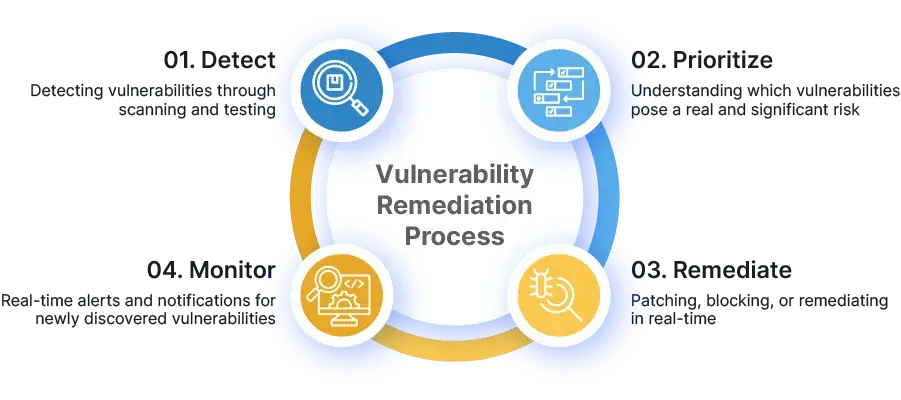
What is Vulnerability Remediation Process
Many organisations tie targets to vulnerability severity and risk levels, often using CVE/CVSS as inputs, along with context such as asset criticality and exploit activity.
Based on the severity of vulnerabilities and CVSS scores, the appropriate SLA timeframes are classified into:
|
Severity
|
Common Vulnerability Scoring System (CVSS)
|
Remediation timeline
|
|
None
|
0.0
|
-
|
|
Low-risk vulnerabilities
|
0.1 to 3.9
|
Within 90 days
|
|
Medium-risk vulnerabilities
|
4.0 to 6.9
|
Within 60 days
|
|
High-risk vulnerabilities
|
7 to 8.9
|
Within 30 days
|
|
Most critical vulnerabilities
|
9 to 10
|
Within 24 hours to 15 days max
|
Table showing the CVSS scoring system and remediation timeline
The Importance of SLAs in Cybersecurity
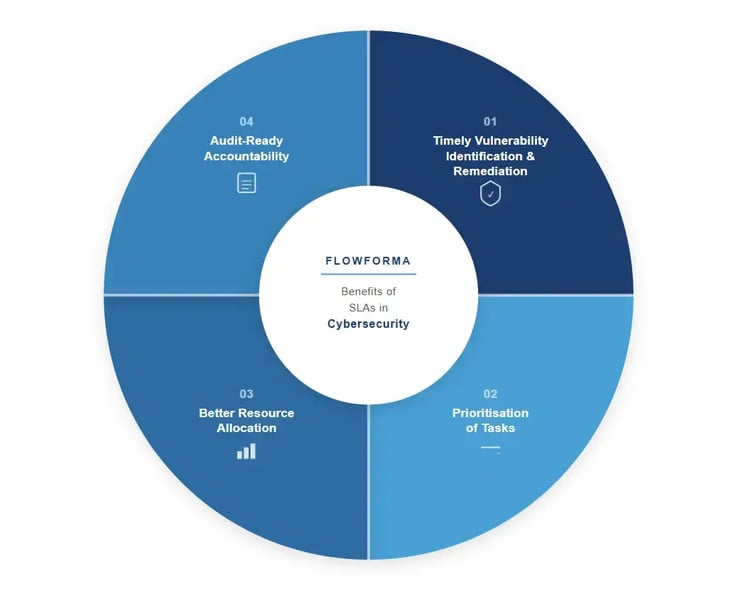
Benefits of SLAs in Cybersecurity
SLAs create a shared operating model between security and delivery teams. They help in four ways:
Timely vulnerability identification and remediation
Many regulatory frameworks (such as HIPAA and ISO 27001) mandate that cyber risks be fixed within a specific timeframe.
SLAs set a deadline for resolving vulnerabilities. With it, the “scan-and-forget” drift is discarded and replaced with more comprehensive oversight so that new vulnerabilities are not left sitting untriaged.
Timely remediation enhances your organisation's security efforts and protects critical assets.
Prioritisation of Tasks
Based on the severity and context of the vulnerability, SLAs help teams consistently determine which security risks to fix first. As such, the most exploited or critical vulnerabilities are higher up in the remediation process.
Better Resource Allocation
Service level agreements allow organisations to allocate resources effectively by outlining the timelines and reducing back-and-forth.
Thus, unnecessary time isn’t wasted scrambling after a pen test, and business operations remain unhampered.
Audit-ready accountability
SLAs create traceable evidence: targets, action taken, exceptions approved, and closure proof. All of this supports internal governance and external compliance frameworks, such as HIPAA, DORA, and PCI DSS.
How to Implement Effective Vulnerability Management SLAs
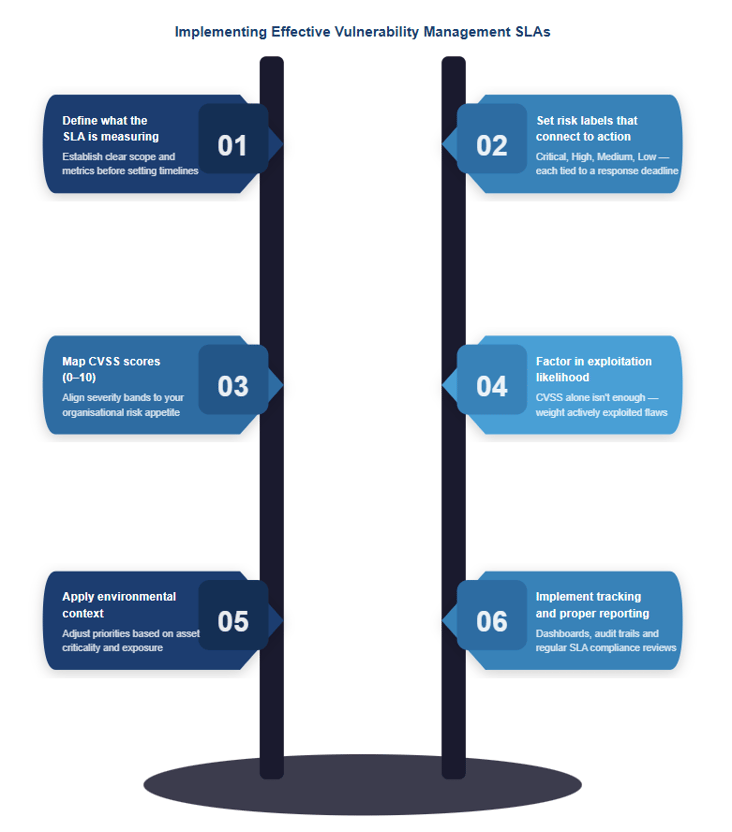
6 Steps to Implementing Effective Vulnerability Management SLAs
Vulnerability remediation SLAs are prepared based on factors such as change windows, asset criticality, risk exposure, and team capacity. Therefore, it is not a one-size-fits-all solution and reflects the realities of your business operations.
Here is a step-by-step guide to implementing an effective vulnerability management SLA:
Step 1: Define what the SLA is measuring
Start by clearly defining the exact outcome your SLA is tied to. In vulnerability management, the SLA typically measures the time from discovery (or assignment) to verified remediation or mitigation, based on risk levels.
Step 2: Set risk labels that connect to action
Create a small set of risk categories (critical, high, medium, low) that teams can apply consistently, then map each category to a remediation window. Labels work best when they match how you already report risk and escalate work.
Step 3: Map CVSS scores (0–10)
Consider mapping score ranges to your labels (for example, the low-risk category would be scored between 0.1 and 3.9). CVSS provides the baseline severity signal and serves as a credible source for SLA performance patterns.
Step 4: Factor in exploitation likelihood
While CVSS is trustworthy, you should also use the Exploit Prediction Scoring System (EPSS) to gauge real-world exploitation likelihood. Higher-likelihood issues should move up the queue, even when CVSS is not at the top tier.
Step 5: Apply the environment’s context
Severity alone does not reflect business impact. Adjust the label when the context changes the real-world risk.
- Raise urgency for systems tied to regulated workflows or sensitive data
- Raise urgency for exposed services where attackers have easier reach
- Factor change windows so deadlines are challenging but operationally workable
- Confirm team capacity, so SLAs remain enforceable
6. Implement tracking and proper reporting
Automate task creation, reminders, and evidence capture so SLA compliance reflects verified remediation or verified mitigation. Proper reporting should be in place to identify overdue drivers and the causes of repeat breaches.
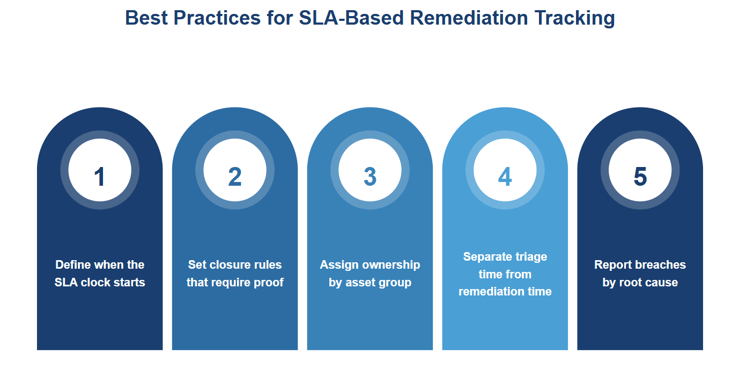
Best Practices for SLA-based remediation tracking
Remediation SLAs fail when tracking is inconsistent. The fix is to define what gets tracked and what proof is required to close work.
Use the best practices below to make SLA tracking defensible and repeatable:
Define when the SLA clock starts
Teams need one rule for when the clock starts, and then the rule must be applied consistently. Some organisations start the SLA clock at “validated detection” while others start at “ticket created” to align reporting with operational workflows.
Set closure rules that require proof
“Closed” should mean the vulnerability is remediated or mitigated. Define what completion means for your environment, including patching, configuration hardening, or removal of the vulnerable component.
Assign ownership by asset group
Map accountable owners to applications or infrastructure domains so tickets route correctly without manual reassignment.
Track time-to-triage and time-to-remediate as distinct measures. Slow triage often signals unclear ownership or noisy findings. Slow remediation often means there are bottlenecks in change management or capacity limits.
Report breaches by root cause
Review why deadlines were missed (patch window, dependencies, vendor fixes, capacity constraints), then adjust SLAs or resourcing based on patterns.
Challenges In Managing Vulnerability SLAs
Fractured SLAs usually come from operational friction, including unclear ownership, noisy findings, constrained change windows, and exceptions that stay open too long.
Common pain points show up fast:
- Findings bounce between teams or sit unowned
- Duplicate or messy data wastes remediation time
- Patch and release windows slow “urgent” fixes
- Exceptions become the default path
- Closure gets marked without strong proof
That said, teams do not experience these issues at the same intensity. That’s why the next step is adapting SLAs to team maturity and business needs, so targets remain enforceable and tighten as execution improves.
Adapting SLAs To Team Maturity And Business Needs
SLAs break when a single policy gets forced onto every team. Some groups are drowning in critical findings, while others have none, so the same deadlines create uneven workloads and predictable breaches.
A maturity roadmap addresses this by setting a shared destination while allowing different starting points:
Set SLAs that reflect how work actually flows today
Targets should match current triage discipline and remediation capacity, then tighten as maturity improves.
Stabilise triage and assignment before tightening deadlines
Remediation windows mean little when findings sit unowned or bounce between queues.
Use observed cycle times and repeat breach causes to adjust targets.
Apply stricter targets where business impact is highest
Regulated data systems and customer-facing services justify faster remediation windows than low-impact internal assets.
Build SLAs around change windows and engineering cadence
Planned remediation beats constant emergency patching. Reflect maintenance patterns in targets, then reserve expedited handling for genuinely urgent issues.
Use missed SLAs as a signal to improve the system
Breaches should trigger root-cause review and adjustments to capacity planning, ownership rules, or exception governance.
Features to Look For In Vulnerability Management Systems With SLA-Based Remediation Tracking
Choosing a good vulnerability management system with SLA-based remediation tracking comes down to whether the tool can run the full loop described in modern vulnerability management. That is, it should be able to prioritise, remediate, validate, and report with deadlines that stand up to scrutiny.
Key capabilities to look for:
Risk labels should map cleanly to remediation timeframes, with logic that is easy to defend during governance reviews and external audits.
Context-based prioritisation that supports SLA decisions
Prioritisation needs to go beyond severity, using exploit likelihood and exposure context so SLA urgency aligns with real-world risk.
Asset-based ownership and routing
Findings should be routed by asset group and accountable owner, so items do not bounce between queues and due dates remain meaningful.
Evidence-backed closure
Validation needs to be part of the workflow. Closure should align with verified remediation or verified mitigation, supported by proof.
Dashboards should show compliance trends plus overdue drivers, so teams can fix bottlenecks instead of only counting open items.
Leveraging Technology For SLA Management
SLA policy tends to break down when remediation tracking depends on manual updates and tools that do not share the same workflow.
Findings often arrive in long-form reports; security teams interpret them one way, delivery teams track them another way, and the evidence needed for governance ends up scattered.
Tools like FlowAssure are designed for the governance layer after testing is complete, helping teams standardise review, tracking, and audit-ready reporting in compliance-heavy environments.
FlowAssure Product Showcase
It reduces process friction that shows up after scanning and across vendor ecosystems, especially where evidence quality and consistency drive decision-making.
FlowAssure also uses purpose-built AI agents to remove review bottlenecks:
- Penn reads and analyses penetration test reports, extracting vulnerabilities, risk ratings, and impacted assets, so findings are ready to route into remediation workflows.
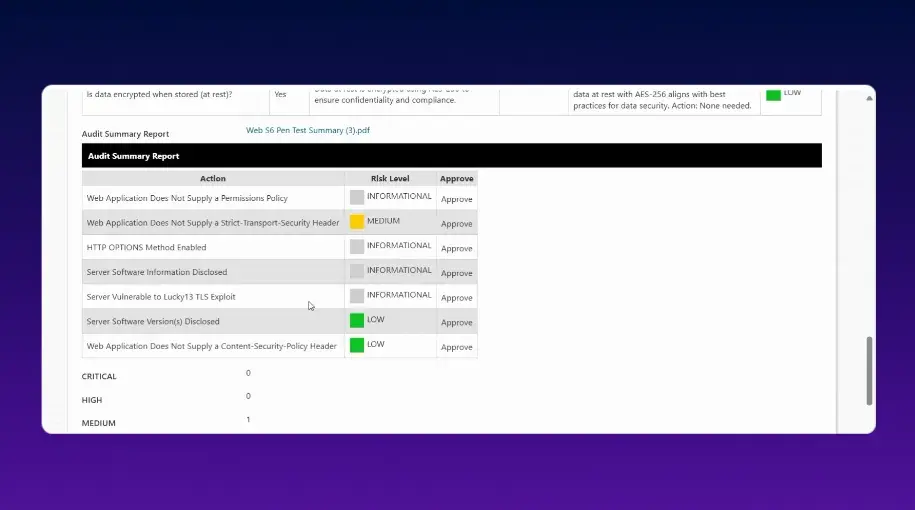
Pen test findings overview
- Quinn flags inconsistencies and missing details in vendor questionnaire responses
Iris reviews ISO 27001 documentation and highlights gaps
- Sam reviews SOC 2 Type II reports and categorises risk signals
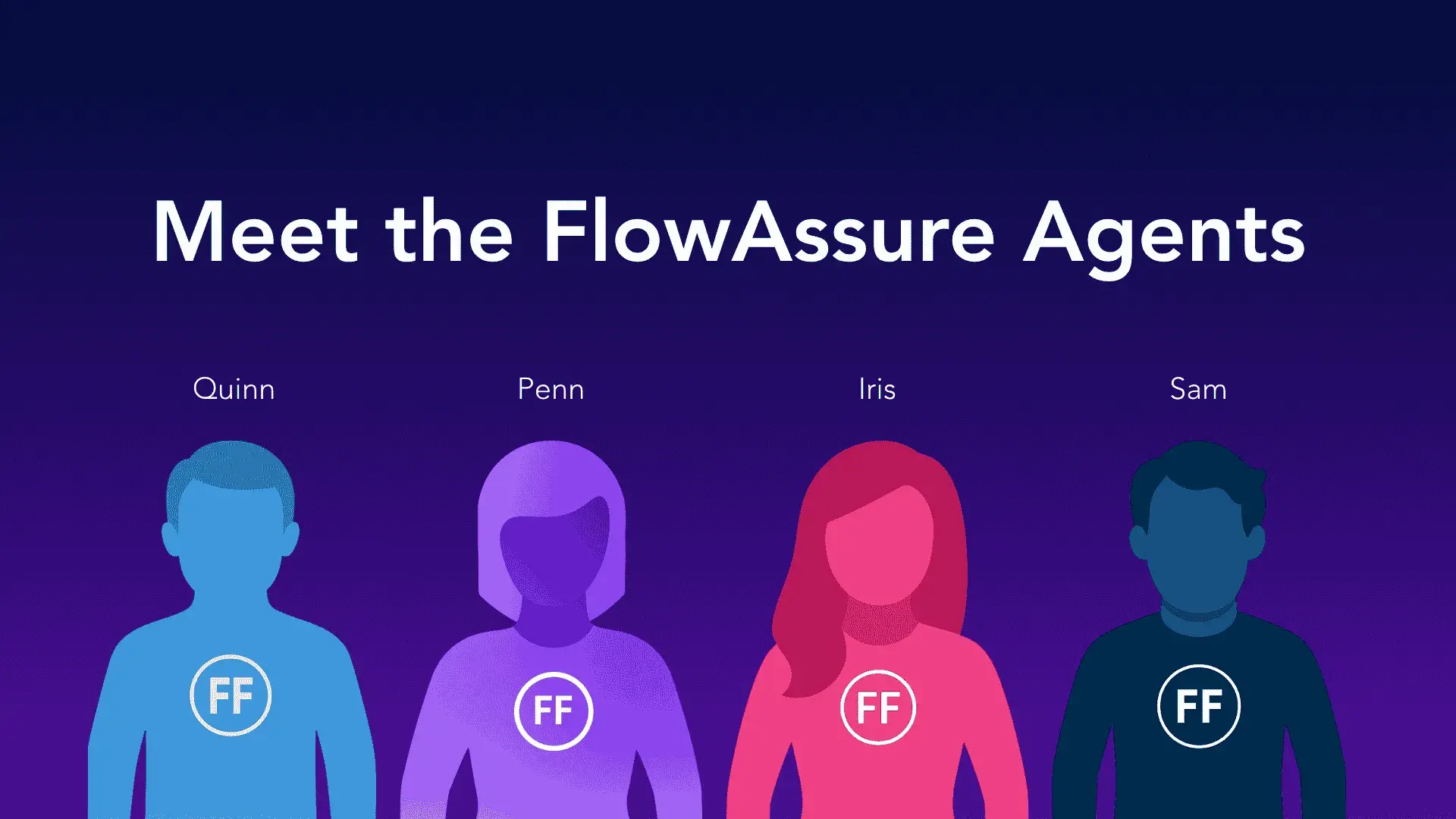
FlowAssure Agents
That combination supports SLA workflows by keeping review decisions consistent and evidence easier to audit.
How to Ensure SLA Effectiveness Over Time
SLA performance drops when policy stays static while the infrastructure changes, new threats show up, and delivery capacity shifts.
Continuous improvement and reviews based on operating data are essential to keep SLAs credible. Here is how you can ensure SLAs remain reliable over time:
Review SLA timeframes quarterly
Check whether your remediation windows still fit your patch cadence and change controls. Use breach patterns by owner group to spot where deadlines fail, then remove the blocker behind the misses.
Update SLAs after incident postmortems
Post-incident reviews often expose gaps in prioritisation and closure proof. Use those findings to adjust urgency rules when exploit signals shift, and tighten verification requirements where needed.
Run tabletop exercises for critical scenarios
Test whether a high-impact issue can be triaged and remediated inside the SLA window under realistic pressure. Tabletop sessions also reveal approval bottlenecks, so escalation stays workable.
Manage Vulnerabilities Effectively With FlowAssure
FlowAssure is suited as a governance and workflow layer for vulnerability remediation. It helps once findings already exist (from vulnerability scans, penetration tests, supplier assessments, or internal reviews) and your challenge is turning those outputs into controlled execution.
Use it when the hard part is:
- Standardizing how findings and supporting evidence are reviewed
- Routing actions to the right owners with clear due dates
- Running approvals for exceptions, compensating controls, or risk acceptance
- Capturing closure evidence and maintaining audit trails for internal governance and external reviews
Besides, the tool generates end-to-end audit trails, with structured workflows that cover assignment, follow-up, approvals, and evidence capture. This ensures accountability stays clear for internal governance and external reviews.
Book a demo today to see FlowAssure in action!






![10 Best OneTrust Competitors For Compliance Management [2026]](https://www.flowforma.com/hubfs/Onetrust-competitors%20%281%29.webp)

![The 13 Best Security Questionnaire Automation Software [2026]](https://www.flowforma.com/hubfs/Best-security-questionnaire-automation-software.webp)