Rated 4.5/5 on G2 Microsoft AI Cloud Partner

Access and Update Processes Anywhere with FlowForma's Mobile App

Fill out and submit forms, review and approve documents and keep your business processes moving anywhere, anytime with the FlowForma Mobile App.

Powering business critical processes for 300,000+ users

Automate Anywhere, Anytime With FlowForma's Mobile App

FlowForma is a world-leading process automation tool integrating forms, workflow, analytics, and document generation. Our mobile app for iOS and Android devices allows you to enter data and progress business processes while working remotely.

Processes that you design on the desktop are immediately available on mobile devices. You can start a process on our mobile app, save it for a later date, or continue it on your desktop when you are back in the office. With companies employing staff members across multiple sites, often in remote or underground locations, the ability to work offline and via mobile applications drastically improves operations.


Book your demo
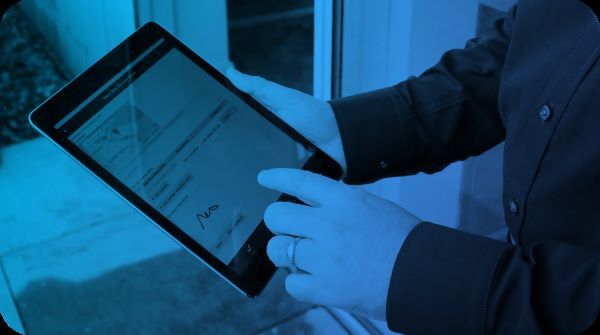
A hand signing a form on a tablet using the FlowForma Mobile App

Work Smarter Anywhere: FlowForma Mobile App in Action

01

No Internet, No Problem

Complete forms with no internet connection; forms automatically update when you regain connectivity.

02

Field Workers

When working on-site, the mobile app enables you to fill in electronic forms, replacing the multitude of paper forms on a typical project.

03

Healthcare

Complex medical records, including photographs, are recorded while treating the patient and can be quickly forwarded to specialist resources for assessment and feedback.

04

Annotate Images

Capture images on your mobile and annotate them straight away. Critical when recording incidents and safety inspections, where the image on its own does not tell the whole story!

What Makes FlowForma's Mobile App Unique

Mobile Access

The mobile app allows you to input to your processes on mobile devices. Processes that you design on your desktop, using our no-code designer, become immediately available to your mobile workforce.

Easy Deployment

The mobile app works on any iOS or Android device, without any setup. Just install the app on your device and log in. The system immediately connects to your Microsoft 365 FlowForma site.

Extensive Features

The app is built for touch screen devices and supports several features: GPS Location supported Google Maps, Photo Capture, Image Annotation, Wet Signatures, and more.

Offline Access

Working remotely? With FlowForma's mobile app, you can keep processes moving even offline. Enter data anytime, and it will sync automatically once you're back online.

Why Enterprises Go Mobile with FlowForma

Instant Access

Instant access to all your processes and tasks anywhere, anytime.

Easy To Use

Familiar interface, retaining the functionality of the desktop on your mobile device.

Feature-rich

Additional mobile features: Location with Google Maps, Image Annotation, Wet Signatures, Photo Capture and more!

Instant Notifications

Get notified via mobile as steps in your processes get completed or warnings when tasks are delayed.

Offline Access

Offline form completion and synchronization with your desktop when back online.

Seamless Collaboration

Seamless collaboration with colleagues by reviewing, approving, and submitting forms directly from your mobile device.

Empower Users With Mobile & Offline Access

Keep your processes moving, anywhere

Book your demo

Recognized By

G2 Best Estimated ROI G2 High Performer, Workflow Management G2 High Performer Enterprise EMEA, No-Code Development Platforms G2 Best Support

Frequently Asked Questions

What is the FlowForma Mobile App?

The FlowForma Mobile App is the iOS and Android companion to the FlowForma Process Automation platform. It lets teams fill out and submit forms, review and approve documents, and keep business processes moving from anywhere, at any time. Processes you design on the desktop are immediately available on mobile, so field workers and remote teams can progress work without waiting to get back to a desk.

Does the FlowForma Mobile App work offline?

Yes. You can complete forms with no internet connection, and the app automatically syncs your data once connectivity is restored. This is designed for teams working across multiple sites or in remote and underground locations, so processes keep moving even when there's no signal.

Which devices and operating systems does the app support?

The FlowForma Mobile App works on any iOS or Android device, with no setup required. You simply install the app, log in, and it connects immediately to your Microsoft 365 FlowForma site. It's built for touchscreen devices while keeping the familiar interface and functionality of the desktop.

What features does the FlowForma Mobile App include?

The app supports GPS location capture with Google Maps, photo capture from the device camera, image annotation, and wet signature capture on touchscreen. It also delivers instant push notifications as process steps complete or when tasks are delayed, and can generate PDFs and push them into your document control workflows.

Do I need to build separate processes for mobile?

No. Any process you design on the desktop using FlowForma's no-code designer becomes immediately available to your mobile workforce, with no separate build.

Who uses the FlowForma Mobile App?

The app is used by field workers, remote teams, and mobile professionals across sectors. Field workers replace paper forms with electronic ones on-site, healthcare teams record complex records and photographs while treating patients and forward them for specialist assessment, and inspectors capture and annotate images on the spot for incident and safety reporting. FlowForma customers include NHS organizations, Aon, and Trinity.

Is the mobile app included with FlowForma, or is it a separate purchase?

The FlowForma Mobile App is included as part of the FlowForma Process Automation platform, so there's no separate license needed. If you're already using FlowForma, your team can install the app, log in, and start progressing processes on mobile straight away.

How is the FlowForma Mobile App different from just using forms in a mobile browser?

Unlike a mobile browser, the FlowForma Mobile App works fully offline and syncs automatically when you reconnect, so no data is lost with no signal. It also uses native device capabilities that a browser can't reliably offer, GPS with Google Maps, camera photo capture, on-device image annotation, and wet signatures, while keeping the same processes and interface you designed on the desktop.

Can I review and approve other people's submissions from my phone?

Yes. The app enables seamless collaboration with colleagues by letting you review, approve, and submit forms directly from your mobile device. Push notifications keep you informed as steps complete or tasks fall behind, so approvals don't stall while people are away from their desks.

Automate processes anywhere

Learn how FlowForma's mobile app can empower your teams to automate anywhere, anytime