.png?width=175&height=42&name=logo_20(1).png "FlowForma Process Automation")

Cyberattacks increasingly begin at the edges. Your organisation’s internet-facing systems, cloud applications, supplier portals, and email gateways are all potential entry points for attackers looking for weak configurations or exposed services.
That’s why external penetration testing has become a core part of modern cyber-resilience. It helps organisations understand how an attacker might breach their perimeter and highlights which issues demand immediate attention.
In this guide, we break down what an external pen test involves, the methodology behind it, a practical checklist, and how to differentiate pen testing from vulnerability scanning.
You’ll also learn how FlowAssure supports organisations after the test is complete by governing the review, scoring, and approval of supplier penetration test evidence.
Key Takeaways
|
What Is an External Penetration Test?

What is an external pen test
An external penetration test is a controlled security assessment that simulates how a real attacker would attempt to compromise your public-facing systems. Instead of looking inside the network, ethical hackers assess what’s exposed to the internet — from web applications and APIs to cloud endpoints, DNS records, VPNs, and email infrastructure.
The goal is simple: identify weaknesses an adversary could exploit without internal access or credentials. This makes external pen testing one of the most realistic ways to understand your organisation’s exposure to cyberattacks, including unauthorised access, data theft, account compromise, or ransomware staging.
Internal pen test vs external pen test
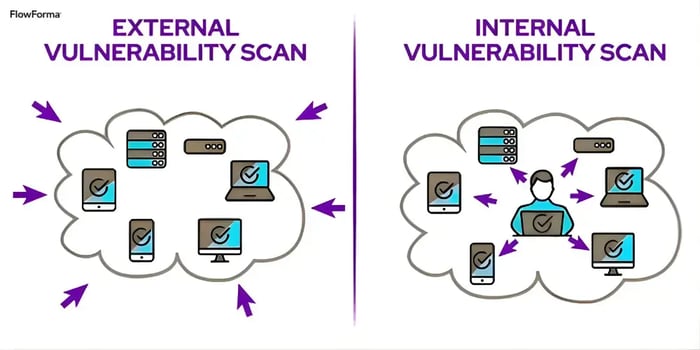
Internal pen test vs external pen test
An external penetration test examines how an attacker could gain access to your environment through internet-facing systems such as web applications, cloud services, or email gateways. It focuses on perimeter and cloud exposure.
Internal penetration testing assumes an attacker is already inside the internal network and assesses lateral movement, privilege escalation, and access to sensitive data.
Both matter, but external testing shows how easily that first breach could happen. As supply chains grow more connected, this also applies to vendors. Many breaches begin with a compromised supplier, making external testing critical for third-party risk management.
What Is the Main Purpose of External Penetration Testing?
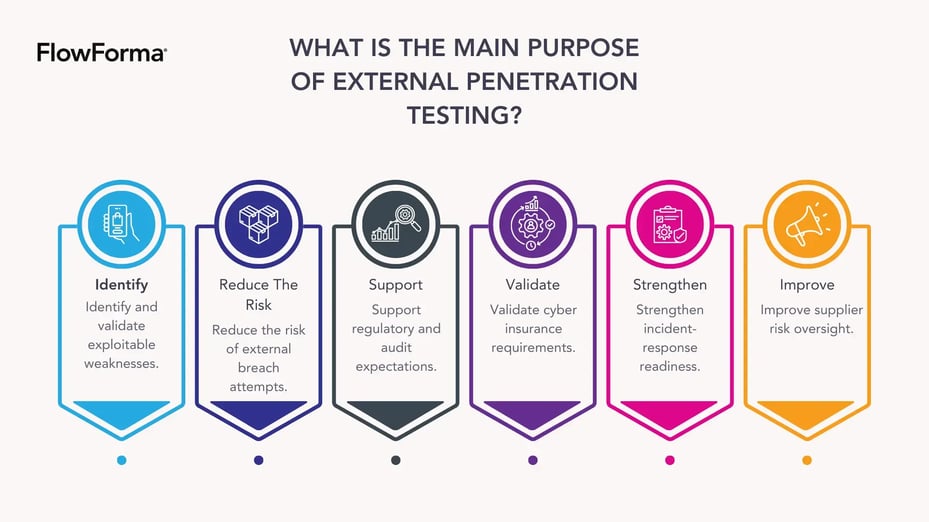
What is the main purpose of external penetration testing
External penetration testing provides security teams and leadership with a clear understanding of how exposed their organisation is to real-world cyberattacks. Its primary purpose is to identify and assess vulnerabilities before attackers use them.
Here is what organisations aim to achieve:
1. Identify and validate exploitable weaknesses
An external pen test uncovers issues such as outdated software, misconfigurations, exposed services, weak authentication, or insecure cloud deployments. More importantly, it confirms whether these issues can actually be exploited.
2. Reduce the risk of external breach attempts
Attackers often use publicly available information to plan their entry. Testing helps you understand what they would see and how they might use it.
3. Support regulatory and audit expectations
Industries working under ISO 27001, GDPR, PCI DSS 4.0, NHS DSPT, or finance-sector regulations use external pen tests to demonstrate effective perimeter security.
4. Validate cyber insurance requirements
Many insurers now require annual or bi-annual penetration testing to assess risk levels accurately.
5. Strengthen incident-response readiness
If a test shows that certain types of attacks succeed too easily, incident-response plans can be updated accordingly.
6. Improve supplier risk oversight
When vendors provide penetration test reports, organisations can use these results to understand whether third-party systems pose residual risk.
Overall, external penetration testing provides a realistic view of your external attack surface and helps guide stronger security decisions across both internal operations and vendor ecosystems.
However, it’s important to note that an external penetration test does not guarantee full coverage of all attack vectors in a single engagement; results are always bounded by defined scope and timing.
Steps in External Penetration Testing
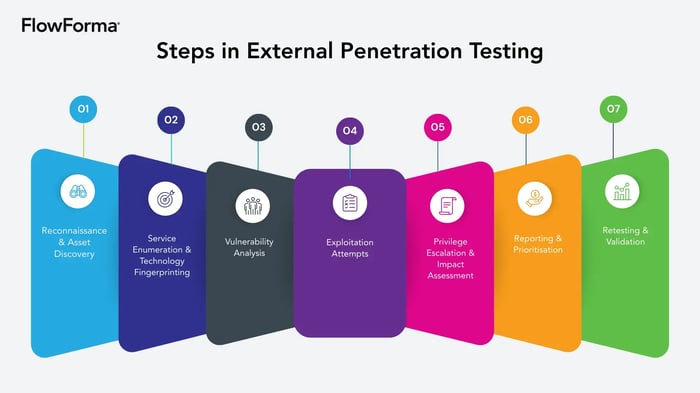
external penetration testing methodology
External penetration testing follows a structured methodology designed to simulate the behaviour of a motivated attacker. Below are the core stages:
Step 1 – Reconnaissance & Asset Discovery
Testers begin by identifying what systems are publicly accessible. It involves:
- DNS lookups and subdomain discovery
- Cloud asset enumeration
- Web application mapping
- Identifying shadow IT or forgotten infrastructure
Attackers often rely on the aforementioned information to plan targeted attempts, making this step especially important.
Step 2 – Service Enumeration & Technology Fingerprinting
Next, testers identify the technologies and configurations in use, which include:
- Open ports and running services
- Web server versions
- Email and VPN endpoints
- Cloud platform signatures
- Application frameworks
Understanding the technology stack helps reveal which vulnerabilities are possible.
Step 3 – Vulnerability Analysis
At this stage, testers combine manual and automated techniques to uncover vulnerabilities, which may involve:
- Authentication and authorisation testing
- Injection tests
- Misconfiguration checks
- Outdated dependency identification
- Weak encryption or insecure headers
- Cloud configuration gaps
This aligns with established external network penetration testing methodology, ensuring findings are repeatable and evidence-based.
Step 4 – Exploitation Attempts
Testers attempt controlled exploitation of identified weaknesses. Examples include:
- Bypassing login mechanisms
- Extracting sensitive information
- Gaining file or command execution
- Manipulating application logic
The purpose isn’t to cause disruption but to demonstrate whether a vulnerability leads to meaningful impact.
Step 5 – Privilege Escalation & Impact Assessment
If exploitation is successful, testers explore:
- Whether unauthorised access can escalate
- What data or internal systems become reachable
- How far an attacker might progress in a real attack
This gives organisations a clear view of worst-case scenarios.
Step 6 – Reporting & Prioritisation
A strong pen-test report includes:
- Vulnerability descriptions
- Technical evidence
- Business-impact analysis
- CVSS or risk scoring
- Remediation recommendations
It helps teams prioritise fixes based on risk rather than volume.
Step 7 – Retesting & Validation
After remediation, testers verify that fixes resolve the vulnerabilities. This closes the loop and demonstrates a measurable security improvement.
External Penetration Testing Checklist
To help security teams prepare effectively, here is a structured checklist to follow before, during, and after an external pen test.
Pre-Engagement Preparation
- Define the scope (domains, cloud services, applications, IP ranges)
- Secure written testing authorisation
- Identify compliance or reporting expectations
- Provide required information securely
- Confirm communication channels for urgent findings
- Ensure vendor systems are included if needed
During the Pen Test
- Maintain an open communication line with testers
- Log testing windows to avoid confusion with real attacks
- Track any in-scope third-party responses or incidents
- Review interim findings if the testers provide them
After the Pen Test
- Analyse the final report with the technical and risk teams
- Prioritise remediation by impact and exploitability
- Assign risk owners and clear timelines
- Validate fixes through retesting
- Capture reporting for ISO 27001, GDPR, PCI DSS, or NHS DSPT audits
- Store evidence in a secure, central repository
- Integrate findings into vendor-risk or supplier-assessment workflows (important for organisations with large supplier ecosystems)
External Pentesting or Vulnerability Scanning?
Although external penetration testing and vulnerability scanning are often mentioned together, they serve very different roles in the cybersecurity landscape. Both are essential, but each provides a distinct level of insight into the state of your organisation’s security.
Vulnerability Scanning
Vulnerability scanning is typically performed by automated tools that scan the network, servers, and applications for known vulnerabilities.
Primary purpose:
To identify known weaknesses that cybercriminals can exploit. These tools rely on a database of known vulnerabilities (e.g., CVE databases) and check whether systems are exposed to them.
Frequency:
It is most useful for regular, continuous checks, especially during patch cycles. Scanners help detect newly disclosed vulnerabilities and ensure that patches are applied as soon as they’re released.
Limitations:
While scanning is helpful for baseline security hygiene, it does not confirm whether the detected vulnerabilities can actually be exploited. For example, a vulnerability might exist but be mitigated by existing system configurations or protections (e.g., firewalls).
External Penetration Testing
Penetration testing (pen testing), on the other hand, is a manual and analytical process where skilled testers simulate real-world attacks to assess the exploitability of vulnerabilities. It involves an in-depth approach that includes recon, service mapping, exploitation attempts, and lateral movement simulation.
Primary purpose:
To validate whether vulnerabilities discovered during scanning can actually be exploited in a real-world scenario. Pen testers go beyond theoretical risks, demonstrating how attackers can breach systems, steal data, or cause other forms of harm.
Business impact:
Pen tests aim to show the business impact of vulnerabilities by simulating what an actual attacker could achieve. It might involve unauthorized access to critical systems or intellectual property, giving a clear picture of potential damage.
Compliance requirements:
Penetration testing is required by many compliance frameworks, such as ISO 27001, PCI DSS, and GDPR, for regular risk assessments and penetration test reports.
Comparing External Penetration Testing and Vulnerability Scanning
Here’s a quick side-by-side comparison of vulnerability scanning and external pen test:
|
Aspect |
Vulnerability Scanning |
External Penetration Testing |
|
Automation |
Fully automated process |
Manual, analyst-driven process |
|
Purpose |
Identifies known vulnerabilities |
Validates if vulnerabilities can be exploited |
|
Frequency |
Can be performed regularly (e.g., monthly) |
Typically performed once or twice a year |
|
Detection |
Detects weaknesses from known databases |
Simulates real-world attack scenarios |
|
Exploitability Check |
Does not confirm exploitability |
Confirms whether vulnerabilities can be exploited |
|
Business Impact |
Limited (focus on vulnerabilities) |
Demonstrates business impact and potential damage |
|
Compliance Requirement |
Not mandatory for most compliance frameworks |
Required for most frameworks (ISO 27001, PCI DSS, GDPR) |
|
Use Case |
Continuous monitoring and patch cycle |
Deeper validation of vulnerabilities for business risks |
Table showing a side-by-side comparison of vulnerability scanning and external pen test
How FlowAssure Supports Organisations with External Penetration Testing
External penetration testing identifies security weaknesses, but managing the findings — especially when it comes to vendor pen-test results and meeting compliance obligations — can be challenging. The process of reviewing these reports, interpreting complex data, and ensuring effective remediation often becomes fragmented and time-consuming.
FlowAssure solves this problem by providing structure, consistency, and compliance-ready controls for managing the entire lifecycle of external penetration testing results. It includes everything from when vendor penetration test reports arrive to reviewing, scoring, and triggering necessary actions for remediation.

FlowAssure Page
FlowAssure’s AI-powered vendor risk management engine is central to streamlining this process. It ensures that every step — from assessment to resolution — is quick, efficient, and compliant. Key features include:
1. AI Pen Test Agent (Penn)
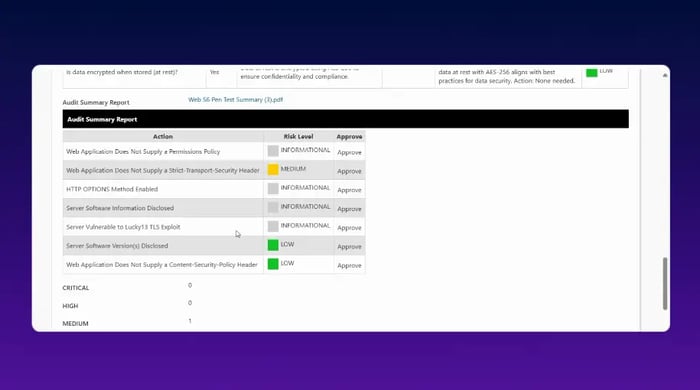
Pen test findings overview
Penn is FlowAssure’s dedicated AI agent that automates the interpretation of penetration test reports submitted by vendors. Penn helps organisations quickly and accurately process and act on findings, eliminating the need for manual analysis. Here’s how Penn contributes:
- Extracts vulnerabilities, CVSS scores, and impacted assets: Penn automatically reads pen-test reports and converts raw data into actionable insights.
- Identifies repeat or systemic issues: Penn detects patterns of recurring vulnerabilities across multiple reports, highlighting critical areas for remediation.
- Classifies risks based on severity: Each identified vulnerability is classified according to its potential impact, making it easier to prioritise security actions.
- Generates remediation recommendations: Penn offers specific suggestions for resolving vulnerabilities, speeding up remediation efforts.
- Triggers workflows or escalations: When high-risk issues are found, Penn triggers automated workflows or escalates them to the appropriate team members.
FlowAssure ensures that every external pen test result is handled with precision, making the process more efficient, consistent, and secure.
2. Multi-Agent Support

FlowAssure Agents
In addition to Penn, FlowAssure includes three other specialised AI agents that provide comprehensive vendor risk management:
- Quinn: Reviews vendor security questionnaires, scoring responses and identifying any ambiguous or incomplete answers.
- Iris: Analyses ISO 27001 documentation, highlighting any gaps in controls or compliance.
- Sam: Reviews SOC 2 Type II reports, categorising risks related to security, availability, and confidentiality.
Together, these agents ensure a consistent and thorough understanding of vendor security, covering all aspects of vendor risk management, from penetration test results to compliance documents.
3. Compliance Workflows and Audit Trails for Full Accountability
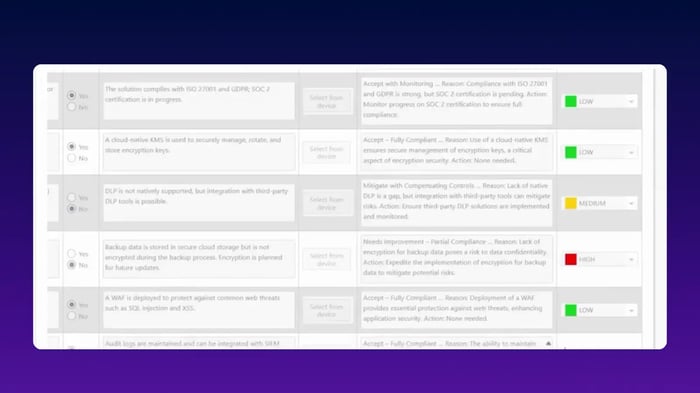
FlowAssure’s compliance module
FlowAssure is built with compliance at its core, providing automated governance workflows aligned with critical frameworks such as:
- ISO 27001, GDPR, PCI DSS 4.0, and NHS DSPT
- Automated assignment and escalation rules for fast risk mitigation
- Evidence capture for audits, ensuring transparent decision-making
- End-to-end traceability of all decisions, comments, and approvals
4. Data Security with Microsoft 365/SharePoint Tenancy
One of FlowAssure’s biggest advantages is its integration with Microsoft 365 and SharePoint.
All vendor security data, including penetration test results, remains within your organisation’s tenancy. This ensures that all documents, assessments, and findings are stored securely in your existing environment, without the need for external cloud storage solutions.
Turn External Penetration Testing Insights into Controlled, Defensible Action
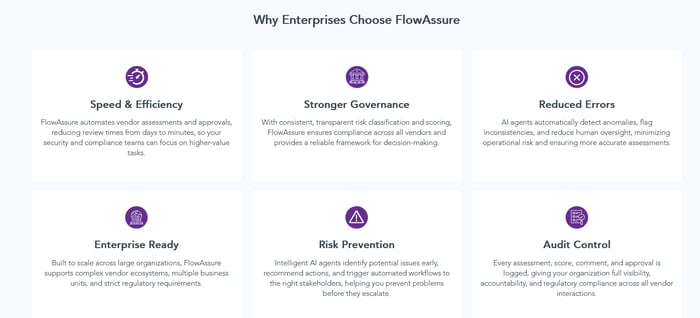
Why enterprises choose FlowAssure
External penetration testing provides valuable insights into vulnerabilities, but managing those findings can be cumbersome without structure. FlowAssure simplifies the process by automating the review, classification, and remediation of pen-test reports. With its AI-powered agents, FlowAssure ensures consistent risk scoring, compliance-ready workflows, and full audit trails — all within your Microsoft 365 tenancy.
By centralising and automating vendor pen-test management, FlowAssure empowers your teams to act swiftly and decisively. Instead of juggling multiple tools or manual processes, FlowAssure provides a streamlined, efficient, and secure way to close the loop on external vulnerabilities.
Take control of your external pen-test findings with FlowAssure — book a demo today.
FAQs
1. What are the common challenges organisations face during external penetration testing?
Organisations often face challenges such as defining a clear test scope, ensuring sufficient communication with vendors, and managing resource constraints.
Additionally, some businesses struggle with balancing testing schedules alongside critical operational work and remediating vulnerabilities identified in the reports. These issues can slow down the process, but proper planning and automation can help streamline the experience.
2. How does FlowAssure help with external penetration testing?
FlowAssure automates the review and management of external pen-test findings. Its AI-powered Pen Test Agent (Penn) reads, scores, and classifies penetration test reports, ensuring consistent analysis.
It also triggers automated workflows, provides remediation recommendations, and generates audit trails, streamlining vendor risk management while maintaining compliance with industry standards.
3. How often should external penetration tests be performed?
External penetration tests should ideally be conducted at least annually, or after significant changes to infrastructure, systems, or applications. Regular testing helps identify emerging vulnerabilities and ensures that new technologies or updates do not introduce security risks, keeping your organization's perimeter protection up to date and secure.
4. What makes FlowAssure different from other pen-test management tools?
FlowAssure offers an AI-driven approach to managing vendor pen-test reports. It automates the classification of findings, triggers remediation workflows, and ensures full compliance with regulatory frameworks.
Additionally, it provides real-time audit trails, keeping all vendor interactions securely within Microsoft 365, reducing risk and operational overhead.