Accelerate excellence in designing processes, driving productivity, and scaling process automation with the power of AI.
Let AI do the heavy lifting and build processes for you, saving time, boosting efficiency, and driving productivity.
Build processes faster, smarter, and more intuitively with the power of AI at your fingertips.
Enhance data to accelerate decision-making, enabling process owners to scale process improvement initiatives.

No technical skills needed. Just describe your process, and FlowForma Copilot does the rest.
The fastest way to capture processes from voice, meetings, and everyday work, without disrupting your flow.
AI Agent Rule acts as your AI-powered assistant, executing predefined actions based on your instructions.
The AI Agent Rule lets you automate intelligent actions, such as:
For Flow Builders:
For Process Users:
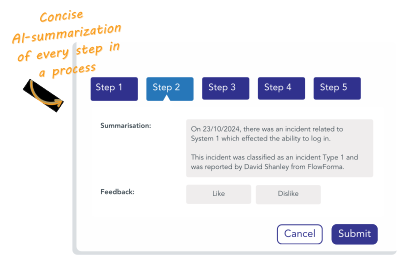
With FlowForma’s AI Summarization Agent, you can trigger summarization at any stage in your process to receive:
Have Question? We are here to help
FlowForma’s AI features use Microsoft Azure’s OpenAI service. Under Azure’s terms:
- Your prompts (what you type), completions (the AI’s replies), embeddings, and any training data you provide are private to your organization.
- They are not shared with other customers.
- They are not available to OpenAI or other Azure model providers.
- They are not used to improve or train AI models unless you explicitly tell us to.
When you use FlowForma Copilot, FlowForma stores your prompts and the AI’s replies so you can reopen a chat and continue the conversation later. You can delete a conversation at any time, and it will be permanently removed.
FlowForma does not use your data to train AI models. Any files or artefacts (such as documents) you upload to FlowForma’s AI features are not stored by FlowForma.
Additionally, human oversight remains central: all AI outputs can be reviewed and approved before deployment, preventing unauthorized or unintended changes and maintaining a fully auditable trail of AI-assisted actions.
FlowForma is ISO27001:2022 certified. Under this framework FlowForma complies with GDPR, NIS 2, EU AI Act.
FlowForma is ISO27001:2022 certified. Bi-annual external audits are carried out by an accredited auditing body (Amtivo). Bi-annual internal audits are also undertaken.
AI agents are perfect for processes that rely on reading documents, as they can automatically read uploaded PDFs or Word documents, extract key information like premiums, coverage details, or contract clauses, and populate that data directly into your workflow forms. This eliminates hours of manual data entry and reduces the risk of human error. For example, AI can compile a quote comparison report by reading quotes from three different insurers automatically.
No, your data remains secure and is not used for training. FlowForma uses Microsoft's OpenAI services, which means the AI does not store or learn from any information about your organisation. Each AI request is a one-time transaction, ensuring your data privacy and confidentiality are maintained.
FlowForma uses Microsoft Azure’s implementation of OpenAI. Different models are in use (GPT5.0, GPT4o) for different FlowForma product features. The models in use are upgraded as new models become available. Microsoft provides assurances on data usage by Azure OpenAI.
Yes, FlowForma’s AI features can be turned off. Its optional AI features and agents enrich the user experience, giving users greater power to automate tasks and accelerate process automation.
AI Agent Rules are like personal AI assistants that you can place at any step in a workflow to perform intelligent tasks.
You give the agent an instruction in plain English, such as "read this invoice and extract the supplier name and total amount," and it will automatically perform that action.
These agents can read documents, extract structured data, validate content, and return the results to your form or another system.
The AI Summarization feature can be triggered at any stage in a workflow to provide a real-time, natural language summary of the process so far.
The summary can be configured to include any data from the FlowForma Flow and will generate a summary of the process so far based on this configuration. This summary can then be presented to an end user to bring them up to speed on the process so far or can be included in email alerts or generated documents.
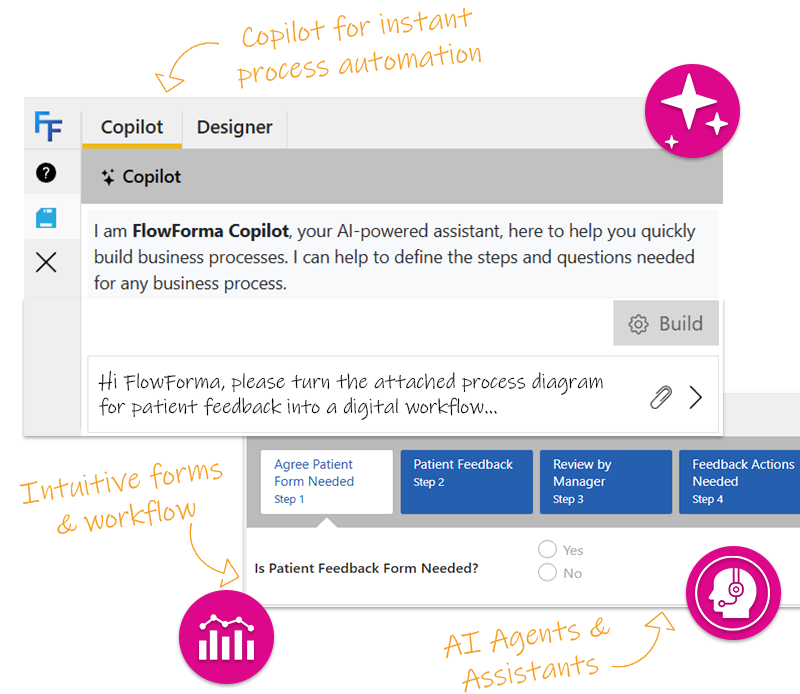
With FlowForma Copilot, you can describe the process you need in plain language — e.g. “I need an asset management process to track devices in use in my insurance brokerage which allows devices to be onboarded and offboarded” — or upload a process diagram. In moments, Copilot builds a fully functional prototype workflow.
Once the prototype is generated, you can refine it: add logic, specify business rules, test scenarios and then publish it as a live, production-ready process.
This dramatically reduces build time: what might previously take hours or days for workflow configuration now can be done in minutes.
Yes. The AI-generated workflow from Copilot is just a starting point — you retain full control. After generation, you can: add or modify logic/rules, adjust forms, map fields, integrate with data sources or other systems, test scenarios, and when you’re ready, move to production.
In other words: AI helps you get a working draft fast — but you can always fine-tune or customize to meet your exact business requirements.
FlowForma is built to integrate deeply with the Microsoft 365 / SharePoint ecosystem.
The platform supports desktop, web, and mobile usage: workflows and processes you design on desktop become immediately available on mobile devices.
FlowForma’s AI features accelerate workflow creation while maintaining full compliance and governance. AI-generated processes inherit your organisation’s permissions, audit trails, version control, and approval rules, ensuring traceability and adherence to regulatory standards.
AI Agents can capture, validate, and standardize data consistently, reducing manual errors and supporting compliant document generation. Standardized workflows created with AI help enforce internal policies, while human oversight remains central—every AI output can be reviewed, refined, or approved before going live—so organisations benefit from speed without compromising regulatory control.