Compliance isn't just a box to check, it’s critical to keeping your business running smoothly and meeting ever-changing regulations. Yet, for many teams, compliance still means mountains of paperwork, endless email threads, and sleepless nights worried about fines or penalties. In fact, in a recent survey we conducted among construction executives,
The solution? Compliance workflow automation. By digitizing tasks like data collection, approvals, and reporting, automation eliminates bottlenecks, improves compliance visibility and reduces human error. It’s like having an always-on assistant managing the repetitive, high-risk parts of compliance, ensuring deadlines are met and nothing slips through the cracks.
With more businesses recognizing the value of streamlining compliance operations, it comes as no surprise that the compliance workflow software market is projected to grow to $7.1 billion by 2032.
What is a Compliance Workflow?
A compliance workflow is a structured series of steps businesses follow to meet legal, regulatory, and corporate requirements. Whether it’s preparing for an audit, managing General Data Protection Regulation (GDPR) requests, or ensuring adherence to International Organization for Standardization (ISO) requirements - these processes rely on well-defined workflows to keep operations in check.
Some of the common compliance tasks include:
- Collecting and organizing data
- Creating a single source of truth for data
- Routing documents for approvals
- Generating reports
- Maintaining communication records
- Maintaining audit trails
- Real-time access for external auditors
But here’s the catch. Most of these steps are interconnected. A missed deadline, an incomplete record, or a lost approval can throw the entire process into disarray, leading to compliance failures. During audits, even minor oversights can result in hefty penalties, reputational damage, or costly corrective actions.
Why Do You Need to Automate Compliance Workflows?
With regulations evolving and audits becoming more rigorous, businesses can no longer afford outdated methods. This is where compliance workflow automation comes in. By digitizing and streamlining compliance tasks, businesses can eliminate inefficiencies, reduce human errors, and ensure they stay audit-ready at all times.
It's important to note that traditional compliance tracking can lead to financial losses for a business, as was the case with the A14 Integrated Delivery Team (IDT). The A14 Cambridge to Huntingdon Improvement Scheme is the largest road construction project in the UK, a £1.5bn joint venture between Costain, Skanska and Balfour Beatty.
The project faced a potential £10M fine for material requisition and required a digital solution to track every step of the material requisition process, along with a complete audit trail. FlowForma's platform provided IDT with the solution they needed, with all-in-one platform to streamline processes and manage compliance.
Results included:
- Processes completed at least 5 times faster
- Audit trails enables better governance with full traceability
- Captured data drives continuous improvements
- Digitizing paperwork supports digital transformation
- Central data repository enables better reporting
With the successful implementation of a digital workflow platform, IDT avoided the large fine and was empowered to complete the project successfully. Read the full case study here for more insights into their workflow journey.
How compliance workflow automation helps
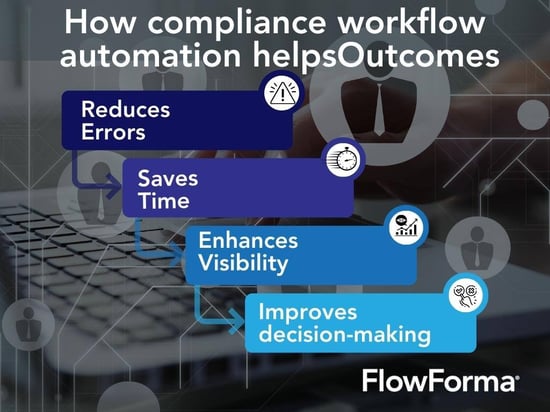 Infographic showing how compliance workflow automation helps
- Reduces errors: Manual data entry increases the risk of errors in reports. A misplaced decimal point or incorrect date in an audit report can lead to regulatory scrutiny or financial losses. Automation ensures accuracy by standardizing data input, validating information, and flagging discrepancies before they become problems.
- Saves time: Traditional compliance processes involve lengthy approval chains and manual document generation that cause delays. With compliance automation, tasks such as approvals, reporting, and document submissions happen instantly.
- Enhances visibility: Keeping track of compliance tasks manually can be overwhelming, especially when managing multiple regulations across departments. Automation provides real-time dashboards that display the current status of compliance efforts, pending actions, and potential risks.
- Improves decision-making: With data available anytime and anywhere, organizations can make informed decisions based on real-time data to ensure they meet their compliance objectives. External bodies can access compliance information for validation anytime and anywhere.
Learn how Downer New Zealand has utilized FlowForma to create Digital Permits to Dig, establishing a single source of truth for data, minimizing the risk of harm to people and property, and supporting compliance objectives.
Downer's journey to compliance
With an automated compliance module, you’re not just mitigating risks, you’re building a smarter, more agile business that stays ahead of regulatory demands.
How Does Compliance Workflow Software Work?
Compliance workflow software simplifies regulatory processes by automating tasks, reducing errors, and improving visibility. With no-code workflow design, teams can build and modify workflows using a simple drag-and-drop interface without any need for IT involvement.
What makes modern solutions even more effective is AI-powered automation. Features like AI assistants help create workflows faster, suggest automation steps, and flag compliance risks before they escalate. Instead of spending hours managing approvals and documentation, AI ensures everything runs smoothly with minimal manual input.
In this interview, Greg Dowell, Finance Director of Great North Wellhead and Frac, describes how he approached the compliance automation journey. Watch the video to learn how compliance tracking in emails and spreadsheets can quickly and easily be converted into a seamless digital workflow with the right process automation too.
Great North Wellhead and Frac describe their compliance journey
Beyond automation, real-time dashboards and built-in analytics provide complete visibility into compliance activities. Teams can track progress, identify bottlenecks, and stay audit-ready. Everything is centralized and accessible, making compliance more efficient and stress-free.
In this video, I use a real-world example to illustrate how organizations can maintain compliance with fire regulations by implementing a weekly fire safety checklist.
Automating fire safety checks
Another example of compliance workflow automation in action is with FlowForma customer Coinford. The challenges faced included the need to digitalize Health & Safety driving practices, slow completion of Health & Safety work inspections (HSWI) due to paper being lost or damaged, and bottlenecks caused by processes being completed via emails and phone calls without a standardized process or audit trail.
The solution was a digital process automation tool that connects with existing systems and allows the workforce to access it via mobile devices anytime, anywhere. The outcomes included an auditable digital record to help meet increasing regulations, such as the Building Safety Act 2022, a 50% reduction in project administration, a 20% reduction in Site Manager hours, 25 processes digitalized, and a wishlist to digitalize over 120 processes based on early success and ROI.
When it comes to compliance workflow automation, FlowAssure, the latest AI innovation from FlowForma, plays a pivotal role in delivering end‑to‑end governance, visibility and control. FlowAssure’s AI‑driven agents automatically process vendor questionnaires, penetration‑test reports, ISO and SOC reports—scoring risks, flagging anomalies and routing workflows for approval—so your organisation remains audit‑ready and aligned with frameworks like ISO 27001, SOC 2, GDPR and NIST.
By digitising and standardising the vendor‑risk assessments that underpin many compliance obligations, FlowAssure enables faster, more accurate decision‑making, reduces manual errors and ensures you have full traceability of every step for regulatory review.
See how the suite of AI agents can help secure compliance in this video:
FlowAssure for Vendor Risk Assessment
Another AI innovation helping to accelerate compliance is FlowForma Copilot. Copilot takes any text prompt and builds out a process with the information in real-time.
For example, you can ask Copilot to:
- Build an automated ISO process for my construction business
- Create a DORA compliance process for my insurance organization
- Build a HIPPA compliance process for my healthcare organization
- Design a GDRP process for my manufacturing organizations
In essence, you can ask Copilot to build ANY compliance process and it will automatically create it for you.
Why not try it out for yourself below?
6 Steps to Implement Compliance Workflow Automation
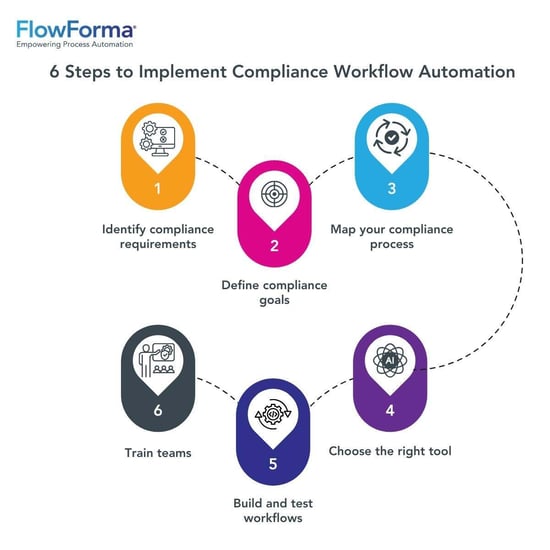 Your first 6 steps towards an automated compliance system
Ready to automate your compliance workflows? Here’s how to get started:
1. Identify compliance requirements
Start by understanding the specific regulations your business needs to meet—whether it’s GDPR, ISO 27001, DORA in financial services, or other industry-specific policies.
For example, a healthcare provider must protect patient data under the Health Insurance Portability and Accountability Act (HIPAA). Listing out these obligations helps you pinpoint where workflows are needed to stay compliant.
I recently hosted a webinar with Suzy Pinket, where she shared insights on aligning business needs with process automation, ensuring compliance, and building a process journey. Hear from Suzy as she shares tips for meeting compliance goals with workflow automation.
2. Define compliance goals
What do you want to achieve with automation? Clearly define your goals, such as:
- Faster audit preparation
- Improved data accuracy
- Better regulatory tracking
- Avoiding a fine or penalty
Setting specific objectives ensures that your automation strategy aligns with your business needs. For instance, if your priority is ensuring audit readiness, focus on automating document management and approval workflows to maintain real-time compliance records.
3. Map your compliance processes
Document your current processes, from policy approvals to incident reporting. For instance, if your organization manages employee certifications, map out how they’re tracked, when they expire, and who approves renewals. This gives you a clear picture of manual tasks that can be automated, such as sending reminders or collecting digital signatures.
4. Choose the right tool
Look for a platform that grows with your organization’s evolving compliance needs and supports no-code workflow creation, built-in document generation, and AI assistance.
For example, FlowForma’s no-code platform allows businesses to create automated workflows without IT support. Furthermore, its advanced AI Copilot can help build even the most complex workflows at lightning speed with minimal input.
5. Design, build, and test your workflows
Start with high-impact workflows that create the most risk or drain the most time. For example, automate your audit preparation process by setting up document checklists, approval routes, and real-time tracking. This ensures that audit documentation is complete and submitted on time, every time.
Incrementally move towards the goal of building your end-to-end business process compliance system.
Start with simple workflows, such as:
- Automating document approvals
- Generating compliance reports
- Routing compliance requests to the right personnel
Run test cases before full deployment to identify any gaps or bottlenecks. With data secured in a central location, organizations will have access to dashboards and reports to monitor compliance in real-time. These reports can be shared with key decision-makers in the compliance process along with external auditing bodies who are in charge of reviewing your compliance data.
6. Train your team
Successful workflow automation for compliance depends on user adoption. Provide hands-on training sessions to familiarize employees with the new system. Focus on explaining how automation reduces workload using analytics and real-time reports.
In addition, adjust workflow steps to improve efficiency and update processes to align with changing regulations.
Challenges in Implementing Compliance Workflow Automation
While automation offers clear benefits, it’s not without its challenges:
- Resistance to change: Compliance requires coordination across departments like HR, legal, IT, and operations. But when teams work in silos and communication is limited, getting everyone on the same page becomes difficult. Rolling out a company-wide compliance framework in these environments can be especially challenging, as teams may be used to managing their own processes without much cross-department collaboration.
- Data security concerns: Compliance data is sensitive, and without proper security measures, it can be vulnerable to breaches, unauthorized access, or compliance violations. A robust compliance workflow software should include encryption, access controls, and audit logs to protect confidential information and ensure regulatory adherence.
- Integration issues: Legacy systems don’t always play well with new technology. Without integrating with existing systems, your compliance workflow software can create data silos, requiring manual workarounds that defeat the purpose of automation
6 Must-Have Features of Effective Compliance Workflow Software
Despite these challenges, businesses that select the right software can unlock faster, more secure, and hassle-free compliance management. Here are six essential features to look for in your compliance workflow software:
1. No-code capabilities
With a no-code interface, compliance teams can take control of their own processes—building, adjusting, and launching workflows as needed, without waiting on technical support. This flexibility not only speeds up compliance operations but also helps ensure that workflows stay aligned with the latest legal and regulatory requirements.
2. Ability to integrate with existing systems
Compliance processes rely on data from multiple sources. The software should seamlessly connect with your repositories and document management systems to ensure a smooth data flow and avoid duplicate entries.
3. AI capabilities
Building workflow using drag-and-drop features is easy, but using AI is even better. Features like the AI Copilot by FlowForma can allow you to build workflows with the help of simple text instructions or diagrams.
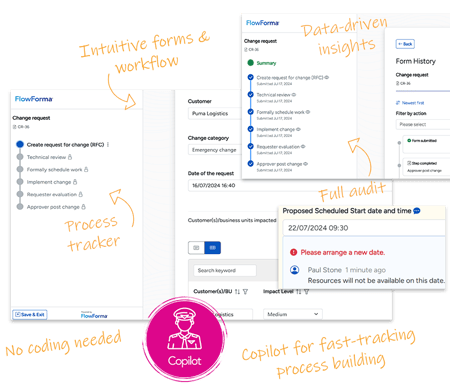
Image of FlowForma forms, workflow and Copilot
In this real-world example, you see how FlowForma Copilot can automate an ISO 27001 workflow in minutes with a simple text prompt:
See FlowForma Copilot automate an ISO 27001 workflow
4. Real-time tracking and reporting
Staying compliant requires full visibility. The right software provides real-time dashboards and automated reporting, giving teams instant access to key compliance metrics and progress updates.
5. Customizable workflows
Compliance regulations vary across industries - what works for a healthcare organization won’t apply to a financial services firm.
A flexible system should allow users to tailor workflows based on specific regulatory requirements, approval processes, and audit protocols.
6. Security and compliance features
Protecting sensitive data is critical. Look for encryption, role-based access controls, and detailed audit trails to ensure compliance with security regulations and protect against breaches.
Start Your Compliance Workflow Automation Journey with FlowForma
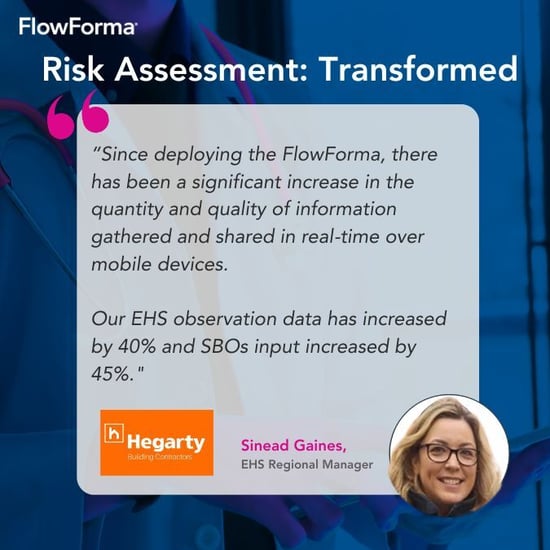
Testimonial featuring Hegarty Building Contractors
Compliance doesn’t have to be a burden. With the right tools, you can transform compliance from a time-consuming task into a seamless, efficient process that keeps your business on track.
FlowForma’s no-code compliance automation platform empowers teams to build, customize, and manage workflows without relying on IT support. Its excellent AI Copilot, real-time tracking, advanced security features, and unmatched intuitiveness help businesses stay ahead of regulations while eliminating inefficiencies from their compliance workflows.
Ready to see how FlowForma works? Book a demo or start your free trial today and take the first step towards experiencing compliance workflow automation at its finest.