As organisations rely more heavily on online forms for data collection, approvals, and payments, many teams begin evaluating Jotform alternatives with more advanced features and stronger automation.
While Jotform is a popular form builder, it is primarily designed for form creation rather than end-to-end business processes.
What often starts as a simple contact form or registration form quickly becomes more complex. Teams need conditional logic, multi-step forms, automated workflows, audit trails, and predictable pricing. At that point, traditional form builders can start to feel restrictive.
In this guide, we compare the best Jotform alternatives in 2026 and explain why FlowForma is the strongest option for organisations that have outgrown form-only tools.
Key Takeaways
|
What Is Jotform?

Jotform homepage
Jotform is an online form builder that lets users create web forms for data collection without coding. It offers a drag-and-drop editor, a large template library, and support for common use cases, including contact forms, registration forms, order forms, donation forms, and payment collection.
Jotform is widely used by individuals, small businesses, and marketing teams to quickly create and publish forms across websites, emails, and embedded pages. It supports conditional logic, basic integrations, and form responses management, making it suitable for straightforward form creation and data capture.
Why Look for Jotform Alternatives?
Jotform works well for basic online form creation, but its approach is form-centric rather than process-centric. As organisations scale their use of forms across teams and processes, friction typically appears in the following areas:
1. Limits around advanced features and logic
Many teams require conditional logic, advanced branching, multi-page forms, and complex logic that spans multiple approvals or decision points. While Jotform supports basic conditional logic, it becomes restrictive when workflows extend beyond a single form submission.

G2 Review for Jotform
2. Automation that stops at submission
Modern teams expect more than data collection. While Jotform focuses on collecting form data, it leaves routing, approvals, document generation, and digital signatures to third-party tools.
3. Shallow AI capabilities
AI form generators are becoming a baseline expectation. However, many form builders limit AI to copy suggestions or layout help. They do not support AI-driven workflow creation, optimisation, or decision logic across processes.
4. Governance and audit gaps
In regulated environments, form data must be auditable. This includes role-based access, structured data handling, and immutable audit trails. Basic form tools like Jotform are rarely designed with healthcare, financial services, or public sector compliance in mind.
5. Unpredictable pricing at scale
Free plans are appealing, but often limit usage to a set number of forms or restrict responses and features. As volume grows, costs rise through paid plans, add-ons, and premium features, making long-term pricing harder to forecast.

G2 Review of Jotform
Top Jotform Alternatives in 2026 (Comparison Overview)
If you want a lightweight form builder for surveys or lead capture, tools like Typeform or Tally may be a good fit. If you need enterprise forms with documents or signatures, Formstack or Nintex can support that.
However, if your priority is creating professional forms that power complex workflows with built-in automation, governance, and AI, FlowForma stands apart from classic form-first tools.
|
Tool |
Core Focus |
AI Capabilities |
Governance & Compliance |
Best For (Industry) |
|
FlowForma |
End-to-end process automation with built-in forms |
AI Copilot, AI agents, summarisation |
Full audit trails, role-based governance |
Highly regulated mid-sized to enterprise organisations |
|
Typeform |
Conversational forms |
AI copy suggestions |
Limited governance |
Marketing teams, UX research |
|
Formstack |
Enterprise forms & documents |
AI-assisted optimisation |
HIPAA, SOC 2 |
Healthcare, enterprise ops |
|
Bonitasoft |
BPM platform |
Limited native AI |
Strong BPM governance |
IT-led enterprises |
|
Cognito Forms |
Secure forms |
Minimal AI |
Encryption, access control |
SMBs |
|
Wufoo |
Classic web forms |
None |
Basic security |
Small businesses |
|
Tally |
Lightweight form builder |
None |
Minimal |
Startups |
|
Nintex |
Automation platform |
AI discovery, RPA |
Enterprise-grade |
Large enterprises |
|
Growform |
Conversion forms |
AI copy support |
Limited |
Marketing teams |
|
Flowable |
Open-source BPM |
Minimal |
Configurable governance |
Technical teams |
Table showing a side-by-side comparison between the top 10 Jotform alternatives
10 Best Jotform Alternatives in 2026
Below, we analyse a few Jotform alternatives that are designed for organisations that need to create custom forms at scale.
1. FlowForma
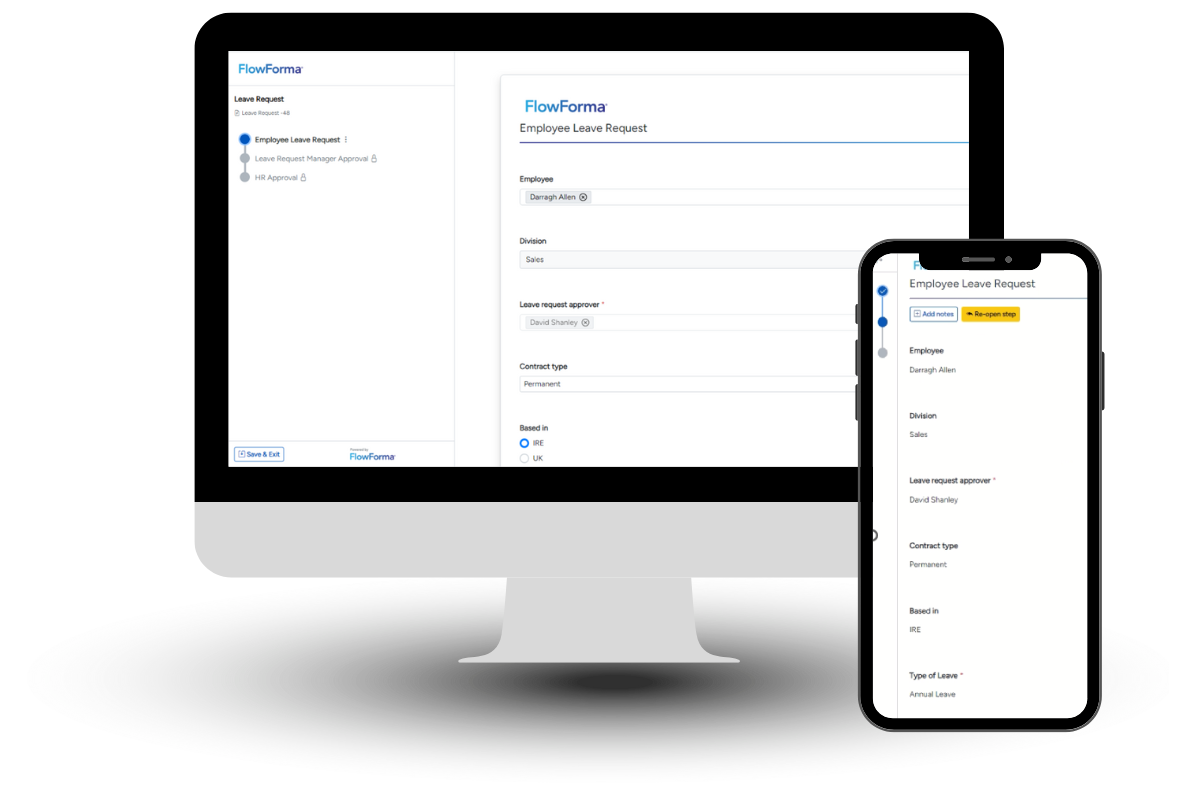
FlowForma product demo
FlowForma is an AI-powered business process automation platform with built-in form automation. It is designed for mid-sized to enterprise organisations that use forms as part of structured, operational workflows rather than standalone data collection.
The platform is widely adopted in regulated industries such as construction, finance and healthcare, where governance, compliance, and auditability are critical. Business users can create and manage forms and workflows using a no-code, drag-and-drop interface, while IT teams retain oversight through built-in governance, security controls, and data policies.
FlowForma’s Key Features
1. AI-powered form and workflow creation
FlowForma allows teams to create professional forms that sit directly within automated workflows. Forms support multi-page layouts, complex form fields, conditional logic, and advanced branching. This makes it suitable for both simple data collection and complex forms that drive operational processes.
FlowForma offers dynamic forms
2. True no-code automation
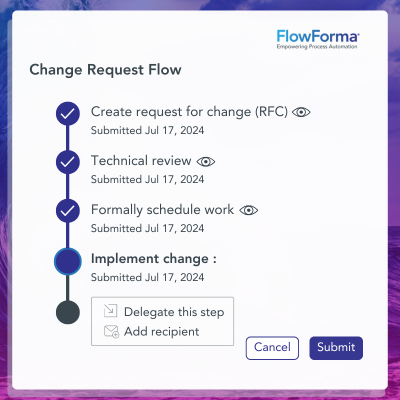
FlowForma is a no-code tool designed for business users rather than developers. Using a drag-and-drop interface, teams can build forms, define logic, and configure workflows without coding knowledge. IT teams retain governance and oversight, while business users manage form creation and process changes independently.

FlowForma’s customer review
3. AI-powered automation

FlowForma’s AI Suite
FlowForma embeds AI directly into the full workflow lifecycle, rather than limiting AI to form generation or text suggestions.
Its AI capabilities are designed to help organisations build, run, and continuously improve complex workflows, while maintaining governance, accuracy, and control. Key components include:
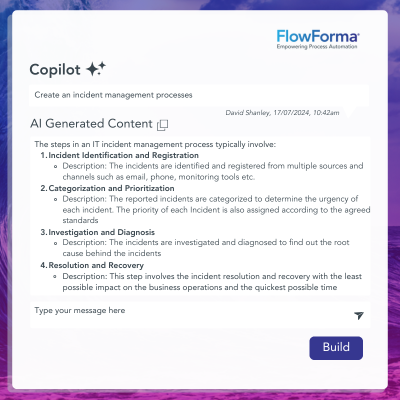
AI Copilot: Assists users during form and workflow creation by allowing them to describe a process in natural language. From that input, FlowForma automatically generates BPMN process diagrams along with the underlying steps, questions, routing logic, and forms.
FlowForma's Copilot in action
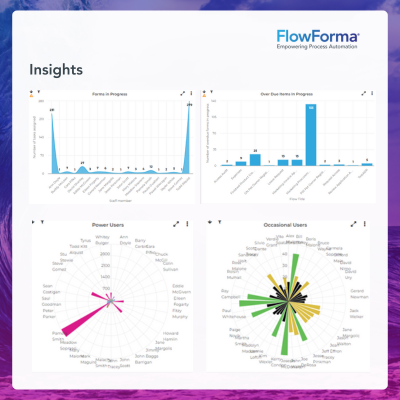
Summarisation Agent: Analyses form data and submissions to produce clear, structured summaries. Discovery Agent: Reviews workflow and form activity to identify patterns, bottlenecks, and improvement opportunities. By analysing how forms and workflows are used over time, it helps organisations understand where processes slow down or become inconsistent.
Smart Assistants: Supports users during both form completion and workflow execution by guiding them through tasks in real time. Instead of navigating complex forms or processes manually, users can interact with assistants using natural language prompts to initiate actions, answer questions, or progress a workflow.
4. Built-in compliance and audit trails
FlowForma includes a built-in compliance module that automatically logs every action taken within a workflow. These include submissions, approvals, changes, decisions, and user interactions, thereby creating a tamper-resistant audit trail and ensuring compliance with regulatory standards such as GDPR and DORA.

customer testimonial for FlowForma
All process data is stored within the organisation’s existing Microsoft SharePoint tenancy, aligning with established identity, security, and data residency policies.
5. Document automation
FlowForma automates document creation within the workflow, eliminating the need to manually generate, edit, or distribute documents after form submission. Data captured through forms is automatically mapped into pre-approved templates to create consistent documents such as contracts, reports, approvals, and records.

FlowForma’s AI-powered document generation
Document generation is triggered by workflow logic, ensuring the right document is produced at the right stage of the process.
FlowForma’s Pros
- True process automation, not just form building
- AI embedded directly into forms and workflows
- Transparent, process-based pricing with no hidden costs
- Unlimited forms and workflows under one licence
- Strong governance suitable for regulated industries
FlowForma’s Cons
- Works only within a Microsoft environment
FlowForma Pricing
FlowForma uses a transparent, process-based pricing model rather than charging per form, response, or feature.
Organisations can build and run an unlimited number of workflows under a single licence, which removes the usage caps and hidden costs common with many form builders.

FlowForma’s process-based pricing model
2. Typeform

Typeform’s form creation page
Typeform is a form builder focused on conversational and interactive forms. It is commonly used by marketing and product teams to create surveys, registration forms, and lead capture forms with strong user engagement.
Typeform’s Key Features
- Conversational and multi-step forms
- Conditional logic
- Customisable design
- Built-in analytics
- Integrations with CRM and marketing tools
Typeform’s Pros
- High form completion rates
- Intuitive and polished interface
- Easy to set up
Typeform’s Cons
- Limited automation beyond form submission
- Pricing increases with form responses
3. Formstack

Formstack’s homepage
Formstack provides enterprise-grade form building along with document generation and digital signatures. It is often used in compliance-driven environments where structured data collection is required.
Formstack’s Key Features
- Drag-and-drop form builder
- Document automation
- Digital signatures
- Payment collection
- Workflow automation add-ons
Formstack’s Pros
- Strong compliance capabilities
- Suitable for regulated industries
- Professional form design
Formstack’s Cons
- Functionality spread across multiple products
- Higher total cost of ownership
4. Bonitasoft

Bonitasoft homepage
Bonitasoft is a BPM platform designed for modelling and running complex workflows. Forms exist within the workflow layer, but configuration typically requires technical expertise.
Bonitasoft’s Key Features
- BPMN-based workflow modelling
- Advanced branching and logic
- Role-based access control
- Integration APIs
- Process monitoring
Bonitasoft’s Pros
- Strong governance and control
- Handles complex workflows
- Suitable for regulated environments
Bonitasoft’s Cons
- Steep learning curve
- Heavy IT involvement
5. Cognito Forms

Cognito Form’s Homepage
Cognito Forms is a secure online form builder aimed at small to mid-sized teams. It focuses on reliable data collection rather than full workflow automation, and is a cheaper replacement for Jotform.
Cognito Form’s Key Features
- Secure data storage
- Conditional logic and calculations
- Payment forms
- Entry management
- API access and third-party integrations
Cognito Form’s Pros
- Affordable pricing
- Easy to manage forms
- Good security basics
Cognito Form’s Cons
- Limited automation features
- Minimal AI capabilities
6. Wufoo

Wufoo Homepage
Wufoo is a long-standing online form builder known for simplicity and ease of use. It supports basic form creation, payment forms, and response management. The platform has seen limited innovation in recent years and is best suited to straightforward form use cases.
Wufoo’s Key Features
- Drag-and-drop editor
- Templates
- Payment processing
- Embedded forms
- Response tracking
Wufoo’s Pros
- Simple to use
- Reliable for basic forms
- Accepts online payments
Wufoo’s Cons
- Outdated interface
- Limited advanced logic
7. Tally
Tally homepage
Tally is a lightweight, modern form builder offering unlimited forms on its free plan. It appeals to startups and individuals who need quick form creation with minimal setup. While it includes basic logic, it does not support automated workflows or governance features.
Tally’s Key Features
- Unlimited forms
- Conditional logic
- Custom styling
- Form exports
- Mobile-friendly forms
Tally’s Pros
- Generous free plan
- Clean interface
- Quick form creation
Tally’s Cons
- No workflow automation
- No governance controls
8. Nintex
Nintex’s Homepage
Nintex is a broad automation platform that includes forms, workflows, and RPA. It is designed for large enterprises with complex automation needs and dedicated IT resources. However, it is often considered more expensive and complex than more focused alternatives.
Nintex’s Key Features
- Automated workflows
- Advanced logic and rules
- RPA capabilities
- Digital signatures
- Built-in analytics
Nintex’s Pros
- Enterprise-grade automation
- Strong compliance features
- Handles complex processes
Nintex’s Cons
- Expensive licensing
- Complex to implement and maintain
9. Growform
Growform’s homepage
Growform is built for marketing teams that prioritise lead capture and conversion rates. It focuses on fast, interactive form creation rather than operational workflows.
Growform’s Key Features
- Multi-step forms
- Conversion-focused layouts
- CRM integrations
- Embedded forms
- Form analytics
Growform’s Pros
- Strong for marketing use cases
- Easy to deploy
- Optimised for conversions
Growform’s Cons
- Not suitable for internal processes
- Limited governance features
10. Flowable

Flowable’s Homepage
Flowable is an open-source BPM engine used by technical teams to build customised workflow solutions. It offers strong control over process logic and governance, but requires development effort to implement and maintain. Forms are typically custom-built rather than configured out of the box
Flowable’s Key Features
- BPM engine
- Case management
- Decision tables
- REST APIs
- Identity management
Flowable’s Pros
- Highly configurable
- Strong governance capabilities
- Open-source flexibility
Flowable’s Cons
- Requires coding knowledge
- No out-of-the-box form UX
Why FlowForma Is the Best Jotform Alternative
Customer testimonials for FlowForma
Most Jotform alternatives focus on form creation. FlowForma focuses on process execution. Forms are treated as a single step in a governed workflow rather than as an isolated data-collection point.
FlowForma combines advanced form building, conditional logic, automated workflows, AI-powered assistance, document generation, and audit trails in a single platform. It supports complex use cases without relying on multiple third-party tools and offers transparent pricing that scales predictably.
Table showcasing a side-by-side comparison between JotForm and FlowForma
For organisations where forms trigger approvals, compliance checks, payments, or operational decisions, FlowForma provides a more complete and future-proof alternative to Jotform. Book a demo to see the tool in action!
|
Feature |
Jotform |
FlowForma |
|
Form building |
Drag-and-drop editor |
Intuitive form builder within workflows |
|
AI form generator |
Limited |
AI-driven form and workflow creation |
|
Conditional logic |
Supported |
Advanced logic and branching |
|
Multi-step forms |
Supported |
Core capability |
|
Automated workflows |
Via integrations |
Built-in |
|
Digital signatures |
Add-on |
Native |
|
Complex workflows |
Limited |
Designed for end-to-end complex workflows |
|
Governance & audit |
Basic |
Full audit trails |
|
Pricing model |
Usage and feature-based |
Transparent, process-based |
|
Best for |
Standalone online forms |
End-to-end automation |
FAQs
Can Jotform alternatives support complex workflows and approvals?
Some Jotform alternatives support basic automation, but most rely on third-party tools for workflows. Platforms like FlowForma, Nintex, or BPM tools support complex logic, multi-step approvals, and governance natively, which is important for regulated or high-volume processes.
How is FlowForma different from a traditional form builder?
Traditional form builders focus on creating forms and collecting form data. FlowForma treats forms as part of a wider business process. It combines form building with automated workflows, AI assistance, document generation, and audit trails, making it suitable for complex workflows rather than standalone web forms.
Are there free Jotform alternatives available?
Yes, some tools offer a free plan or basic plan, such as Tally. However, free Jotform alternatives often limit features such as advanced logic, multi-step forms, custom domains, or form responses. Teams handling professional forms usually move to paid plans as requirements grow.
Is FlowForma suitable if we don’t have coding knowledge?
Yes. FlowForma is a no-code tool designed for business users. Teams can create custom forms, define advanced logic, and manage automated workflows using a drag-and-drop interface, while IT teams maintain governance and oversight.
By