Evaluating Bizagi as part of your automation shortlist? In that case, you’re likely weighing three core factors: how much the platform will cost, how quickly your team can build sustainable processes, and whether a low-code tool will meet your adoption targets.
These are the questions that arise when pricing isn’t publicly available, and delivery timelines depend on technical capacity.
In this guide, we will provide a clear breakdown of Bizagi’s pricing model, its strengths, its limitations, and what organisations should expect when implementing it at scale. You’ll also see why FlowForma emerges as the leading alternative, with transparent pricing, an extensive AI suite, and a no-code interface that helps organisations automate up to 10x faster.
Key Takeaways
- Bizagi is a low-code BPM platform that helps organisations model, document, and automate business processes through tools like Bizagi Modeller and workflow execution.
- Many users look for alternatives because Bizagi’s pricing is consumption-based, its low-code setup requires technical support, and its modelling-first approach slows down delivery.
- FlowForma stands out as the stronger option by offering true no-code automation, a complete AI suite, and predictable pricing with unlimited workflows.
- Its Microsoft 365-native deployment gives FlowForma a clear advantage by enabling fast adoption, better governance, and easier scaling for mid-sized to enterprise organisations
|
What Is Bizagi?
.webp?width=700&height=318&name=Bizagi%20Homepage%20(1).webp)
Bizagi Homepage
Bizagi is a low-code platform designed to help organisations model, automate, and optimise business processes. It supports users and technical teams through tools such as:
- BPMN modelling through Bizagi Modeller
- Workflow execution
- Rules and routing
- Integration with external systems
- Application development for business teams
Bizagi’s modelling-first, low-code approach is designed for technical users and often requires a larger team and higher budget to manage ongoing development.
FlowForma offers a different path: it is SharePoint-native, with all data stored securely within the organisation’s own Microsoft 365 tenancy, making it a stronger fit for regulated industries.
Besides, its no-code design is quite intuitive, enabling business teams to build and adapt workflows themselves, while maintaining stronger governance and compliance through Microsoft 365’s built-in controls.
Bizagi: Key Features and Use Cases
Here are the key features, use cases, and drawbacks of Bizagi:
|
Feature
|
Use Case
|
Best For
|
Drawbacks
|
|
Bizagi Modeler
|
BPMN diagramming for mapping and simulation
|
Enterprises that want detailed diagrams before they create automated workflows
|
BPMN knowledge required; may slow teams aiming to gain a competitive edge
|
|
Workflow Automation
|
Turning mapped models into automated processes for HR, finance, procurement, and recruitment workflows
|
Organisations aiming to improve operational efficiency across departments
|
Requires configuration and IT involvement; may increase delivery risk
|
|
Low Code Development
|
Building process applications visually with employees acting as citizen developers
|
Teams with the capacity to maintain low-code apps and workflows as they scale
|
Still needs technical oversight; ongoing changes may require IT
|
|
Analytics & Process Mining
|
Tracking performance, identifying bottlenecks, and improving workstreams through dashboards and real-time insights
|
Organisations focused on continuous optimisation, audit support, and compliance reporting
|
Depth varies by plan; additional setup may be required
|
|
Integrations
|
Connecting Bizagi to existing systems such as SharePoint, ECM platforms, APIs, and Microsoft Word
|
Companies modernising legacy infrastructure while maintaining flexibility across the cloud and on-prem environments
|
Integration maintenance can add cost and administrative overhead
|
|
Collaboration & Version Control
|
Model sharing, versioning
|
Large BPM teams that need formal governance across multiple business units
|
Advanced collaboration sits behind enterprise licensing
|
|
Document Handling & Reporting
|
Generating documentation, exporting PDFs, and producing historical reports
|
Finance, HR, and accounts payable teams needing structured outputs for regulators and internal stakeholders
|
Limited automation without additional configuration
|
Table showing the key features and use cases of Bizagi
Benefits of Using Bizagi for Business Process Management
Bizagi is valued for its structured process approach and suitability for enterprise BPM teams. Common benefits include:
- Improved documentation discipline
- Insight into process performance
- Strong governance
- Ability to run workflows at scale
- Support for modelling, execution, and optimisation in one platform
Bizagi supports a wide set of use cases across HR, procurement, finance, and operations. It is particularly effective for organisations that invest heavily in BPM governance and want to model and execute in a single environment.
Bizagi Pricing in Depth
Bizagi does not list pricing publicly. Organisations must contact sales to understand the actual cost of ownership. The platform’s custom pricing model is based on several factors:
1. Consumption-based cloud billing
Bizagi Cloud Automation uses consumption metrics to determine cost. Workload spikes or high transaction volumes can lead to fluctuating monthly bills, which makes forecasting difficult for organisations with expanding automation needs.
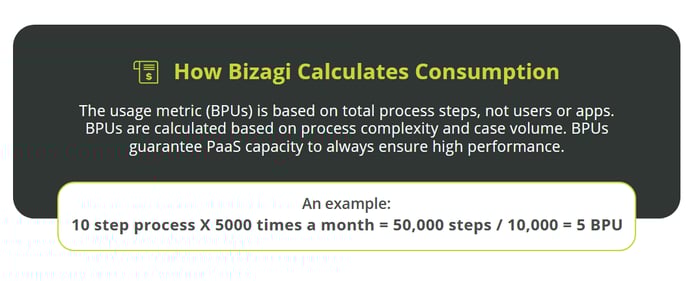
How Bizagi calculates consumption
2. User-based licensing
Pricing varies depending on the number and type of users (modellers, administrators, operational staff). As teams scale, licensing requirements expand.
3. Environment and infrastructure costs
Multiple environments (development, test, production) increase cost. Organisations hosting Bizagi on-prem may require additional internal infrastructure.
4. Bizagi modeller enterprise licensing
Although Bizagi Modeller has a free version, advanced collaboration, governance, and process mining features require a paid enterprise licence, the cost of which is not disclosed publicly.
How pricing alignment works
Bizagi states that its model provides better correlation between value delivered and pricing. However, in practice, consumption can be unpredictable as automated processes scale across departments.
For organisations that prioritise predictability, FlowForma’s transparent pricing with unlimited workflows provides a more structured investment path.
Pricing Comparison: Bizagi vs FlowForma
Here's a detailed comparison of the pricing of Bizagi and FlowForma's digital process automation platform:
|
Feature
|
FlowForma
|
Bizagi
|
|
Best For
|
Mid-sized to enterprise organisations that want rapid, business-led automation while retaining IT oversight
|
Organisations running modelling-heavy BPM programmes with established process governance teams
|
|
Pricing Structure
|
Process-based pricing that includes unlimited workflows under one licence
|
User-based licensing combined with consumption-based billing that changes based on workload
|
|
Pricing Transparency
|
Very high — pricing is fixed, predictable, and easy to forecast
|
Moderate — pricing is not publicly available and varies by usage, requiring a custom quote
|
|
Cost Predictability
|
Stable, with no hidden fees or workload-related cost spikes
|
Variable; usage surges or additional environments may increase total cost
|
|
Technical Dependency
|
No-code AI-powered platform designed for business users to build and modify workflows independently
|
Low-code platform where more complex automation requires technical oversight or developer involvement
|
|
Deployment Model
|
Runs natively inside Microsoft 365, keeping data within existing governance and security frameworks
|
Cloud or on-premise deployment; governance and infrastructure vary by chosen model
|
|
AI Capabilities
|
Full AI suite: AI Copilot, AI Agent Rule, Discovery Agent, Summarisation Agent, Smart Assistants
|
Automation and rules engine available, but no equivalent integrated AI suite
|
|
Ideal Use Cases
|
Rapid automation across HR, finance, operations, compliance, construction, healthcare, and the public sector
|
Structured BPM programmes where teams need detailed modelling and simulation before automation
|
Table showcasing a detailed comparison of the pricing of Bizagi and FlowForma
FlowForma offers fixed pricing regardless of how many workflows you build. Bizagi’s model changes with usage, meaning budgeting must be continually monitored as adoption increases.
Advantages and Disadvantages of Bizagi
Bizagi performs well in structured BPM environments, especially for teams that rely on detailed process modelling.
However, reviews also highlight drawbacks around pricing clarity and the technical effort needed to maintain low-code workflows. Here’s a quick breakdown of the key pros and cons.
Bizagi’s Pros
Bizagi earns positive feedback across G2 and Capterra for its strength in structured BPM programmes. Reviewers frequently highlight its modelling depth, governance controls, and ability to support large-scale business process automation.
1. Strong BPMN modelling through Bizagi Modeller
Bizagi Modeller provides organisations with detailed BPMN capabilities for documentation, simulation, and workflow standardisation.
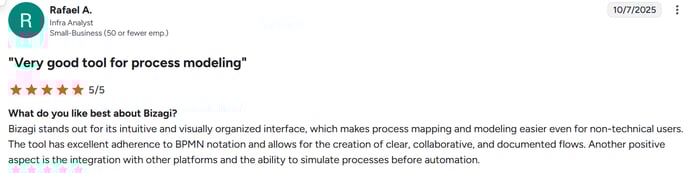
G2 user review for Bizagi
2. Deep governance capabilities
Bizagi’s modelling-first approach enables strong lifecycle control, which appeals to organisations prioritising compliance, audit support, and reduced risk.
3. Useful for technical and BPM-driven teams
IT departments and business users with BPM knowledge often appreciate the tool’s depth, particularly when aligning models, rules, and integrations across multiple departments.

Capterra review for Bizagi
4. Supports documentation-led process improvement
Bizagi is effective for organisations that emphasise documentation, especially in industries where diagrams, manuals, or structured workflows are mandatory. This focus also assists teams involved in recruitment, onboarding, and regulated workflows.
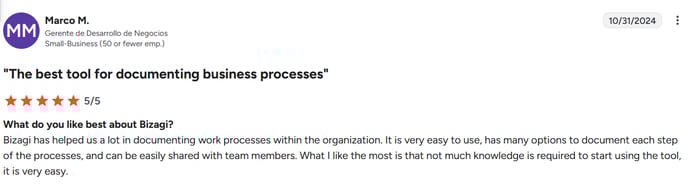
G2 Review for Bizagi
Bizagi’s Cons
Despite its capabilities, reviews also point to several challenges buyers should consider — particularly regarding pricing clarity, the learning curve, and technical dependence.
1. Non-transparent pricing
Bizagi pricing requires direct sales engagement, making early-stage evaluation and internal budgeting difficult. Reviewers often note that predicting full cost before implementation is challenging.
Besides, consumption-based pricing makes cost forecasting difficult.

2. Difficulty handling complex processes
Several reviewers note that when processes involve large datasets, multiple rules, or deep branching logic, Bizagi can experience performance slowdowns or UI lag, which can impact operational efficiency in high-volume environments.

G2 review for Bizagi
3. Low-code still requires technical involvement
Although positioned as low-code, reviewers consistently mention reliance on IT for modelling, scripting, and maintenance. This can slow delivery and limit accessibility for employees who want to build their own workflows.

G2 review for Bizagi
4. Longer development cycle compared to no-code
Bizagi’s modelling-first structure means processes must be mapped, reviewed, and converted into automation, which delays deployment.
5. Steeper learning curve for non-technical business users
Users on aggregator sites note that Bizagi’s interface, rule configuration, and modelling tools require training and familiarity with BPM. As such, it can reduce adoption and efficiency for teams wanting to boost efficiency quickly.

G2 review for Bizagi
6. Configuration can be complex for deep integrations
Bizagi performs well when appropriately integrated, but connecting to legacy systems or multi-step workflows may require specialist skills, which increases implementation time and adds operational overhead.

Capterra review for Bizagi
7 Reasons to Choose FlowForma Over Bizagi
While Bizagi offers strong modelling capabilities, many teams find that implementation speed, technical dependence, and pricing uncertainty limit long-term value.
FlowForma takes a different approach by running natively on SharePoint, keeping data within the organisation’s own tenancy for stronger security and regulatory alignment.
Its true no-code design makes it easier for business users to build and update workflows directly, improving governance and compliance. This makes it highly suitable for regulated industries like healthcare or the financial sector.
1. Faster automation and up to 10x acceleration
FlowForma enables rapid automation by allowing teams to build workflows directly, without converting BPMN diagrams into applications. Faster build cycles reduce administrative delays, accelerate service delivery, and free IT teams from repetitive configuration work.
For example, Blackpool Teaching Hospitals NHS automated more than 70 processes at speed, helping departments cut down manual paperwork, improve tracking of clinical and non-clinical requests, and remove bottlenecks caused by email-based approvals and fragmented data.
Blackpool Teaching Hospitals automated 70+ processes with FlowForma
|
“The speed of development and the opportunity to involve process owners in creating their own forms and workflows is a game-changer…”
-Mark Greenwood, Senior Developer at BTH
|
2. AI suite for seamless automation
.webp?width=700&height=364&name=FlowForma%E2%80%99s%20AI%20Suite%20(1).webp)
FlowForma’s AI Suite
FlowForma’s AI Suite stands as a key differentiator, giving the tool a competitive advantage over Bizagi:
2.1. AI Copilot
AI Copilot allows users to describe a workflow in natural language. From that description, the system automatically creates steps, questions, routing, logic, and forms.
Users can upload diagrams, documents, or process notes, and Copilot converts them into a functioning workflow within minutes.
Try the AI Copilot playground to see how processes can be created within seconds:
FlowForma AI Playground in action
2.2. AI Agent Rule
AI Agent Rule automates interpretation tasks typically handled by specialists. It can read documents, extract key information, validate data, and populate workflow fields.
This is especially valuable because these tasks are typically slow, repetitive, and prone to human error — particularly in finance, accounts payable, procurement, HR, and compliance, where teams process high volumes of documents daily.
Bizagi offers scripting and rules, but FlowForma brings this intelligence directly into the workflow without code.
2.3. Discovery Agent
Discovery Agent analyses organisational content (policies, SOPs, diagrams) and meeting notes to identify potential processes suitable for automation, helping teams uncover workflows that may have been overlooked.
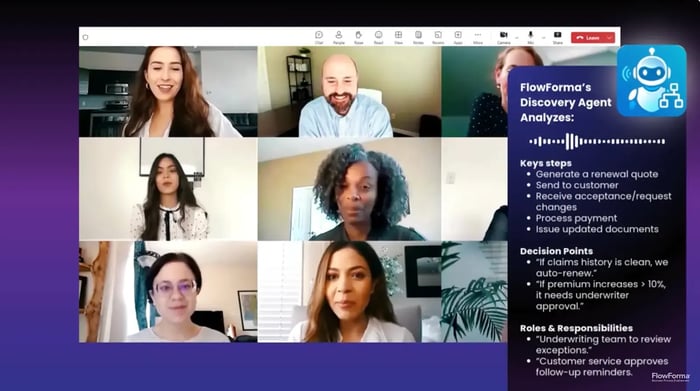
FlowForma’s Discovery Agent
2.4. Summarisation Agent
At any step in a workflow, Summarisation Agent provides an instant update summarising everything that has happened so far — decisions, comments, blockers, risks, and context.
Bizagi offers logs, but not real-time AI-generated summaries.
2.5. Smart Assistants
Smart Assistants guide users through complex flows using intuitive prompts. They help businesspeople navigate tasks, ask questions, and complete submissions without training. They also help flow builders configure workflows through interactive guidance. This leads to higher adoption and fewer support requests.
3. True no-code for business users
FlowForma is an AI-powered business process automation tool that enables users to automate complex workflows while IT defines the guardrails—security, integration, access controls, environments, and platform configuration.
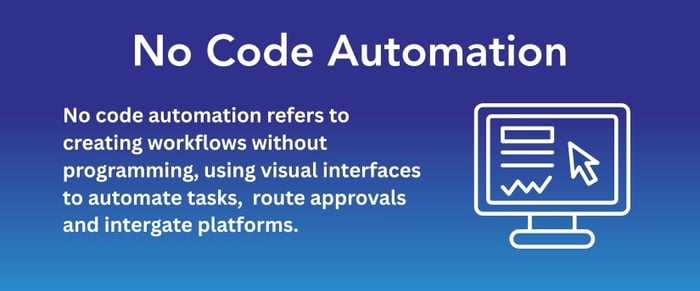
FlowForma is a no-code platform with an easy-to-use interface
Alt Text: By delivering agility and autonomy without compromising compliance or control, this hybrid model empowers teams to design, deploy, and optimise their own workflows.
Bizagi’s low-code environment supports citizen developers, but technical oversight is still needed for deployment, logic, and changes.
4. Transparent pricing with unlimited workflows
FlowForma offers predictable pricing without transaction-based surprises. Organisations can automate up to 3 processes with the Essentials Plan without worrying about rising costs as the number of users increases.
Its stable cost structure helps procurement and finance teams plan long-term investments.
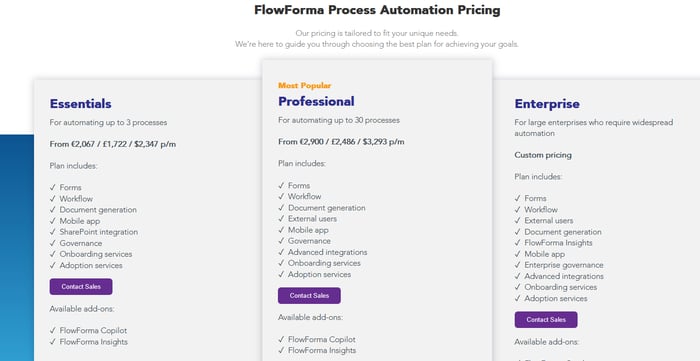
FlowForma’s process-based pricing model
6. Microsoft 365 native deployment
FlowForma stores all data within the Microsoft 365 environment, supporting governance, audit readiness, and enterprise-grade security. This creates immediate alignment with IT policies in sectors such as healthcare, public sector, construction, education, and financial services.
.webp?width=700&height=394&name=FlowForma%20integrations%20(1).webp)
FlowForma integrations
7. Built-in compliance and audit trails
FlowForma is ISO 27001 certified and supports strict regulatory requirements across highly governed sectors.
The platform automatically records every step, route, and decision, giving teams complete audit trails that align with frameworks such as DORA, ISO 27001, and GDPR. This built-in traceability makes compliance oversight far simpler for organisations operating in regulated environments.
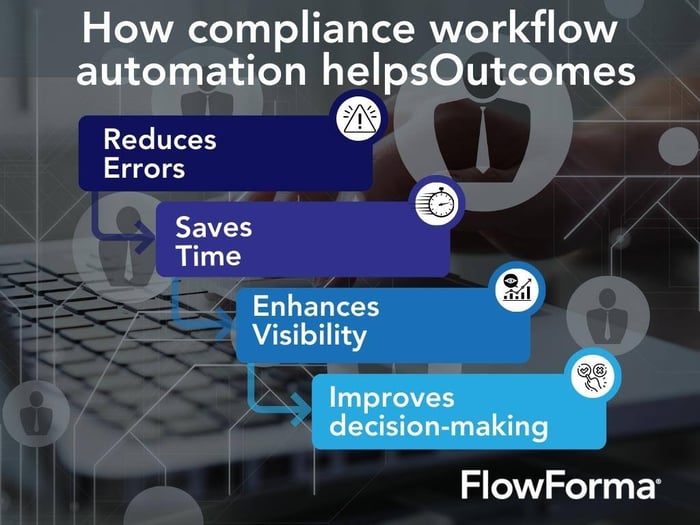
How FlowForma’s compliance module works
Why FlowForma is Better than Bizagi for Digital Process Automation

Customer testimonial for FlowForma
Bizagi offers modelling and automation features, but its pricing complexity and low-code structure introduce a degree of technical reliance for many organisations. For teams seeking quicker delivery, predictable costs, and broad adoption, FlowForma offers a compelling alternative.
With a full AI suite, intuitive no-code environment, Microsoft 365-native governance model, and proven customer results, FlowForma helps organisations accelerate digitalisation and maintain scalable, compliant workflows.
Ready to see FlowForma in action? Book a demo today.
FAQs
1. How does Bizagi perform with complex, multi-step processes?
Bizagi handles complexity, but reviewers sometimes report performance lags when workflows include heavy branching, large datasets, or deep integrations. As such, it might impact throughput in high-volume environments.
2. How does FlowForma’s pricing compare to Bizagi’s consumption model?
FlowForma offers transparent, process-based pricing with unlimited workflows, making budgeting predictable. Bizagi uses consumption-based billing, which can fluctuate as automation scales.
Many organisations prefer FlowForma for more precise cost control during multi-department rollouts.
3. Can FlowForma replace Bizagi for teams without BPMN or low-code skills?
Yes. FlowForma is a true no-code platform, enabling business users to build workflows without BPMN knowledge or developer assistance. This reduces training time and accelerates adoption compared to Bizagi’s modelling-first, low-code environment.
4. Why do organisations choose FlowForma over Bizagi for enterprise rollout?
FlowForma runs natively inside Microsoft 365, making governance, security, and adoption much simpler. Teams highlight quicker deployment, lower technical overhead, and broader user participation compared to Bizagi’s more technical and modelling-heavy setup.
.png?width=175&height=42&name=logo_20(1).png "FlowForma Process Automation")




.png)