Pega (aka Pegasystems) sits firmly in the enterprise automation space, offering case management, workflow orchestration, and rule-based decisioning for large organizations.
It is often selected for high-volume, regulated processes. However, buyers evaluating PegaSystems pricing quickly discover that the total cost of ownership increases as user counts rise, more modules are added, and additional environments are required.
In this guide, we break down how PegaSystems pricing works, what buyers report about costs, and the practical pros and cons to consider before committing.
You will also see why many organizations choose FlowForma as a cost-predictable, AI-powered alternative that accelerates delivery for business users while keeping IT in control.
Key Takeaways
- PegaSystems is an enterprise automation platform, but its modular pricing, per-user fees, specialist developer needs, and long implementation cycles make ownership expensive and complex.
- Organizations are increasingly exploring alternatives due to unpredictable costs, slow delivery timelines, and limited ability for business users to build or update workflows independently.
- FlowForma solves these challenges with no-code automation, process-based pricing, and full AI capabilities included, helping teams automate faster without relying on developers.
- Microsoft 365 deployment, built-in compliance, and complete audit trails make FlowForma a secure, scalable choice for regulated industries and multi-department automation programs.
|
Pega: Key Features and Use Cases
Pega is a business process management software that offers a rule-driven automation engine, advanced decisioning, and support for high transaction volumes and complex workflows.
Here are its key capabilities and use cases at a glance:
|
Capability
|
Key Features
|
Use Cases
|
|
Case management
|
Full case lifecycle, routing, SLAs
|
Claims, onboarding, regulatory reviews
|
|
Workflow automation
|
Multi-step routing, escalations
|
Customer service, back office tasks
|
|
AI and decisioning
|
Next-best-action logic, personalization
|
Contact centers, customer loyalty programmes
|
|
Low-code platform
|
Visual configuration tools, drag and drop options
|
Operational applications built by developers
|
|
Integrations
|
APIs, data layers, connectors
|
Core banking, CRM, legacy systems
|
|
Analytics
|
Dashboards, real-time insights
|
Performance monitoring, audit checks
|
Table showcasing the key features and use cases of PegaSystems
Pega Pricing In Depth
Before comparing platforms, it is essential to understand how PegaSystems pricing actually works. While Pega positions its platform as accessible across industries, the real cost structure reflects an enterprise-focused model with mandatory minimums, capacity blocks, and multi-year commitments.
The overall cost also depends on infrastructure, such as whether the organization chooses on-premise or Pega Cloud deployment.
Pega Pricing
Pega uses a case-based pricing model that charges organizations for each workflow unit (or case) processed on the platform.
While the per-case price appears simple, total cost is shaped by edition choice, mandatory usage minimums, and additional modules required for enterprise deployments.
Below is a consolidated view that combines official Pega pricing and third-party purchasing requirements to provide a realistic picture of what organizations typically commit to.
|
Edition
|
Designed For
|
Official Pricing (As of January 2026)
|
Notes
|
|
Low-Code Factory Edition
|
Simple workflows for individuals or small workgroups
|
$0.45 USD per case
|
App Studio has limitations (no child cases). Process AI, robotics, and advanced automation require add-ons.
|
|
Standard Edition
|
Departmental automations with multiple channels and advanced workflow needs
|
$0.80 USD per case
|
Includes Dev Studio for more advanced workflow automation. Some AI and robotics features remain add-ons.
|
|
Enterprise Edition
|
Large-scale, customer-facing, mission-critical workflows with full AI decisioning
|
Custom quote only
|
Includes full Pega GenAI Suite, robotics, Process AI, Email Bot, and advanced automation.
|
Table showcasing Pega pricing tiers
Additional Pricing Requirements
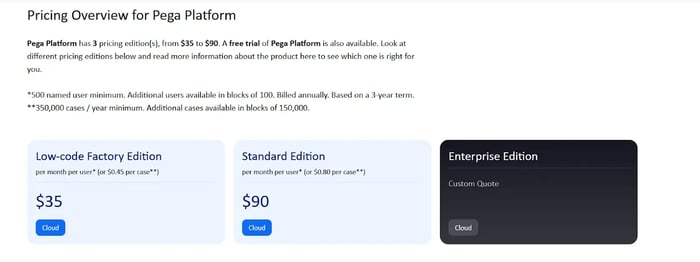
Pega’s additional requirements from TrustRadius
While Pega advertises per-case pricing, third-party disclosures such as TrustRadius clarify mandatory minimums and contract requirements used in real enterprise deals.
|
Pricing Component
|
Details (as of 2025)
|
What This Means for Organizations
|
|
Minimum users
|
500 named-user minimum
|
Mid-sized organizations must commit far above their actual user count.
|
|
User expansion
|
Extra users sold in blocks of 100
|
Even small growth triggers a large licensing jump.
|
|
Billing term
|
Annual billing on a 3-year contract
|
Limited flexibility to scale down or adjust spend.
|
|
Minimum case volume
|
350,000 cases per year
|
Forced into a high baseline, even if real usage is lower.
|
|
Additional case blocks
|
Extra cases sold in blocks of 150,000
|
Case growth leads to immediate cost escalation.
|
|
Not included in base pricing
|
Pega Cloud, Customer Decision Hub, Dev/QA/UAT environments, implementation, developers, ongoing support
|
Total cost of ownership expands further with essential add-ons.
|
Table highlighting Pega pricing taken from third-party sources
As a result of this complexity, the real annual spend often reaches hundreds of thousands to several million dollars, especially once organizations expand automation across multiple teams or channels.
Mid-sized buyers face barriers from the 500-user and 350,000-case minimums, while large enterprises face rising costs as case volume increases.
FlowForma vs Pega Pricing: Side-by-Side Comparison
Pricing for Pega often appears simple on the surface, yet the real cost emerges only when user minimums, case thresholds, AI add-ons, and environment fees are applied.
This comparison highlights how Pega’s enterprise-heavy structure differs from FlowForma’s transparent, all-inclusive pricing.
|
Pricing Dimension
|
PegaSystems
|
FlowForma
|
|
Licence Structure
|
Modular licensing. Each capability (case management, Customer Decision Hub, Pega Cloud, AI features, analytics) is priced separately. Mandatory minimum case volume and minimum user commitments apply.
|
One all-inclusive licence. Includes workflow automation, forms, rules, analytics, document automation, mobile access, governance, compliance, and collaboration tools.
|
|
Pricing Model
|
Case-based. Pricing appears affordable on paper ($0.45 to $0.80 USD per case), but enforced minimums shape the real cost.
|
Process-based pricing with unlimited users. Licence cost remains stable as automation expands across teams.
|
|
Minimum User Requirement
|
500 named-user minimum, billed annually on a 3-year term. Additional users are sold in blocks of 100.
|
No minimum user count. Organizations can involve any number of employees or external participants without increasing the license cost.
|
|
Environment Costs
|
Dev, QA, UAT, and staging environments cost extra.
|
No extra environment charges. Runs fully inside the customer’s Microsoft 365 environment.
|
|
AI Pricing
|
AI and decisioning via Customer Decision Hub are separately licensed, with costs depending on interaction volume and data throughput.
|
All AI features included: Copilot, AI Agent Rule, Discovery Agent, Summarization, Smart Assistants, AI-powered document & form tools.
|
|
Governance & IT Load
|
High IT dependency because of complex configuration, code-based components, and multi-environment promotion cycles.
|
IT retains oversight, but business users handle the day-to-day process building. Lower governance overhead.
|
|
Scalability Impact
|
Scaling automation increases cost due to per-user pricing, environment growth, and additional case blocks.
|
Scaling increases value but does not impact license cost. Ideal for enterprise-wide rollout.
|
Side-by-side comparison of FlowForma vs Pega pricing
Pros and Cons of Pega
Pega’s design supports complexity, personalization, and scalable automation across large enterprises. However, the platform introduces high licensing fees and operational demands that not all teams can support.
Pega’s Pros
Here are the tool’s key advantages:
1. Supports case management
Pega excels in case-driven processes that require branching paths, structured approvals, and detailed activity log tracking. Large enterprises benefit from the high configurability.
2. Advanced decisioning with Pega Customer Decision Hub
The Pega Customer Decision Hub supports predictive analytics and personalization for customer interactions, which is helpful for loyalty programmes, service teams, and marketing operations.
3. Enterprise-level integrations
Pega simplifies connectivity to core systems through APIs, data layers, and connectors. This supports organizations with complex back-office systems and older applications.

Capterra review of Pega
Pega’s Cons
Users list high licensing fees, ongoing developer support, and a steep learning curve as Pega’s chief drawbacks.
1. High overall cost
PegaSystems pricing increases as users, environments, and automation workloads expand. Many Pega reviews highlight cost as a key barrier for new business adoption.
Conversely, no-code tools like FlowForma provide an affordable, transparent pricing model, allowing organizations to scale their processes without hidden costs.
2. Dependence on developers
Despite positioning itself as a low-code platform, the tool has a steep learning curve for new users. Besides, most real-world implementations require Pega-certified developers for configuration, integration, and long-term maintenance.
3. Longer implementations
Pega releases often require structured upgrades, multiple testing cycles, and governance checkpoints, which slow automation and affect productivity.
4. Limited flexibility for rapid change
Adjusting business logic or workflows requires careful orchestration across environments, which slows down adaptation when new requirements appear.
Reasons Why Organizations Choose FlowForma Over the Pega Platform
FlowForma is an AI-powered business process management platform. It is chosen by mid-sized and enterprise organizations that want workflow automation without heavy development effort, unpredictable licensing, or complex environment management.
The platform offers an intuitive user interface and operates within SharePoint tenancy, helping teams improve efficiency while IT maintains governance, data security, and compliance.
Here’s why it is widely seen as a leading Pega alternative:
1. No-code user interface
FlowForma is a no-code tool, which means citizen developers can build workflows, forms, rules, document steps, and approvals without heavily relying on IT, while still giving them oversight for security and governance. This reduces development time and allows teams to automate business processes at scale.

FlowForma is a no-code platform with an easy-to-use interface
The combination of self-service building plus controlled oversight is one of the primary reasons organizations choose FlowForma over traditional low-code platforms.
2. Process-based pricing
FlowForma uses a transparent, process-based pricing structure with three clear pricing plans. Organizations can automate unlimited workflows and involve unlimited users without incurring additional license costs.
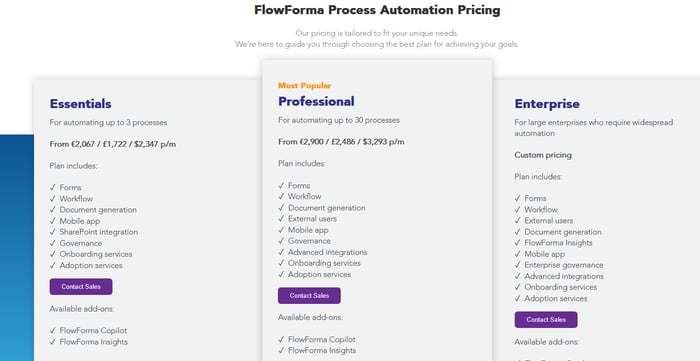
FlowForma’s process-based pricing model
As such, mid-sized organizations gain predictable budgeting and a low barrier to expansion. Large organizations avoid the steep cost increases associated with user-based or environment-based pricing models commonly found in enterprise platforms.
3. AI-powered automation
FlowForma includes several AI capabilities as part of the standard licence.
AI Copilot
Builds workflows from natural language or diagrams. Teams describe a process, and Copilot automatically generates steps, routing, and logic. As such, users can design complete workflows in minutes, reducing reliance on IT and accelerating deployment.
Pro Tip: Try the AI Playground to see how processes can be created within seconds.
Video showcasing the AI Playground
AI Agent Rule
Extracts information from documents, validates fields, and populates forms, eliminating manual data entry, reducing errors, and speeding up high-volume document processing.
Discovery Agent
Analyses organizational documentation and identifies suitable workflows for automation, helping teams prioritise high-value processes that might have otherwise been overlooked.
Summarization Agent
Provides real-time summaries of completed steps, comments, and activity logs to help reviewers understand context quickly.
Analytics
Offers dashboards and insights that highlight process performance, delays, recurring issues, and operational trends.

FlowForma has AI-powered Insights
Smart Assistants
Guide employees through submissions, approvals, and complex stages to reduce reliance on training.
AI-Powered Document and Form Features
Automate document creation, field detection, and structured data capture, improving accuracy and reducing processing time.
4. Compliance and audit trails
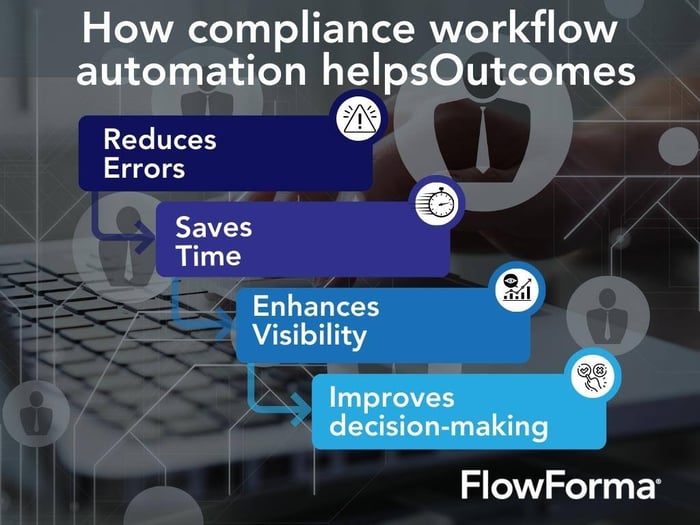
FlowForma compliance modules
FlowForma includes a built-in compliance module that supports organizations operating under GDPR, HIPAA, ISO, NHS DSPT, financial governance rules, and industry-specific requirements.
The platform is also ISO 27001 certified and supports strict regulatory requirements across highly regulated sectors such as education, healthcare, finance, and construction. Besides, every action inside a workflow is logged, and all data is securely stored in the customer’s Microsoft 365 tenancy.
5. Microsoft 365 Integrations
FlowForma is natively deployed inside Microsoft 365, allowing seamless integration with SharePoint, Teams, and Outlook. This removes the need for separate infrastructure, simplifies collaboration, and ensures that workflows align naturally with the tools employees already use every day.
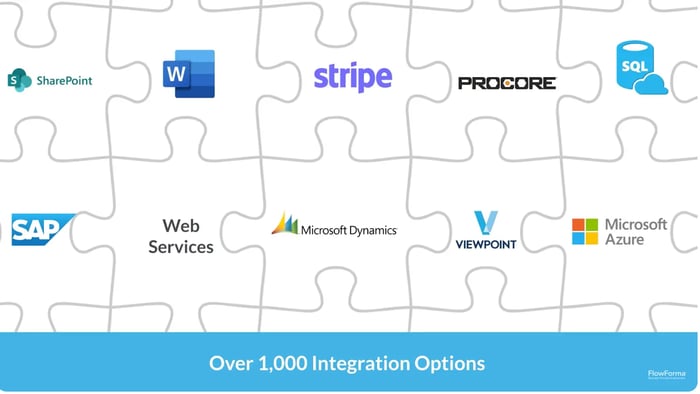
FlowForma integrations
6. Quick Deployment
A frequent pain point with Pega is the time it takes to get projects off the ground. Deployments often run for several months due to configuration complexity, environment setup, and specialist development requirements. FlowForma offers a far quicker path to automation.

Faster rollout, faster return with FlowForma
Teams can roll out digital workflows in a matter of days or weeks using no-code tools, drag-and-drop builders, and AI Copilot. Pre-set templates help departments launch critical processes without waiting for long delivery cycles.
By going live sooner, organizations benefit from earlier cost savings and increased operational agility.
Suggested Read: Pega Alternatives
Why FlowForma is the Best Pega Alternative
Pega is a good option for large enterprises that need advanced case management, analytics, and structured governance. However, its cost, complexity, and reliance on developers make it difficult for many organizations to scale.
FlowForma provides a more accessible approach to process automation, offering predictable pricing, rapid delivery, and a user-friendly no-code experience. Teams gain end-to-end workflow automation, lower ownership cost, and full control within Microsoft 365.
Want to see FlowForma in action? Book a personalized demo to see how it transforms workflow automation from day one.
FAQs
Why does PegaSystems' pricing vary so widely?
Pega’s pricing depends on the number of required environments, usage scale, interaction volume, support tier, and the development effort needed to configure business logic. This can result in significant variations even among organizations with similar automation needs.
Does Pega require specialist developers?
Most implementations in Pega rely on trained developers to configure workflows, integrations, and business logic, which increases costs and development time.
What makes FlowForma a strong alternative to Pega?
FlowForma offers predictable pricing, a no-code builder, AI-powered features, and seamless Microsoft 365 integration, enabling organizations to automate processes without heavy reliance on technical expertise.
How fast can teams build workflows in FlowForma?
FlowForma users report 10x faster time to live because business teams can automate processes without coding, testing overhead, or multi-environment promotion cycles.
Does FlowForma support complex enterprise workflows?
Yes. FlowForma can automate approvals, compliance workflows, customer service steps, internal requests, and industry-specific scenarios with audit trails, analytics, and full governance.