Nintex and Power Apps are two of the most widely adopted workflow automation platforms. Nintex is known for its enterprise-grade automation and document generation capabilities, while Power Apps is favored for its deep integration with Microsoft 365 and flexibility in-app creation.
In my experience both platforms are strong contenders for process automation, but both have their pros and cons, and their suitability to your requirements are determined by a number of factors that I'll outline in this article.
To give you a overview of which platform is best for your requirements, I'll break down the core differences between Nintex and Power Apps, including features, pricing, and user feedback.
I'll also discuss how FlowForma could be an alternative to both Nintex and Power Apps, depending on specific requirements.
Nintex: Best for enterprise scale process automation
Nintex is a workflow automation platform designed for enterprise use. It helps organizations automate structured, repeatable processes like document reviews, approvals, and compliance workflows.
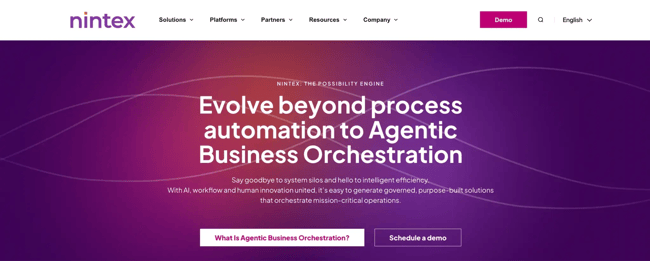 Nintex homepage
Key capabilities include workflow automation, robotic process automation (RPA), document generation, e-signatures, and analytics. The tool is commonly implemented by IT departments or centralized teams to support digital process initiatives across business units.
Although marketed as low-code, Nintex often demands a technical background, particularly when implementing complex workflows, integrating with on-premise systems, or configuring governance modules.
Most enterprise-level deployments involve IT administrators or external consultants to set up and maintain the environment.
Typical use cases for Nintex include:
- Multi-stage approvals: Automating routing of contracts, policy changes, or financial requests through conditional logic and role-based assignments.
- Audit preparation and compliance: Capturing logs, storing approval trails, and generating audit-ready documentation in regulated industries like finance or healthcare.
- HR and onboarding workflows: Managing offer letters, policy acknowledgments, and access provisioning with integrated DocGen tools.
- Cross-platform RPA workflows: Linking legacy and modern systems through bots and connectors to reduce manual handoffs.
Power Apps: Best for Application Development Within MS 365
Microsoft Power Apps is a low-code application development platform that enables organizations to build custom business apps.
It’s a part of the Microsoft Power Platform, which relies on Power Automate for workflow logic, Power BI for reporting, and Dataverse for data storage.

PowerApps homepage
Power Apps are adopted by businesses already using Microsoft 365 as they integrate with tools like Teams, SharePoint, Excel, and Outlook. With a drag-and-drop app builder and Power Fx, a formula language similar to Excel, users can design apps for desktop and mobile.
Power Apps is commonly used for:
- Custom internal apps: Building applications for leave requests, service tickets, or field inspections.
- Data collection tools: Enabling mobile staff to submit forms and reports that sync back to SharePoint or Dataverse.
- Embedded experiences: Surfacing custom apps directly within Teams or Microsoft 365 environments for smoother collaboration.
- Automation workflows (via Power Automate): Linking app submissions to backend actions like email alerts, database updates, or approvals.
There’s no denying that the tool is quite powerful. However, real-world usage often reveals the dependency on other Power Platform tools.
For example, you’d need Power Automate for logic, AI Builder for predictive inputs, and premium connectors for non-Microsoft systems if you want to use Power Apps to its fullest. Each of these adds layers to the cost and complexity, which is somewhat of a deal-breaker for many businesses.
Nintex vs Power Apps: Feature Comparison
Nintex and Power Apps both serve enterprise process automation needs, but they do so in very different ways.
Nintex is built for IT-led automation with document routing and compliance capabilities, while Power Apps is better known for building custom apps within the Microsoft ecosystem.
Here’s a side-by-side comparison of the two platforms. We have also included FlowForma in the comparison to give you another option for process automation.
|
Feature
|
Nintex
|
Power Apps
|
FlowForma
|
|
No-Code Process Builder
|
Low-code typically requires IT or technical expertise
|
Low-code with Power Fx; business users may face a learning curve
|
True no-code; business users can design and deploy complex workflows without technical support
|
|
Microsoft 365 Integration
|
Integrates with SharePoint and Teams
|
Deep integration with Teams, SharePoint, and Dataverse
|
Built specifically for Microsoft 365 and SharePoint
|
|
Document Generation
|
Available via separate DocGen module (additional cost)
|
Requires Power Automate and premium connectors
|
Built-in document generation capabilities
|
|
Workflow Execution Limits
|
Usage-based; fees increase with execution volume
|
Flow runs are metered separately, which can lead to extra charges
|
No limits or overage fees; flat per-process pricing
|
|
AI-Assisted Rule Creation
|
Not natively available
|
Available via AI Builder (sold separately, usage-capped)
|
Agentic AI built-in for contextual automation within workflows
|
|
Compliance and Audit Tools
|
Strong governance options (often sold as add-ons)
|
Basic logging, advanced compliance needs require add-ons
|
Integrated audit trails, compliance-friendly logs, and role-based access
|
Nintex vs Power Apps: Pricing Comparison
When choosing an automation platform, pricing transparency and predictability are important considerations.
Both Nintex and Power Apps offer tiered licensing structures, but each comes with its own set of complexities, hidden costs, and scaling limitations.
Let’s break them down:
PowerApps is available as part of Microsoft 365 enterprise plans (E1, E3, E5) or as a standalone license.
While the enterprise bundles may seem like the simpler route, they don’t include everything you’ll need to run automated workflows at scale.
Here are the three stand-alone licenses that Power Apps offers:
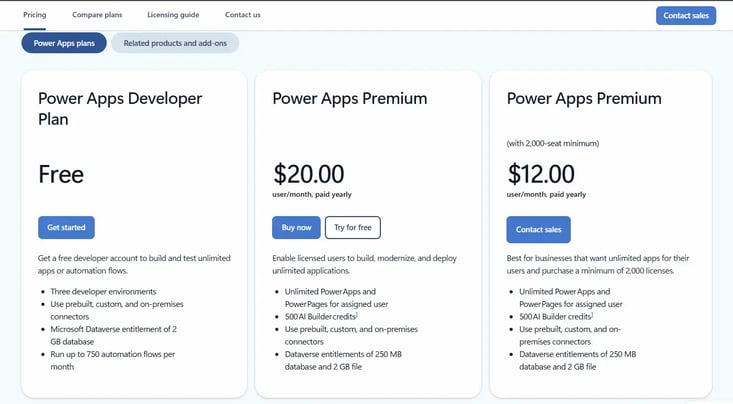 PowerApps pricing
While the base pricing appears straightforward, the real cost emerges with add-ons:
- Power Automate flows for logic are billed separately.
- Premium connectors (e.g., Salesforce, Oracle) require extra licensing.
- AI Builder credits are limited (only 500 per month).
- Azure and custom APIs often add cloud usage fees.
This fragmented model makes it hard for teams to predict monthly costs, especially as workflow usage scales. Add to that the learning curve and need for technical support, and the total cost of ownership increases significantly.
Nintex pricing
Nintex pricing is split across two core products: Nintex Automation Cloud and Nintex Process Manager.
Both are offered under consumption-based and user-based licensing models to give you the freedom to choose according to your organization’s preferences.
Nintex Automation Cloud
Nintex automation cloud has two different licensing models:
1. Consumption-based pricing
Organizations pay a base fee and are charged per workflow execution and document generation.
|
Plan
|
Annual Base Fee
|
Included Workflow Instance
|
DocGen Capacity
|
|
Pro
|
£21,175
|
10,000
|
2,000
|
|
Premium
|
£42,350
|
50,000
|
10,000
|
2. User-based pricing
A fixed annual price based on company size, with capped usage limits.
|
Company Size
|
Annual Price
|
Max Workflow Instances
|
Max DocGen Capacity
|
|
250 Employees
|
£34,000
|
38,000
|
5000
|
|
500 Employees
|
£66,000
|
75,000
|
20000
|
|
1000 Employees
|
£85,000
|
150,000
|
40,000
|
|
5000 Employees
|
£355,000
|
1,000,000
|
200,000
|
|
10,000 Employees
|
£590,000
|
2,550,000
|
400,000
|
This model offers predictability, but only if your usage fits neatly within the limits. Overage fees apply if workflows or document generation exceed the cap, and scaling up incurs steep jumps in price.
Nintex Process Manager
A separate product for process mapping and optimization, priced either by usage or employee count.
1. Consumption-based plan
|
Plan
|
Annual Base Fee
|
Included Processes
|
Overage Costs (Per Process)
|
|
Pro
|
£21,175
|
100 processes
|
£143.99 (decreases with volume)
|
|
Premium
|
£40,656
|
250 processes
|
£118.58 (decreases with volume)
|
2. User-based plan
|
Company Size
|
Annual Price
|
Max Named Users
|
Included Processes
|
|
250 Employees
|
£21,175
|
250
|
Unlimited
|
|
500 Employees
|
£40,656
|
500
|
Unlimited
|
|
1000 Employees
|
£75,856
|
1000
|
Unlimited
|
|
5000 Employees
|
£299,838
|
5000
|
Unlimited
|
|
10,000 Employees
|
£498,883
|
10,000
|
Unlimited
|
Like Power Apps, Nintex pricing quickly escalates with growth. Organizations must estimate their workflow load in advance or risk significant overage charges.
Nintex vs Power Apps: Pros and Cons From Our Experience
From speaking with our platform migration team who have real-world experience and feedback from customers of both Nintex and Power Apps, we hear the following feedback across the board.
Nintex Pros and Cons
Nintex Pros
- Advanced automation for enterprise-level processes
- Customizable workflows with granular control
- Very strong document generation capabilities
Nintex Cons
- Nintex On-Premise and Nintex Workflow for Office 365 migrations not managed well
- Requires technical knowledge or external consultants for setup
- AI roadmap is not advanced as other platforms on the market
Power Apps Pros and Cons
PowerApps Pros
- Intuitive drag-and-drop interface
- Deep integration with Microsoft 365, Dataverse, and Teams
- Custom logic via PowerFx formulas
PowerApps Cons
- Workflow automation often requires combining with Power Automate (this means more cost)
- Difficult to manage performance and costs as usage scales
- Learning curve around formula-based logic and tool ecosystem means tech skills are needed
FlowForma: Best for process automation within MS 365
Nintex and Power Apps often fall short in the areas that matter most to modern business teams, such as ease of use, pricing transparency, and migration support (especially when it comes to Nintex).
FlowForma could be a strong option for you if you are looking to stay with the Microsoft ecosystem, want a more 'hands up' customer support experience, and need an integrated workflow automation and forms solution.
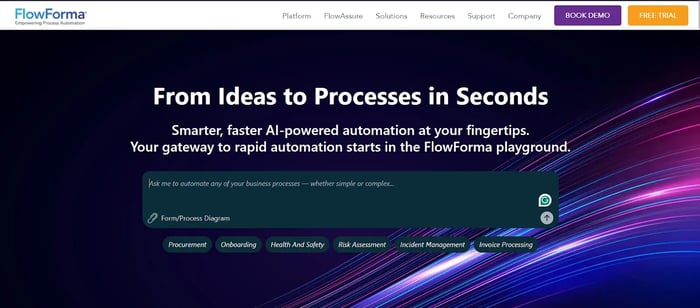
FlowForma’s homepage
FlowForma is an AI-powered business process automation platform that combines the workflow and document generation capabilities of Nintex with the seamless Microsoft integration of Power Apps.
Learn more about how FlowForma fares against Power Apps in the real world. Check out the story of Bouygues Energies & Services.
Video testimonial showing how FlowForma automates 4x faster than Power Apps
Built for business users, it adds standout features like a visual flow designer, mobile-ready forms, real-time analytics, and built-in compliance, making it a scalable, no-code solution for modern automation needs.
The review below from Will Johnson of Morley College London showcases FlowForma’s strengths in transitioning from complex platforms like Nintex and Power Apps to its simpler, no-code design.
"We needed to move beyond legacy platforms like InfoPath and Nintex. With FlowForma, we didn't just replace, we improved." Will Johnson, Head of IS, Morley College
Key features and benefits include:
1. No-code workflow design for non-technical users
FlowForma empowers no-code workflow design to serve operations, HR, compliance, and project leads to create and manage workflows independently. Its intuitive drag-and-drop builder puts process ownership directly in the hands of business users.
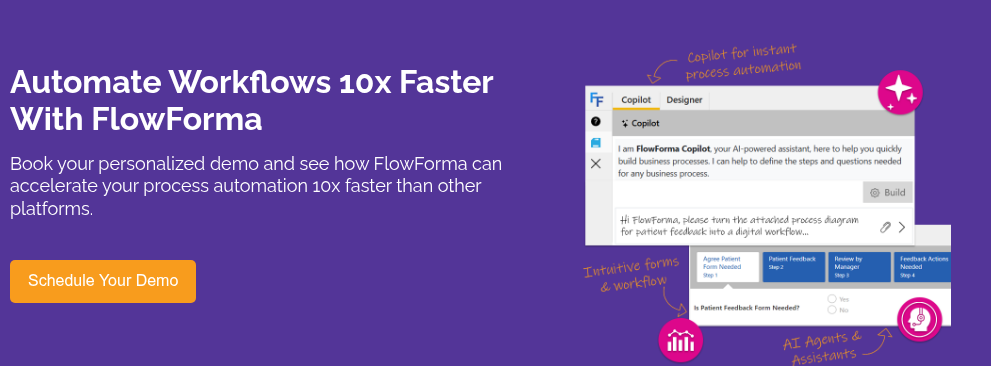
2. AI Copilot
One of the most exciting and genuinely differentiating features of FlowForma is its AI Copilot, a built-in assistant that takes the complexity out of workflow creation.
While other platforms like Power Apps and Nintex either rely on external modules or require some level of technical fluency, FlowForma takes a refreshingly intuitive route.
Its AI Copilot allows users to build process logic simply by describing what they want in everyday language. Whether it's routing a task based on department, setting conditional approvals, or triggering document generation, the AI interprets natural instructions and turns them into actionable steps in real time.
2. Agentic AI
While AI Copilot helps you build smarter workflows, FlowForma’s Agentic AI takes things a step further by actively participating in your workflows, not just building them.
Think of it as an intelligent micro-agent that can be dropped into any step of a process to resolve bottlenecks, automate repetitive decisions, or handle routine queries without human intervention. It’s not just smart, it's action-oriented.
What makes Agentic AI truly stand out is its ability to make decisions within workflows based on context. For example, if a process reaches a step where a certain approval or validation is needed, the AI can be prompted to assess the data, apply logic, and make the decision on the spot.
This kind of autonomous functionality is something you won’t find in platforms like Power Apps or Nintex, where AI is often passive or focused solely on prediction and classification.
3. Built-in document generation
FlowForma includes native document generation as part of every workflow. Whether it’s a contract, patient summary, audit form, or onboarding checklist. You can dynamically generate compliant documents populated with real-time data, without relying on external tools like DocGen or Power Automate.
4. Transparent pricing
Many automation platforms start out affordable but quickly become expensive once you add users or unlock essential features. FlowForma avoids that trap with a clear, process-based pricing model—starting at €2,067 / £1,722 / $2,347 per month, billed annually.
Every plan includes core features like no-code workflow automation, digital forms, document generation, mobile access, SharePoint integration, and governance tools.
Unlike other platforms, FlowForma Copilot and FlowForma Insights are included across all tiers, so teams get full AI and analytics capabilities from day one, without hidden fees or costly add-ons.
5. Compliance and audit tools out of the box
FlowForma comes with built-in audit trails, approval tracking, and role-based access to meet regulatory needs like General Data Protection Regulation (GDPR), Digital Operational Resilience Act (DORA), and ISO 27701, making it a reliable fit for finance, healthcare, and other compliance-heavy industries.
The compliance module offers features such as AI-powered assistants to create workflows faster, flag compliance risks, and ensure data security through a single source of truth.
6. Seamless Microsoft 365 integration
FlowForma is purpose-built for SharePoint, Microsoft Teams, and Power BI. This allows teams to automate processes, manage documents, and monitor performance directly within the Microsoft tools they already use.
Ready to move beyond complexity?
Start your 7-day free trial to see how FlowForma makes process automation faster, easier, and more scalable than ever before.