Today, the education sector is in flux. Teachers are working longer hours and feeling the pressure from parents on delivering results, budgets are tight with leaders tasked with driving operational improvement, and AI is transforming how both teachers and student engage with curriculum.
According to the OECD, teachers are working up to 50 hours per week, with more time spent on administrative duties, meetings, and communication than on actual teaching.
This mounting workload is driving talent out the door. With institutions incurring costs up to $25,000 to replace a single teacher, the need to streamline the school workflow system has never been greater.
But when worklows are automated the benefit is real and tangible, with one UK college highlighted later in this article, saving over 4,700 staff hours after automating just eight workflows.
And what about AI?
Speaking with our education customers, we see our own AI features being heavily used by their teams, which indicates that IT teams at institutions are early adopters of AI workflow automation technologies.
And according to EY, Almost twothirds (62%) of US teachers and 60% of UK teachers are using AI for work purposes in 2025, up from 25% and 30% in 2023 respectively.
In this article, I discuss how workflow automation can play a central role in addressing staff morale, student satisfaction, productibity drives, and the new era of AI in education. I'll start with the foundations of workflow automation and then delve into real-world use cases you can apply in your own institution.
What is Education Workflow Automation?
Education workflow automation refers to the use of technology to streamline and automate repetitive administrative tasks within an institution, eliminating the need for manual effort. It helps automate processes such as:
- Attendance tracking
- Student enrollment
- Timetable scheduling
- Fee collection
- Assignment grading
- Report generation
By automating these paper-based processes, the school staff can focus more on teaching and student support. Time savings by automating these processes will translate into operational improvements, cost savings and improved morale.
How Does Workflow Automation in Education Work?
The 2024 EdTech District Leadership report notes that 97% of education leaders see benefits in AI, yet only 35% have actually implemented generative AI initiatives. This gap indicates that, while the will to innovate exists, the path to execution still requires clarity.
That’s where FlowForma’s agentic AI capabilities can by help educational institutions take the first practical steps toward digitization and AI readiness.
Here’s how education AI workflow automation typically works:
1. Map and digitize processes
Start by identifying time-consuming, manual tasks such as student onboarding, leave requests, or teacher evaluations. FlowForma’s agentic AI capabilities can turn these into digital workflows, removing reliance on paper forms and scattered email threads.
It powers automation using intelligent agents that adapt, decide, and act.
This video highlights how FlowForma Copilot can build an education process in seconds with a simple text prompt or by uploading an image of a process diagram.
FlowForma Copilot
- AI Copilot: Allows users to build and update workflows using text, images, or voice prompts. For instance, an admissions team can simply upload a scanned registration form or describe their process in plain language. Copilot, powered by a large language model, will automatically generate a complete digital workflow
- AI Agents: These smart agents can understand prompts, respond in real-time, and act like built-in experts
- AI Summarization: Users can review steps quickly with context-aware summaries to boost clarity and speed up approvals
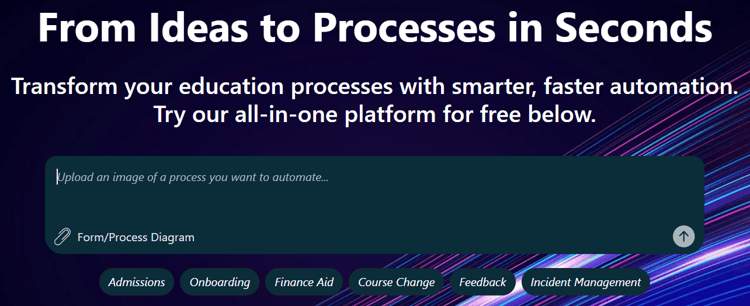 Try automating any education process in the FlowForma Playground
See how fast, intuitive, and dynamic it can be to automate processes in education by visiting the FlowForma Playground. Here, you'll see your process build out before your eyes.
2. Automate forms, approvals, and routing
Once digitized, processes can be automated to route forms and approvals to the right people. FlowForma’s no-code builder allows staff to design and manage these workflows independently, so a course enrollment request can automatically go to the registrar and then the academic advisor without delays.
3. Set logic and triggers
FlowForma supports institutions in setting business rules and triggers, like notifying faculty when a student exceeds an absence threshold or auto-approving low-risk procurement requests.
4. Integrate with existing systems
Education workflows often interact with multiple systems, including student information systems, HR tools, or learning management platforms.
FlowForma integrates seamlessly across your existing tools, especially within the Microsoft 365 ecosystem, including SharePoint, Teams, and Outlook.
As a cloud-native, no-code solution, it enables staff to build and manage workflows independently while ensuring that your data remains secure, synchronized, and accessible across platforms.
5. Improve visibility and accountability
With centralized tracking, administrators and educators can see where requests stand, identify process bottlenecks, and maintain compliance. FlowForma offers dashboards and audit trails to ensure nothing falls through the cracks.
Data is secured as FlowForma is built “on top of” Microsoft 365 / SharePoint Online, which inherits many enterprise-grade security, compliance, governance, and infrastructure protections.
In this example below, Morley College London describes the advantage of leveraging the existing MS 365 framework for workflow automation.
Morley College London describe the advantages of automating within the Microsoft 365 enviroment
6. Adapt and scale easily
As education priorities change, whether it’s scaling AI initiatives or responding to new compliance needs, FlowForma makes it easy to adapt workflows without starting from scratch.
Benefits of Workflow Automation for Education Institutions
Let’s look at how enterprise workflow automation is already driving measurable benefits across the education sector:
1. Increased operational efficiency
Automation in higher education reduces the time spent on repetitive administrative work by handling data entry, lead tracking, and student communications for you. It frees up faculty and staff to focus on teaching and student support, allowing for faster turnarounds and fewer errors.
2. Time savings and money
With education bodies under constant budgetary pressure, the time savings from automating manual processes has a significant impact for finance teams. Cost savings can be used for other operational budgets across the institution.
3. Reduced processing errors
Workflow automation reduces processing errors across the admissions, students and alumni lifecycle. This leads to an improved educational experience and reduced admin as administrators have less manual data fixes to do.
How to Start With Education Workflow Automation
Many institutions see the value of school workflow automation but don’t know where to start. With a clear plan and the right tools, you can build systems that simplify tasks, improve collaboration, and free up time.
Here’s how you can do it :
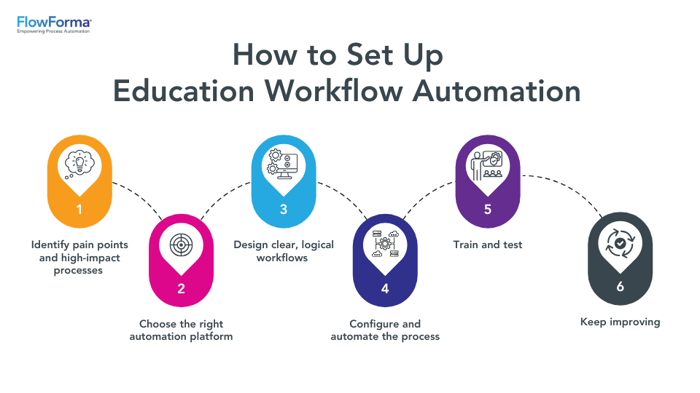 Key steps to implement workflow automation in education
1. Identify pain points and high-impact processes
Start by mapping out manual, repetitive tasks that slow things down, such as:
- Student onboarding and admissions
- Course registration and changes
- Staff leave and absence requests
- Transcript and certificate issuance
- Procurement and facility requests
Focus on processes that involve multiple approvals, paper forms, or email chains.
2. Choose the right automation platform
Select a no-code or low-code workflow tool designed for education, such as FlowForma. Look for:
- Microsoft 365 compatibility (if applicable)
- Integration with SIS, HR, and LMS systems
- Dashboard and reporting capabilities
- Role-based access and audit trails
- Agentic AI capabilities to automate decisions, summarize steps, and execute actions
Make sure the platform supports user roles, data validation, and mobile-friendly access. But, if you do choose the wrong platform, there is always a solution.
Discover how Morley College transitioned from InfoPath and Nintex to FlowForma Process Automation in this case study as a tangible example.
3. Design clear, logical workflows
Once you’ve identified what to automate, start by mapping out each step of the process using real-world examples, such as student enrollment, course registration, or staff leave requests. Ask:
- Who initiates the task? (e.g., a student submits an enrollment form, a teacher requests time off)
- Who’s responsible at each step? (e.g., advisors, department heads, HR, registrars)
- What systems are involved? (e.g., SIS, HR software, learning management system)
- Where do delays usually happen? (e.g., waiting on approvals, lost paperwork, back-and-forth emails)
Use this input to build workflows that reflect how your teams operate, not just how you think they should. Digitize any related forms, define task owners, and outline the sequence of approvals or actions. This foundation ensures your automation is realistic, efficient, and easy to adopt.
4. Configure and automate the process
Using your platform’s drag-and-drop interface:
- Digitize forms and inputs
- Define roles and approval paths
- Set business rules (e.g., auto-approve low-risk requests)
- Add notifications, reminders, and escalation rules
Ensure every step is clear and action-oriented to reduce confusion and manual follow-ups.
5. Train and test
Automation only works if your team is on board. Walk them through the changes, show them how it helps, and give them time to get comfortable. Launch new workflows gradually. Run pilot tests with the actual users, staff, faculty, or students, who will use the workflow. Use their feedback to adjust anything that doesn’t work as expected.
6. Keep improving
Don’t treat automation as a one-time setup. Track its performance over time to identify what’s working, what’s not, and where people are still reverting to manual processes. Make small, regular updates to get a long-term impact.
6 Tasks You Can Automate in the Education Sector
In real-world settings, here are the areas where automation in education can make an immediate impact:
1. Registration and admissions
Colleges and universities are rethinking how they manage admissions by replacing fragmented, manual processes with streamlined, automated workflows.
With FlowForma, institutions can digitize every step of the student journey—from application intake and document collection to review workflows, offer letters, and onboarding tasks such as ID creation or course registration.
Interactive demo of FlowForma’s AI Copilot automating student onboarding
2. Attendance tracking
Manually recording attendance takes up valuable classroom time. Automated systems let teachers track student presence with just a few clicks. This makes it easier to spot attendance trends, reduce tardiness, and free up classroom time.
3. Grading and assessments
Marking, reviewing, and approving assessments often involve collaboration between different educators and tight deadlines. With FlowForma, academic departments can automate grading approval processes, track moderation reviews, and generate student result reports, saving time and ensuring consistent evaluation standards. This frees up time for giving personalized feedback or supporting students who need extra help.
4. Course registration and academic approvals
Course registration and academic approvals often involve multiple steps, from prerequisite checks to departmental sign-off. Automating this process ensures that students get timely responses and that departments avoid scheduling conflicts or capacity issues.
Tools like FlowForm enable you to create structured, logical workflows and automate approvals.
For example, when a student submits a request to add or drop a course, the platform automatically routes the request through advisors, department heads, and registrars, with layerable logic that handles prerequisites and enrollment caps.
5. Health and compliance management
Maintaining a safe campus environment is a top priority, especially in labs, dormitories, and during student activities. Whether it’s a lab incident or campus safety report, FlowForma allows staff to submit real-time incident forms via mobile, triggering automated risk assessments and compliance workflows.
Every submission is logged, timestamped, and audit-ready, helping institutions demonstrate accountability and respond swiftly to emerging risks or regulatory inspections.
6. Travel requests, tracking, and approval
In today’s global education landscape, both students and lecturers often need to travel nationally or internationally. Automating the process of submitting, routing, and approving travel requests is vital for efficient communication, financial oversight, and overall management.
With its 24/7 mobile app, FlowForma enables students and lecturers to submit travel requests anytime, while allowing relevant stakeholders to approve, monitor, and report on travel seamlessly.
One tangible example of an educational body that automated its travel process is the Liverpool School of Tropical Medicine.
In this interview, Martyn Coleman of Liverpool School of Tropical Medicine explains how automating the institution's travel request and approval process delivered faster compliance, reduced manual workload, and improved visibility across international travel, all within FlowForma's platform.
How FlowForma Empowers Education Workflow Automation
FlowForma is an AI-powered no-code platform that allows educational institutions to digitize key workflows without relying on IT teams. The platform simplifies key tasks like auditing, attendance, grading, risk assessments, student updates and trip management through intuitive workflow automation.
Now powered by agentic AI, FlowForma doesn't just help users build workflows; it intelligently supports them throughout execution. It can suggest next steps, surface risks, flag missing information, and optimize processes in real time.
Case Study in Focus: Abingdon & Witney College Saves Over 4,700 Hours with FlowForma
Abingdon & Witney College faced major inefficiencies due to paper-based processes spread across campuses. With no unified ERP system, staff dealt with delays, lost paperwork, and fragmented workflows.
To address this, the college implemented FlowForma Process Automation to enable staff to digitize high-volume processes quickly and affordably.
The team built eight high-impact workflows using FlowForma’s no-code builder, starting with the most time-consuming tasks:
- Trips and visits approvals
- Accident and Incident Reporting
- Expense Claims
- Student Risk Assessments
In the screenshot below, you'll see an interactive map showing all the trip and visits across the world. The red dots highlight the country where the student and teachers are visiting.
They also wanted to know the type of trip, short, recurring, or overnight so the dashboard includes data sets for this.
The dashboard also contained data sets on the trip type by faculty. With the easy to use dashboard, the team could build out multiple dashboard variations depending on what information they wanted to surface. They could also control who say what information, for governance over their data.
 Planning your Trips & Visits has never been easier with FlowForma
Each process was designed with automated rules, pre-filled fields, and digital approvals to eliminate delays and errors.
Key outcomes:
- 4,702 hours saved across six processes
- Trips and Visits cut from 1 week to 1 day
- Real-time visibility with Power BI dashboards
- Better data accuracy and accountability
- Staff empowered to build and manage flows independently
What changed? Less paper. Faster decisions. Better use of staff time. FlowForma helped the college streamline operations and boost professionalism across departments.
|
"As Financial Director, reducing cost and increasing efficiencies is part of my role. By using FlowForma Process Automation, we've saved over 5,000 hours, empowering our people to work on more value-added work".
Mark Lay
Finance Director, Abington and Witney College
|
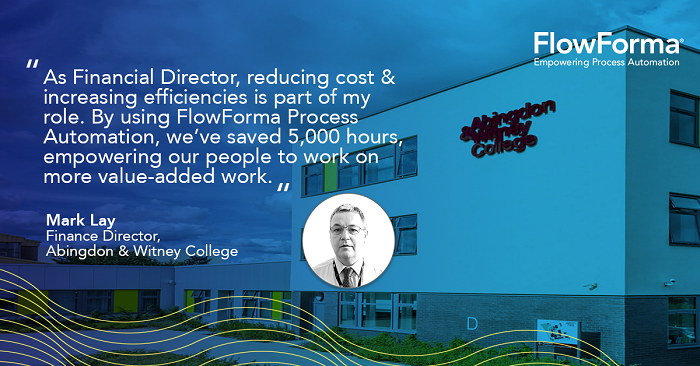 Customer feedback from Abingdon & Wintney College, which implemented workflow automation in education with FlowForma
Read the entire case study here to learn more.
Why FlowForma is the Education Workflow Automation Tool of Choice
Education workflow automation enables institutions to work smarter and free up more time for teaching, research, and student engagement. FlowForma stands out as the tool of choice for educational institutions looking to streamline operations and support long-term digital transformation. Here’s why:
-
Increases operational effectiveness: Automates paper-based processes like trips and visits, which often require multi-department approvals
-
Offers transparent pricing: Unlike traditional automation platforms that charge for every user or require expensive enterprise licenses, FlowForma offers a clear per-process pricing model, ideal for education institutions managing tight budgets. This means you only pay for the workflows you actually build and use, whether it’s for admissions, incident reporting, or staff onboarding.
-
Ensures compliance and audit readiness: Captures accurate records with full traceability, helping institutions meet governance and reporting requirements
-
Facilitates continuous business improvement: Built-in reporting tools (like Microsoft Power BI and KPIs) make it easy to track patterns, identify inefficiencies, and drive informed decision-making
-
Promotes data consistency and transparency: Standardized digital fields (e.g., dropdowns in incident reporting) ensure uniform data entry and simplify reporting
-
Enables cross-departmental collaboration: Automates information flow between departments, breaking silos and improving communication
Abingdon & Wintney College describes its journey to process automation success
Ready to reduce admin burden and accelerate digital transformation at your institution?
Start automating high-impact education workflows today with FlowForma. Book a live demo today.