Laserfiche presents itself as a comprehensive solution for document management and process automation. However, from speaking with some organizations during my day-to-day, evaluating the platform often encounter unexpected pricing challenges.
For organizations evaluating Laserfiche in 2026, transparency, scalability and predictable automation costs have become critical decision factors. This guide provides a clear, structured breakdown of Laserfiche’s pricing, its limitations and how modern alternatives like FlowForma offer a more scalable cost model.
What is Laserfiche?
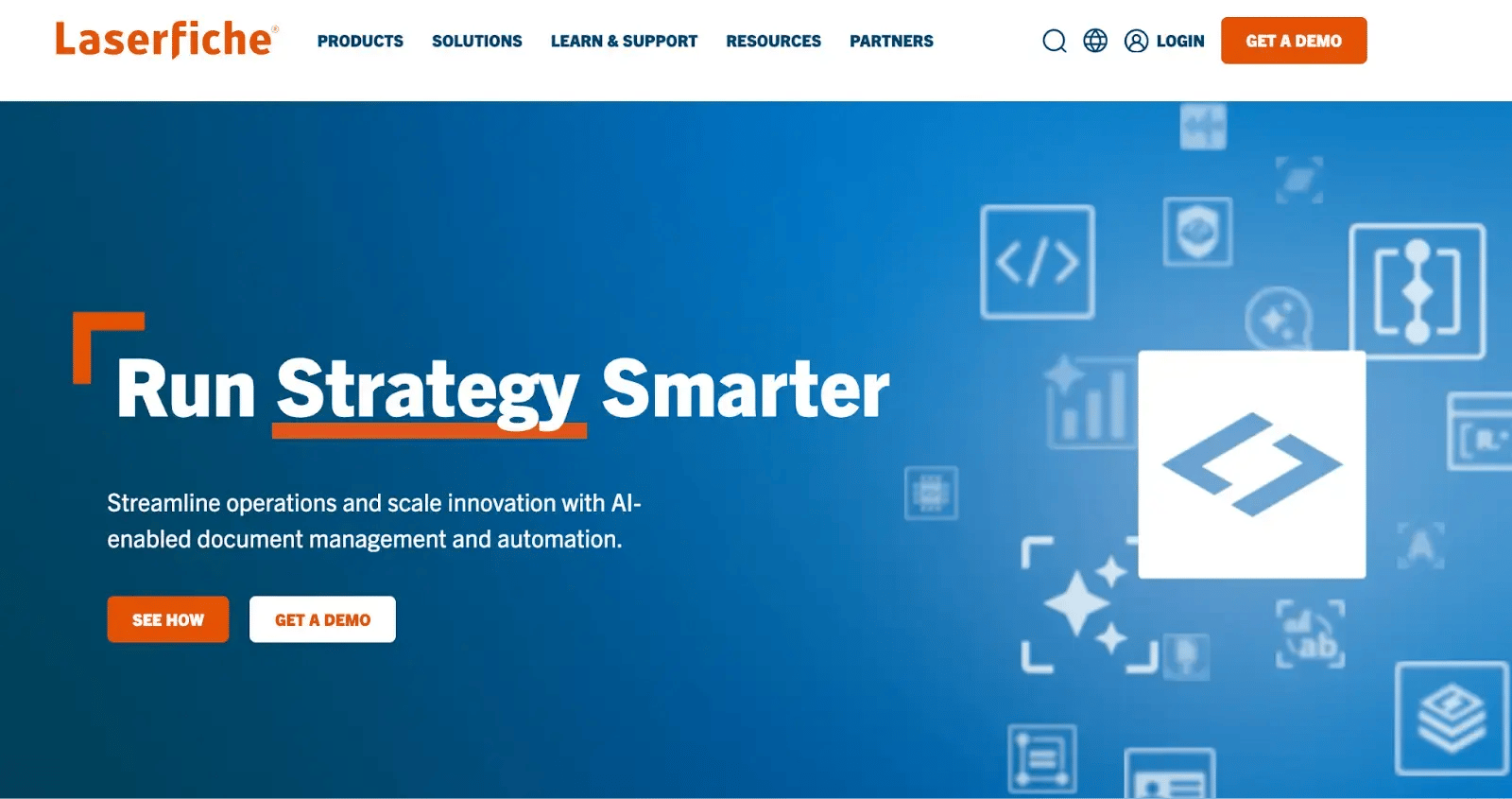
Screenshot of Laserfiche
Laserfiche is widely known for its role in document management, business and digital process automation, helping organizations manage their documents, streamline processes and reduce reliance on manual work.
The platform combines core document management functions with workflow tools, allowing users across sectors such as government, education, healthcare and financial services to digitise their information, improve compliance and strengthen operational security.
Key features and use cases of Laserfiche
Laserfiche offers a range of features designed to transform how organizations handle their documents and business process requirements.
Key features include:
1. Document management and repository
Centralised storage with version control, metadata tagging and full-text search capabilities across all file types.
2. Workflow automation and electronic forms
Visual workflow designer with conditional logic, electronic forms and automated routing for approval processes.
3. Records management and compliance
Retention scheduling, audit trails and compliance features aligned with regulatory standards including GDPR.
4. Capture and optical character recognition
Automated document capture with intelligent indexing, barcode recognition and OCR for converting scanned documents into searchable text.
Suggested reading: What is document workflow automation and how it works?
5. Cloud and on-premises deployment
Flexible hosting options including cloud, on-premises or hybrid configurations to suit organisational requirements.
6. Integration capabilities
Pre-built connectors for Microsoft 365, SQL databases, SharePoint and various line-of-business applications, plus REST API for custom integrations.
7. Mobile access and collaboration
Native mobile applications for iOS and Android enabling remote document access, approvals and annotations.
While Laserfiche’s automation capabilities are solid for document-driven scenarios, buyers with broader cross-department process needs often report that scaling workflows, maintaining citizen-led automation or adjusting complex processes requires more configuration effort than expected.
Some of Laserfiche’s top use cases include:
- Government agencies managing case files
- Educational institutions digitising student records
- Financial services teams centralising documentation
- Healthcare providers archiving compliance-critical forms
Laserfiche Pricing And Cost Breakdown (In-Depth Analysis)
Laserfiche offers a tiered pricing structure across three cloud plans (Starter, Professional and Business), with costs disclosed publicly on a per-user, per-month basis when billed annually.
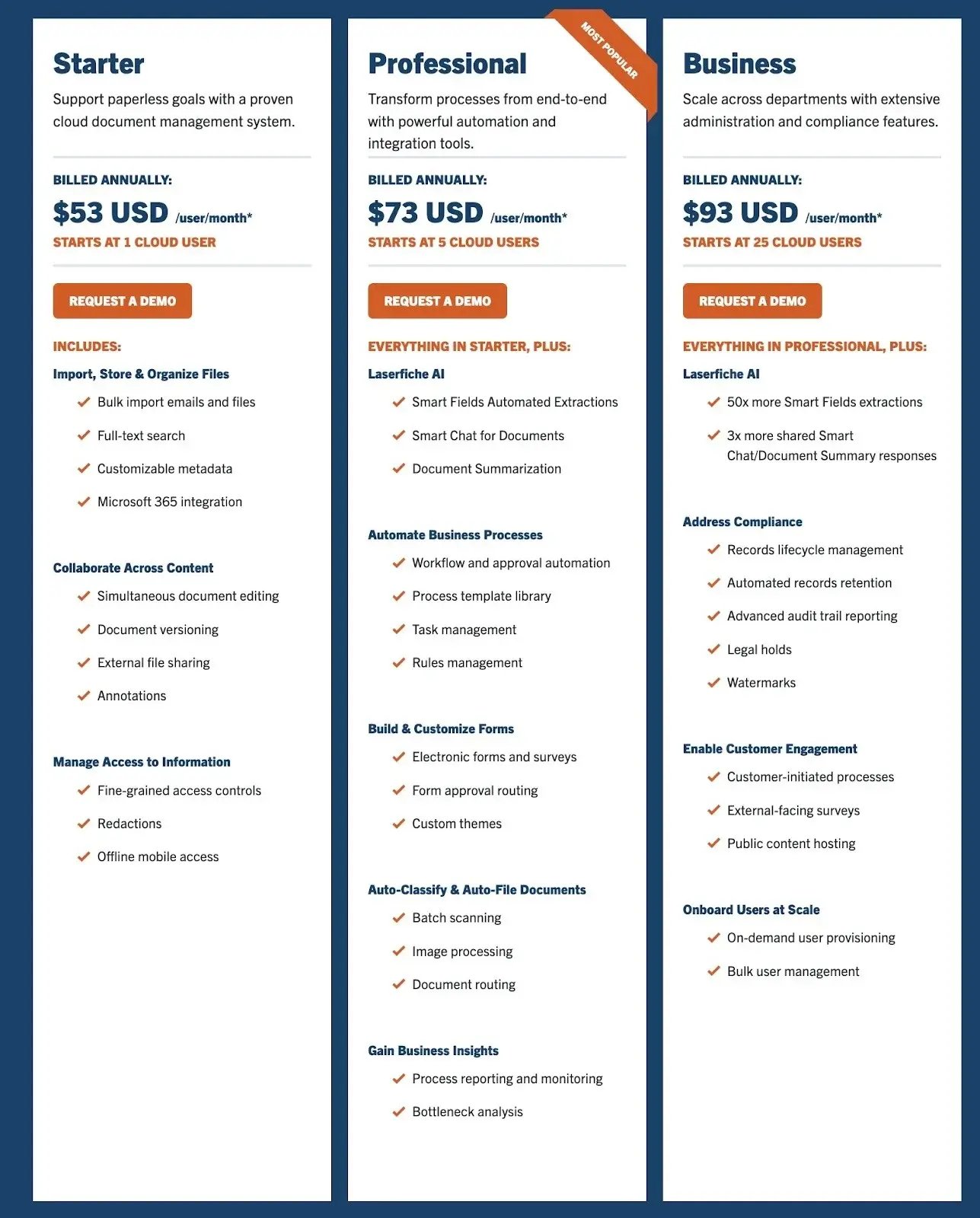
Screenshot of Laserfiche pricing
The platform also provides a self-hosted option called Laserfiche 12 for organizations preferring on-premise deployment, though pricing for this requires contact with the sales team for a custom quote.
Each plan progressively unlocks advanced business process automation capabilities, AI-powered features, compliance tools and integration options designed to scale with organizational needs.
Let's take a closer look at Laserfiche pricing details and the exact structure of each plan.
1. Laserfiche Starter pricing plan
|
Price: $53 USD/user/month (annual billing)
Suitable for: Small teams moving from paper to basic cloud document management
API limit: 50,000 calls/month
Support: Online learning, documentation and community forum
|
Starter supports a minimum of one cloud user and provides core storage, search and collaboration features. It does not include workflow automation or AI, so teams needing process automation or intelligent data extraction will outgrow it quickly.
The plan includes:
- File storage and bulk import
- Full-text search
- Metadata templates
- Microsoft 365 editing and integrations
- Versioning and annotations
- External sharing
- Detailed access controls with basic audit trails and multi-factor authentication
- Mobile offline access with advanced search and email archiving
- SOC 2 Type 2 compliance and encryption
2. Laserfiche Professional pricing plan
|
Price: $73 USD/user/month (annual billing)
Suitable for: Mid-sized teams ready for workflow automation and AI-supported document processing.
API limit: 150,000 calls/month
Support: Enhanced online resources and community access
|
Professional is Laserfiche’s most common tier. It requires five users and adds automation, AI data extraction and more advanced business process capabilities. Most organizations deploy it with project oversight to configure workflows properly.
Includes everything in Starter, plus:
- Laserfiche AI: 50,000 Smart Field extractions/year, Smart Chat (5,000 responses/year), document summarisation (5,000 responses/year), regex builder, 50 hours of transcription
- Automation: Drag-and-drop workflow builder, templates, versioning, task and rules management, scripting options, analytics
- Forms: Dynamic forms, routing, themes, CSS/JS, mobile offline submissions
- Document tools: Auto-classification, batch scanning, Smart Fields
- Integrations: SharePoint Online, Redtail CRM, Microsoft Dynamics 365, Boomi, direct database lookups
3. Laserfiche Business pricing plan
|
Price: $93 USD/user/month (annual billing)
Suitable for: Enterprises needing advanced compliance, records management and multi-department scalability.
Support: Priority support and direct access to Laserfiche’s professional services
|
Business requires 25 users and adds enterprise-grade AI limits, compliance tooling and customer-facing features. It is suited to highly regulated environments but becomes a significant investment as user counts grow.
Everything in Professional is included under the Business plan, plus:
- Expanded AI: 2.5M Smart Field extractions/year, 15,000 Smart Chat and summarisation responses, 300 hours of transcription
- Compliance and security: Automated retention, advanced audit trails, legal holds, watermarking, lifecycle actions
- External engagement: Public forms, surveys, customer-initiated processes, public content hosting
- Enterprise scale: Multiple repositories, SCIM provisioning, bulk user management
- Integrations: Salesforce, DocuSign, SDK access
- Optional: WORM-style storage via Laserfiche Vault
4. Laserfiche Self-Hosted version
|
Price: Custom quote required
Suitable for: Organizations requiring on-premise deployment, complete infrastructure control or operating in air-gapped environments.
|
Laserfiche 12 represents the newest self-hosted release, giving organizations complete control over their deployment environment, ideal for teams with strict security needs, existing on-premise infrastructure or regulatory constraints that limit cloud adoption.
Pricing isn’t publicly available and requires direct engagement with Laserfiche’s sales team to assess requirements and service options.
Key considerations for self-hosted deployment:
- Complete control over hardware, security and maintenance
- Requires internal IT resources for ongoing management and support
- System requires dedicated infrastructure and technical team members for implementation
What Do Users Say About The Platform?
Laserfiche is well-regarded across review sites such as G2, Capterra and TrustRadius, where users consistently highlight its strong integrations and adaptable framework.
Some reviewers highlight limitations with datasets and mention that the platform can feel complex at first, especially when figuring out how to split product management responsibilities.
Some users also report slower repository search performance and note that the web interface for searching and printing can feel less streamlined than expected.
Users also point out that Laserfiche’s licensing tiers and modular pricing can feel complex and restrictive, often leading to confusion about user permissions and access levels.
Some note that with dedicated internal expertise, many of these challenges could be reduced through better-designed forms and workflows.
📌Overwhelmed With Laserfiche's Implementation Complexity and Escalating User Costs?
Try a simpler solution with FlowForma.
FlowForma provides a more accessible approach to business process automation. Built natively for Microsoft SharePoint environments, it delivers transparent pricing without the per-user model that becomes expensive as teams grow.
Rather than navigating steep learning curves or managing intricate configurations, FlowForma's pricing is based on the processes you automate and the capabilities you require, enabling predictable scaling without hidden fees or demanding extensive IT resources.
Explore FlowForma's pricing.
|
Laserfiche Vs FlowForma: Pricing and Cost Comparison
When evaluating Laserfiche's pricing against alternative platforms, the per-user cost structure reveals significant challenges for growing organizations.
In contrast, FlowForma bases pricing on process volume, not headcount, while offering complete automation within Microsoft SharePoint.
Here is a detailed comparison of the pricing plans of Laserfiche vs FlowForma on annual billing:
|
Pricing tier
|
FlowForma pricing (as on 2026)
|
Laserfiche pricing (as on 2026)
|
Key differences
|
|
Essentials vs Starter
|
Starts from €2,067/£1,722/$2,347; process-based, up to 3 processes, docs, M365
|
$53/user/month (min 1 user), basic document management, no automation
|
Unlimited participants vs per-user fees
|
|
Professional vs Professional
|
Starts from €2,900/£2,486/$3,293; up to 30 processes, external users, governance, onboarding
|
$73/user/month (min 5 users), AI features, workflow automation, forms
|
Fixed cost vs escalating commitments
|
|
Enterprise vs Business
|
Custom, by process volume, Insights, governance, docs, M365, onboarding, optional AI
|
$93/user/month (min 25 users), advanced compliance, records management
|
Process-driven vs headcount-driven costs
|
|
Free Trial vs Demo
|
7-day full trial, AI, docs, approvals, external participants, SharePoint
|
Demo requires sales contact
|
Immediate access vs gated evaluation
|
|
AI plans
|
Flat add-on, no usage fees
|
Tiered limits on extractions and responses
|
Predictable cost vs consumption limits
|
1. FlowForma Essentials vs Laserfiche Starter
FlowForma Essentials: €2,067 / £1,722 / $2,347 per month
Laserfiche Starter: $53 per user per month (minimum 1 user)
FlowForma Essentials supports up to three processes with workflow design, forms, document generation, mobile access, governance, onboarding support and Microsoft 365 integration. Pricing remains fixed regardless of how many team members participate.
Laserfiche Starter charges $53 per user monthly, increasing with each new team member. It provides document storage, search, collaboration and security features but excludes workflow automation, electronic forms and AI capabilities entirely. Process automation requires upgrading to Professional.
For teams needing automation alongside document management, Essentials delivers integrated functionality without splitting capabilities across pricing tiers.
2. FlowForma Professional vs Laserfiche Professional
FlowForma Professional: €2,900 / £2,486 / $3,293 per month
Laserfiche Professional: $73 per user per month (minimum 5 users = $4,380/month)
FlowForma Professional handles up to 30 processes and adds external participation, advanced integrations, deeper governance and full adoption services. Costs stay predictable as different departments adopt the platform.
Laserfiche Professional introduces workflow automation, AI features (Smart Fields, Smart Chat, document summarisation), electronic forms and templates. It requires a minimum 5 users ($4,380 monthly baseline) with costs increasing per additional user. The tier includes 50,000 annual AI extractions, organizations exceeding this face constraints or must upgrade.
For multi-department implementations with external collaborators, FlowForma Professional provides comprehensive capabilities without fluctuating costs or minimum user requirements.
3. FlowForma Enterprise vs Laserfiche Business
Both use custom pricing but scale differently. FlowForma prices by process volume, providing clearer cost trajectories as automation expands.
FlowForma Enterprise includes: workflow and form design, document generation, external users, FlowForma Insights, enterprise governance, advanced integrations, mobile access, full adoption services and optional AI add-ons. All functionality operates within Microsoft 365 infrastructure.
Laserfiche Business ($93 per user monthly, 25-user minimum = $27,900 monthly baseline) adds advanced compliance features including records lifecycle management, legal holds, enhanced AI capacity (2.5 million annual extractions) and customer-facing processes.
The user-dependent model with substantial minimum commitments creates significant cost increases as adoption broadens.
For enterprises requiring consistent governance and Microsoft 365 alignment, FlowForma Enterprise offers greater cost predictability than Laserfiche Business.
4. FlowForma Free Trial vs Laserfiche Demo
FlowForma Free Trial: 7 days
Laserfiche: Demo requires sales contact
FlowForma provides immediate platform access without vendor engagement. Users can build processes using AI Copilot, test approvals, generate documents, include external participants and assess governance capabilities. Full feature access ensures accurate evaluation before commitment.
Laserfiche requires sales engagement for demos and pricing information.
Whilst enabling customised presentations, this creates evaluation friction for organizations seeking rapid assessment.
Teams valuing swift evaluation and transparent pricing benefit from FlowForma's self-service approach.
5. FlowForma vs Laserfiche: AI pricing plans
Both platforms offer AI features with different pricing models. FlowForma provides AI as an optional flat add-on across all plans (Essentials, Professional, Enterprise).
Such pricing enables organization-wide AI deployment without transaction volume concerns.
Laserfiche includes AI across Professional and Business tiers with consumption limits. Professional provides 50,000 Smart Fields extractions and 5,000 Smart Chat responses annually, whilst Business increases these to 2.5 million extractions and 15,000 responses. Exceeding these allocations requires upgrades, introducing unpredictable costs.
For organizations prioritising cost stability and comprehensive AI adoption, FlowForma delivers superior predictability. Laserfiche suits consistent usage patterns but allocation limits become restrictive as adoption expands.
Here’s How FlowForma Wins Over Laserfiche With Added Scalability, Minus The Complexity
Whilst Laserfiche offers comprehensive document management at escalating per-user costs, FlowForma delivers end-to-end process automation with predictable, process-based pricing.
|
Feature/Criteria
|
Laserfiche
|
FlowForma
|
|
Pricing Model
|
Per-user pricing; costs increase with team growth; minimum user commitments required
|
Process-based pricing with unlimited users; no hidden upgrades or per-user fees
|
|
Workflow Volume
|
Workflow automation only available from Professional tier onwards
|
Unlimited workflows under a single licence; cost remains predictable
|
|
AI Capabilities
|
Tiered AI limits based on plan; consumption-based extractions and responses
|
Full AI suite included for all customers (AI Copilot, AI Agent Rule, AI Summaries, Smart Assistants)
|
|
Document Generation
|
Built-in document management and capture; limited generation capabilities
|
Native document generation for contracts, PDFs, onboarding documents, reports
|
|
Governance & Compliance
|
Advanced compliance features only in Business tier (records management, legal holds)
|
Governance dashboards, audit trails, data stored in customer's SharePoint tenancy across all plans
|
|
Microsoft 365 Integration
|
Integrates via connectors; separate system requiring API connections
|
Native to SharePoint and Teams, uses Microsoft authentication
|
|
Ease of Adoption for Non-Technical Users
|
Steep learning curve noted by users; requires dedicated IT resources
|
No-code, designed for business users; customers build flows 10x faster than traditional tools
|
|
Cross-Department Scalability
|
Per-user pricing creates cost barriers as departments adopt platform
|
Consistent workflow structure across all departments, no rebuilding needed
|
|
Data Storage and Security
|
Cloud-hosted on Laserfiche infrastructure or self-hosted deployment required
|
Data resides fully within your Microsoft 365 tenancy, giving IT more control
|
|
External Stakeholder Participation
|
Available only in Business tier with customer-initiated processes
|
FlowForma Engage allows secure participation from suppliers, contractors or clients
|
|
Reporting & Insights
|
Process reporting available from Professional tier; advanced analytics in Business
|
DIY reporting, dashboards and standardised data collection across all plans
|
|
Support Model
|
Support varies by tier; implementation fees apply separately
|
High-touch support with process expertise included
|
FlowForma vs Laserfiche comparison
Here are six reasons why FlowForma stands out over Laserfiche:
1. Predictable cost structure for enterprise adoption
Laserfiche's per-user model creates unpredictable costs as teams grow. The Professional tier requires a minimum of five users ($4,380/month baseline), while the Business tier requires 25 users ($27,900/month baseline). Each additional user increases monthly spend, making wider adoption difficult.
FlowForma removes this complexity with transparent, process-based pricing and provides transparent pricing based on processes, not headcount. Teams can involve unlimited participants without additional licence fees, making budget planning straightforward and protecting against cost escalation as automation scales.
Beyond transparent pricing, FlowForma includes every feature in a single licence:
- AI, documents, governance
- Mobile access, external participation, dashboards
- No tier-based limitations or hidden costs
2. Native alignment with Microsoft 365
FlowForma integrates seamlessly with SharePoint, using Microsoft authentication and connecting directly to Teams and the wider Microsoft 365 ecosystem. All workflow data stays within familiar infrastructure, cutting security risks and eliminating external connectors.
The native integration also connects to 1,000+ third-party applications and systems through APIs and connectors.
3. True no-code for seamless business process automation
FlowForma's no-code interface eliminates IT-heavy configurations. Business users, department heads and process owners can build processes 10x faster compared to traditional tools.
The consistent workflow structure (steps, questions, rules) scales across departments—once users learn one workflow, they can build others with minimal training.
4. Enterprise-grade AI for instant workflow creation
FlowForma's range of AI innovations builds workflows and drives automation strategy with intelligent assistance:
- AI Copilot to build workflows from natural language or uploaded diagrams
- AI Agent Rule for intelligent data extraction and validation
- AI Summaries for quick context across workflows
- Discovery Agent analyzes existing documentation and conversations to identify automation opportunities
- Smart Assistants to guide builders and end users
In short, FlowForma’s comprehensive AI toolkit operates without usage restrictions or consumption-based pricing.
5. Intuitive and in-built document generation and digital form creation
FlowForma generates documents natively without third-party tools. Teams can create contracts, onboarding packages, audit-ready reports and structured PDFs directly within workflows.
By eliminating the need for separate document tools, it streamlines processes and lowers software costs.
6. Compliance and governance without tier barriers
FlowForma embeds governance and regulatory controls directly into every automated process across all pricing tiers. Detailed tracking, role-based access controls and built-in compliance safeguards help businesses in finance, healthcare and legal services meet regulatory obligations without tier-based restrictions.
All data resides within the customer's SharePoint tenancy, providing IT complete control.
Overall, FlowForma enables organizations with a cost-effective path to digital transformation. Switch to enterprise-grade scalability without any added complexities.
Try FlowForma today for free with a 7-day free trial (no credit card details required).
Want to see FlowForma in action? Book a personalised demo to see how it transforms workflow automation from day one.