In an era where agility and efficiency define success, organizations that rely on manual processes risk falling behind. Errors, delays, and inefficiencies in traditional workflows can lead to frustrated employees and dissatisfied customers.
Workflow automation steps in to bridge this gap, offering businesses a powerful way to streamline operations, maintain accuracy, and ensure compliance with industry standards.
Workflow automation eliminates the need for manual intervention in routine tasks. It empowers organizations to digitize processes, such as onboarding, contracts, procurement, and incident management, ensuring they capture accurate data, run more efficiently, and empower better decision-making and accuracy.
By leveraging automation, teams can focus on strategic goals and meaningful work instead of being tied up with administrative bottlenecks, poor experiences, and bad data.
From small teams to global enterprises, workflow automation is transforming how work gets done. By improving productivity, reducing human error, and ensuring compliance, automation has become an indispensable tool for businesses aiming to adapt to today’s fast-paced environment.
Layer AI on top to make process automation and deployment faster, or support process execution and decision-making with AI Agents; you're powering substantial efficiencies.
What is Workflow Automation?
Workflow automation is all about using technology to handle manual, repetitive tasks, route information, and manage data according to set rules.
Instead of manually ticking off every step in a process, automation steps in to do the heavy lifting. This means tasks get done faster, more accurately, and without constant human intervention, leaving your team free to focus on more strategic and creative work.
Think about it like this: instead of chasing approvals or updating spreadsheets, automation ensures everything flows seamlessly.
For example, when onboarding a new employee, automation can handle creating their profile, sending welcome emails, and scheduling training sessions. It's not just about saving time, it's about making sure no step is missed and everyone’s on the same page with real-time process visibility.
Some of the most common applications of workflow automation include:
- Automating tasks like approvals and notifications
- Streamlining processes for better efficiency
- Ensuring accuracy and consistency in workflows
- Maintaining compliance with industry regulations and standards
Examples of Workflow Automation
Workflow automation is incredibly versatile, finding applications in various domains and industries. Here are a few key examples that highlight its potential:
1. Employee onboarding
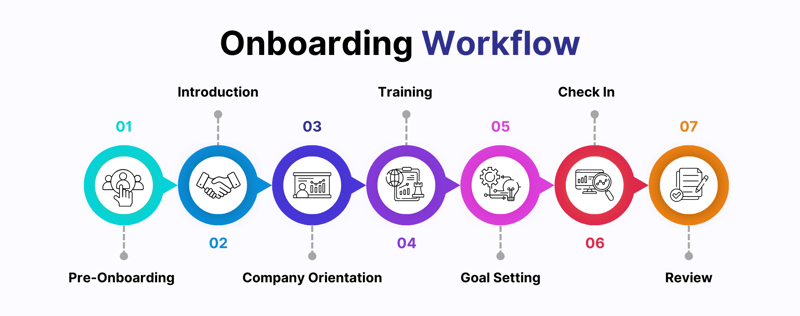 A typical onboarding workflow for a sales and marketing department
Automation simplifies the often-complicated onboarding process. It can handle everything from generating offer letters and setting up IT accounts to scheduling training sessions and managing compliance documentation. This ensures new employees have a smooth, consistent experience while saving HR teams and managers countless hours.
2. Expense approvals
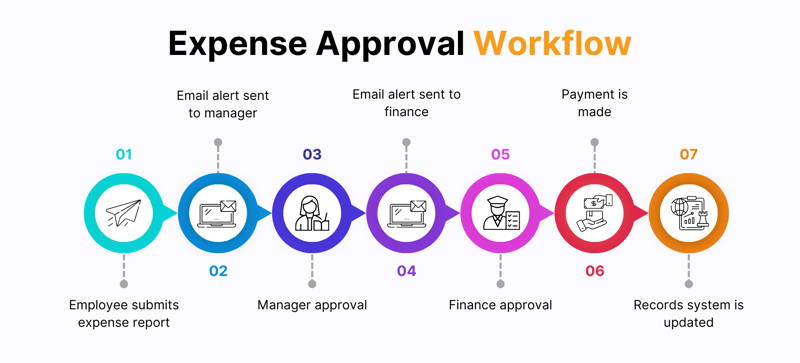
A simple expense approval workflow for typical organizations
Manually processing expense reports can be time-consuming and prone to error. Automation speeds up this process by routing requests to the appropriate managers for approval, notifying stakeholders of pending actions, and ensuring reimbursements are processed promptly. It keeps the workflow transparent and eliminates delays caused by bottlenecks.
3. Service requests
For IT or customer support teams, automation can turn incoming emails or form submissions into actionable tickets. These tickets are automatically categorized, assigned to the right personnel, and tracked until resolution. This streamlined process enhances response times and boosts customer satisfaction.
4. Healthcare Automation
Healthcare automation transforms processes within hospitals, improving efficiency and patient care.
For example:
- Patient Onboarding: Automates data collection, insurance verification, and scheduling to reduce wait times and administrative work.
- Claims Processing: Ensures accurate claims submissions and faster reimbursements by eliminating manual errors.
- Compliance Management: Tracks documentation and processes to adhere to industry standards like HIPAA, GDPR, etc.
These workflows not only enhance accuracy and reduce costs but also allow healthcare professionals to focus on delivering quality patient care rather than administrative burdens.
These examples show how workflow automation not only saves time but also improves accuracy, consistency, and scalability across different business functions. From streamlining internal operations to enhancing customer-facing processes, the possibilities are endless.
Key Benefits of Workflow Automation
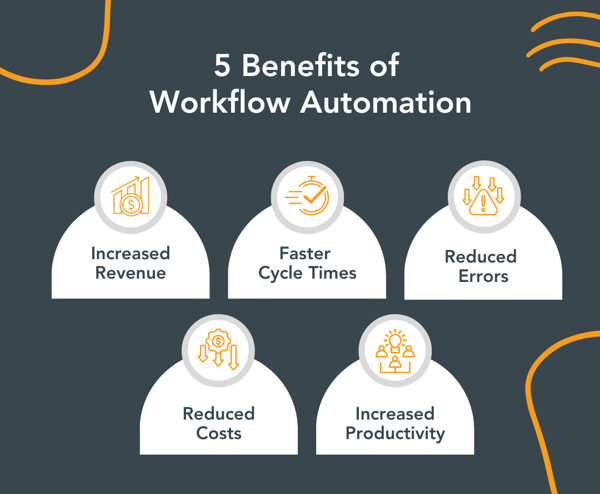
If done right, automation can address a lot of common issues a business faces
The advantages of implementing workflow automation are extensive, making it a valuable tool for businesses of all sizes:
- Improved productivity: Automation allows employees to spend less time on mundane, repetitive tasks and focus more on strategic, high-value activities that drive growth
- Cost savings: By automating manual processes, businesses can cut down on labor costs, reduce paperwork, and eliminate inefficiencies, resulting in significant savings over time
- Enhanced accuracy: Automated workflows minimize human errors in data entry and processing, ensuring that information is consistent, reliable, and error-free
- Better collaboration: Workflow automation streamlines communication by providing real-time updates, ensuring that all stakeholders are informed and approvals are handled seamlessly
- Scalability: As businesses grow, automated workflows can easily adapt to increasing demands without the need for additional resources, making them a scalable solution for long-term success
- Compliance: Automation enforces adherence to industry standards, such as SOX or DORA in finance, by maintaining audit trails, standardizing processes, and reducing the risk of compliance violations
Listen to AcruxKC as they share the advantages of workflow automation with FlowForma Process Automation.
How to Automate Your Workflows
Implementing workflow automation might sound like a big project, but with the right approach and tools like FlowForma Process Automation, it’s surprisingly straightforward. Here's how you can start:
1. Identify workflows for automation
Begin by analyzing your current processes to identify tasks that are repetitive, rule-based, and prone to delays or errors. Examples include incident management, expense approvals, or contracts management. FlowForma Process Automation provides templates for common workflows, making it easier to spot areas where automation can deliver the most immediate value.
2. Map out the process
Clearly outline each step of the workflow, including tasks, decision points, and required approvals. Visualizing the process helps you spot inefficiencies and ensures that every step is accounted for. FlowForma’s drag-and-drop process builder allows you to design workflows intuitively, so even non-technical users can map out complex processes effortlessly.
Useful tip: If you have a visual of your process or document detailing the processes, you can upload those materials into tools like the FlowForma Copilot process builder and watch it map out your process in minutes.
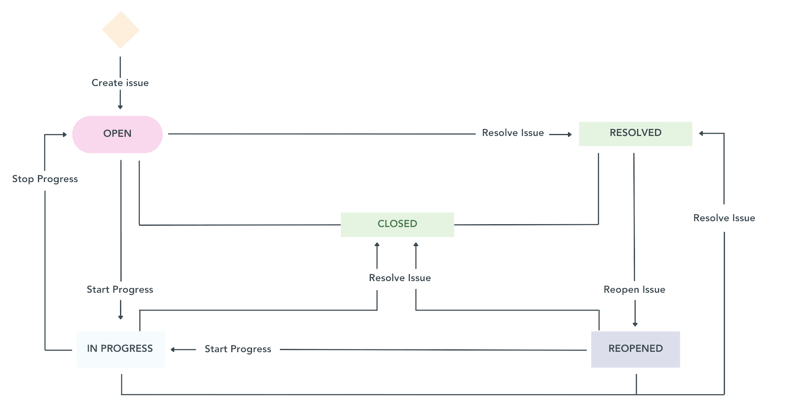 Often, just mapping out a process can help you identify many inefficiencies and simplify things.
3. Use a no-code platform
Five years ago, the only way forward would have been to get a developer or an IT resource involved. That approach needed a lot of iterations and back and forth before perfection. Things are so much better now with no-code, AI-native platforms.
You can opt for a no code, AI-powerered solution like FlowForma Process Automation to set up and manage your workflows without needing extensive IT support. Its user-friendly interface and AI-powered Copilot provide intelligent suggestions for workflow configuration, enabling you to automate processes quickly and with minimal effort. For instance, you can configure conditional approvals or automated notifications with just a few clicks.
4. Integrate with existing systems
Connect your workflow automation platform with the tools you already use, such as CRM, ERP, or HR software. FlowForma’s seamless integration capabilities with MS Teams and other tools ensure that data flows smoothly between systems, eliminating silos and creating a unified operational environment.
5. Test and optimize
Run a pilot phase to test your workflow in a controlled environment, gathering feedback from users. Identify any bottlenecks or areas needing improvement. With FlowForma, you can make real-time adjustments to refine the process, leveraging analytics and performance insights to optimize workflows further.
6. Scale and monitor
Once you’ve perfected your workflow, roll it out across the organization. FlowForma’s scalability ensures that as your business grows, your workflows can adapt without requiring additional resources. Its reporting tools provide actionable insights, helping you continuously monitor real-time performance and identify areas for improvement.
Workflow Automation vs. Robotic Process Automation
While both workflow automation and robotic process automation (RPA) focus on increasing efficiency, they address different needs within an organization.
Workflow automation
Workflow Automation manages entire processes that involve multiple stakeholders, integrating tasks across various departments or systems. It’s designed to streamline operations like employee onboarding, project approvals, and procurement workflows.
Platforms like FlowForma go beyond automating tasks by providing a structured, end-to-end solution for managing and optimizing complex workflows, all without the need for coding.
Robotic process automation
RPA, on the other hand, focuses on automating individual, repetitive tasks that don’t require much decision-making. Examples include extracting data from invoices, filling out forms, or transferring data between systems. While effective for specific tasks, RPA doesn’t connect these tasks into a cohesive process.
What is Workflow Automation Software?
In the simplest terms, workflow automation software, like FlowForma's, empowers businesses to create, execute, and manage workflows efficiently. Since no two organizations are the same, any workflow automation tool would need more than just automation capabilities.
Customizations, adaptability, and easy-to-understand GUIs set apart modern workflow automation tools disrupting the market today with AI features and functionality.
Some of the key features include:
- Drag-and-drop workflow builders
- AI-powered workflow creation
- Integration with other business tools
- Advanced analytics for performance tracking
- AI-powered capabilities to improve execution speed and decision-making
What to Look for in Workflow Automation Software
Selecting the right workflow automation software can significantly impact your organization's efficiency and scalability.
Our recent webinar, AI and Digital Process Automation in 2026, an IT Leaders Briefing, discussed the key features and functionality to look for in a process automation platform, along with the benefits of choosing an automation platform that aligns well with your existing technology stack. Watch the presentation in the webinar recording below:
AI and Digital Process Automation in 2026, an IT Leaders Briefing
Here’s what you should consider to make the best choice:
1. Ease of use
Opt for a platform that empowers your team, regardless of technical expertise. A no-code or low-code solution like FlowForma ensures that even non-technical users can easily design, implement, and manage workflows. Look for intuitive interfaces, drag-and-drop functionality, and AI-powered guidance to map processes, build workflows, and support execution and delivery.
2. Integration capabilities
The software should seamlessly integrate with your existing systems, such as CRMs, ERPs, or HR management tools. FlowForma excels here by offering pre-built integrations and APIs, enabling your workflows to connect with thousands of systems. This ensures data flows smoothly across platforms, creating a unified and efficient ecosystem.
3. Scalability
As your business grows, so will the quantity of your processes and the level of workflow complexity. Choose a platform that can adapt to increased demands without compromising performance. FlowForma’s scalable architecture supports everything from small teams to enterprise-level operations, allowing you to scale at speed.
4. Support and training
A reliable automation platform should come with robust customer support and training resources. FlowForma provides comprehensive onboarding, tutorials, and ongoing assistance to ensure users maximize their platform’s potential. Additionally, its AI-driven Copilot offers real-time guidance, reducing the learning curve and ensuring users can troubleshoot issues independently.
5. AI innovation
Modern workflow automation tools should incorporate AI-powered capabilities to optimize processes. Features like intelligent task routing, predictive insights, and real-time suggestions streamline workflows and help organizations make data-driven decisions.
FlowForma’s AI-driven tools, including its Copilot feature, provide invaluable assistance, enhancing productivity and reducing errors.
In this interactive demo, you'll see Copilot build a commercial insurance renewal workflow in minutes. Check it out to explore the future of AI in workflow automation.
6. Alignment with your existing technology stack
An important consideration for the organizations I speak with is the alignment of new apps and tools with their existing tech stack; for example, if you are a Microsoft house and want seamless integration with Microsoft Teams, SharePoint Online, Azure, etc., onboarding a tool that is aligned with Microsoft is an advantageous decision.
Many IT leaders love the fact that with FlowForma Process Automation, all their data stays within their Microsoft tenancy, plus many other benefits.
Unlock the Full Potential of Your Business with Workflow Automation
Workflow automation isn’t just a buzzword; it’s a transformative approach that redefines how businesses operate. By automating repetitive tasks, streamlining processes, and improving accuracy, organizations can unlock efficiency, reduce costs, and create a more productive work environment.
Whether you're looking to enhance collaboration, scale your operations, or simply free up time for strategic initiatives, the right automation tool can make all the difference.
Platforms like FlowForma provide the flexibility, scalability, and ease of use required to meet the demands of modern businesses, empowering teams to rapidly design and optimize workflows that drive real results.
Ready to take the next step? Explore how workflow automation can transform your operations. Book a demo or start a free trial today and experience the FlowForma difference.