Everywhere I turn these days, whether watching the news, listening to the radio or a podcast there is
headline about a new AI-powered platform that will transform the future of workflow automation.
AI has accelerated the pace of product development leading to a plethora of AI-powered workflow automation platforms for organizations to choose from. This makes it difficult for IT leaders to determine which platform is best for them.
But among the AI hype, the fundamentals of workflow automation, document management and collaboration remain the cornerstone of workflow automation, and I would even argue that today, they are even more important than ever.
In this article, I will discuss why SharePoint still matters in the AI era, the evolution and future of SharePoint workflow automation, and provide a roadmap to accelerate your own workflow automation journey. Let’s get started.
Why SharePoint Workflow Automation Still Matters
As I mentioned earlier, the volume of new workflow automation platforms brought to market has accelerated with the advent of AI. But, throughout this technology revolution, the same key requirements for organizations remain: robust documentation and communications.
This is the arena where SharePoint excels and is one of the key reasons why SharePoint still matters and continues to support projects from simple workflows to complex company workflows involving cross-departmental stakeholders.
Organizations that are embedded within the Microsoft ecosystem typically use SharePoint to store important documents such as contracts or purchase orders.
For organizations already in this situation who are looking to bring in a workflow automation platform, it makes sense to leverage its existing document repository within SharePoint.
Why? There will be less development time, reduces the risk of broken audit trails, and in a security-conscious world, this is also a natural choice for organizations that want M365 security boundaries.
Collaboration is also a key reason why organizations use SharePoint for automation rather than siloed platforms.
SharePoint is designed for co-authoring so that documents can be read, edited and approved in real-time by multiple people in an organization.
With the additional layer of version history, documents become collaborative, saving time, improving efficiency and creating detailed audit trails.
The Evolution: SharePoint Designer, Nintex, Power Automate, What's Next?
Let’s go back in time and see how the options for SharePoint workflow automation have evolved with new tools to solve the workflow challenges of the day.
SharePoint Designer 2013
When workflow automation was first brought to SharePoint, SharePoint Designer was the tool that organizations used. Completely free, it was designed for approvals, notifications, and simple routing.
But, although it was designed for simple workflows, it was difficult to use for non-technical users. Microsoft never released a newer version of SharePoint Designer 2013 and support is scheduled to end on Jul 14, 2026.
Nintex And K2: The Enterprise Answer
Platforms such as Nintex and K2 (now owned by Nintex) were introduced to handle genuinely complex enterprise scenarios.
While both are robust platforms that work well specifically for document-heavy organizations, there are some trade-offs around pricing and migrations.
With Nintex, the true cost of ownership can start to scale due to their partner structure. The licence fee plus the specialist to build it and the partner to maintain it can quickly add up.
The other area worth considering is the retirement of legacy SharePoint workflows and how platforms such as Nintex are handling migrations. Feedback from the market is that customers feel stranded and there is not a huge amount of support provided to make migrations seamless.
Power Automate: Microsoft's Modern Platform, And Its Centre Of Gravity
Power Automate is another option that is widely used by thousands of Microsoft-centric organizations globally.
It has a huge connector library and is ideally suited for organizations that already work within the Microsoft ecosystem.
Power Automate is essentially a workflow engine with conditional logic, multi-stage human approvals, branching, and document generation. But it needs to be combined with Power Apps, for form capability, to provide a full process automation capability.
Power Automate is a powerful platform and can tangle complex workflow scenarios, but one of the drawbacks is that it’s a low-code platform rather than a no-code platform.
This means that organizations using the platform will need a team or teams of developers for enterprise automation projects.
It’s less suited to citizen development and more suited to organizations who have the capacity and budget for development teams.
The "What's Next" And Why The Gap Keeps Reopening
Throughout each product evolution solutions are solved but areas of improvement are also surfaced.
- SharePoint Designer 2013 was free, but it was too technical and is now end-of-life.
- Nintex/K2 are powerful, but costs can scale with the partner support model and does not excel at migration support.
- Power Automate is a robust platform for workflow automation but may not suit organizations looking for workflow automation for non-technical users.
Today organizations are looking for another road to take with empowering citizen developers to build workflows, a supported migration path and transparent pricing.
Types Of Workflows to Automate in SharePoint
The list of possibilities is endless when it comes to workflow automation in SharePoint. Some of the key workflows we see automated are across finance, HR, operations, and health and safety.
|
Department
|
Workflows to automate
|
|
Finance
|
PO approvals, invoice processing, expense claims, budget sign-off, audit evidence
|
|
HR
|
Onboarding/offboarding, leave and absence, performance reviews, policy acknowledgement, grievance cases
|
|
Operations
|
Supplier onboarding, contract lifecycle, facilities requests, quality and inspection checklists
|
|
Health & safety
|
Incident and near-miss reports, hazard reporting, risk assessments, safety inspections, corrective-action tracking
|
I’ll provide some real-world examples of how some of our customers at FlowForma have automated these workflows below:
Finance Workflow Automation With ARBS
Workflow automation is ideally suited to finance processes such as purchase orders, expenses and budgeting.
One notable case study in this area is with Aberdeen Radiation Protection Services (ARPS).
Based in Scotland, ARPS provides radiation protection services including contamination meters and leak test equipment to measure radioactive by-products on rigs.
ARBS were struggling with managing purchase order requests on spreadsheets. The team were looking for a SharePoint native platform that would help them automate its finance and other workflows to improve business efficiency in line with its business growth.
Automating it’s purchase order workflow, ARBS were able to centralize it’s data within SharePoint so that all customer information was located in one place.
This made it much easier to find invoices, it helped to improved efficiency and managed costs which enabled the business to scale.
Penny Wade, Director at Aberdeen Radiation Protection Services commented on the project:
"FlowForma Process Automation is very quickly becoming a business-critical application for us. I wouldn’t like to go back to how it was. We only started this a year ago, and it’s already made a big difference to the business.
With spreadsheets someone could save something with a mistake and the next person wouldn’t necessarily see it. FlowForma Process Automation gives us more control, forcing users to answer certain questions. We now have much more confidence in the results."
HR Workflow Automation With Eurofound
Another key function that relies heavily on workflow automation is HR. This case study is fairly typical of FlowForma’s customer base where the team automated an onboarding workflow alongside the wider project of migrating away from InfoPath.
Eurofound is a European Union agency that provides research and knowledge in the area of social and work-related policies for the improvement of living and working conditions.
Eurofound is a Microsoft house that has made SharePoint® the central pillar of its internal application development.
When they discovered FlowForma, the fact that our platform is built natively on SharePoint strongly aligned with their own SharePoint-centric strategy, making it a key factor in their decision to partner with us.
Eurofound pointed HR onboarding as a quick win workflow to automate and showcase the value of FlowForma’s platform internally.
The process was managed by documents and emails across HR, IT, facilities, reception. This led to a slow overall process and risked slowing down the onboarding of new recruits.
FlowForma was brought in to automate the onboarding process so that there was a streamlined and consolidated digital communications and sign off process between the HR, IT, facilities and reception.
With a digital workflow in SharePoint, each function now has a clear part to play in the process, with full audit trail capability, document uploads and sign off.
The results of the project were immediate and clear. David Pritchard, Systems Analyst at Eurofound stated,
"We rebuilt a process in around a week, as opposed to the month we would have needed with the old application – that’s a 75% efficiency improvement – and we’ve ended up with something much better than what we had before.”
Operations Workflow Automation With State of Utah DHHS
Operations workflows are critical to operational efficiency. In the following case study, I’ll walk you through how Utah Department of Health and Human Services (DHHS) transformed it's contract and grants workflows with intelligent workflow automation.
The DHHS is the primary state government agency responsible for public health, healthcare programs, and human services in Utah, the United States of America.
Being a government agency, contracts and grants were a core part of their operations. But the documents were managed through InfoPath & SharePoint Designer, which the team found not to be user friendly.
DHHS were looking for an alternative to InfoPath & SharePoint Designer which provided a more user-friendly experience, was native to SharePoint Online and provided a centralized cross-departmental document approval hub.
FlowForma fit the requirements that DHHS was looking for as it was:
- No-code platform
- User friendly
- Can handle complex business processes
- Attractive pricing
- Integrated signature capability
- Seamless document generation
- Native to SharePoint Online
The workflows were automated by the team which transformed the way DHHS worked, improving efficiency, visibility, and compliance.
The migration away from InfoPath and SharePoint Designer also provided DHHS with an opportunity to scale their workflow automation initiatives across additional areas of operations such as risk assessments and SOWs.
Sarah Klenk from DHHS commented,
“We love FlowForma Process Automation from a compliance perspective. The last time we were audited, there were no queries at all, because we could show exactly who approved what and when, with all the data and metadata we captured.”
Health & Safety Workflow Automation With PJ Hegarty
Health and safety are one of the most popular use cases we see across the construction, manufacturing and oil and gas sectors.
One recent case study that was featured as a webinar was PJ Hegarty.
PJ Hegarty is one of Ireland’s leading construction firms with over 100 years of trading behind them.
Their journey began in 2021 when they were looking for a tool to help them streamline their Safety Behaviour Observation Process (SBO).
The paper-based safety observations were manually entered into Excel, with macros breaking down. This was a slow process that was not efficient for the business.
PJ Hegarty needed a platform to address their immediate SBO process but was flexible enough to grow with their needs in the future.
The platform also needed to sit within SharePoint and be user-friendly so that business users could operate the platform with IT guardrails. FlowForma ticked all the boxes for PJ Hegarty, and they proceeded to automate its SBO process.
Business outcomes were visible within 12 months. There was a 45% increase in Safety Behaviour Observations and a 25% reduction in EHS administration time using a digital workflow compared with an Excel spreadsheet.
Sinead Gaines, Regional EHS Manager, PJ Hegarty stated,
"We didn't want an off-the-shelf solution that forced us to change how we work. We chose FlowForma because it gave us the flexibility to digitize and standardize our safety processes in a way that fits our business, while also providing the scalability and seamless integration we needed across the organization."
Native SharePoint vs. Third-Party Automation Tools
Having worked with thousands of organizations over the years, I know that some organizations love working with SharePoint while others prefer a self-hosted solution.
It might be a strategic technology direction they take such as being a Google house only, or wanting a very specific point solution, but there are key differences to consider when you are looking for a platform for workflow automation.
I’ve listed out the key considerations here:
|
Consideration
|
Native to SharePoint (built in M365)
|
Self-hosted (integrates in from outside)
|
|
Where it runs
|
Inside your M365 tenant
|
On the vendor's own infrastructure
|
|
Data residency
|
Stays in your tenant
|
Copied out to the vendor platform
|
|
Security model
|
Inherits M365, Entra identity, conditional access, sensitivity labels, DLP
|
Separate security regime; you assess it independently
|
|
Integration effort
|
Native, no connectors to build or maintain
|
Requires integration/connectors into SharePoint
|
|
Points of failure
|
One environment
|
Two systems plus the link between them
|
|
Setup & time-to-value
|
No separate platform to stand up
|
Provision, configure and connect a separate platform
|
|
Maintenance
|
Lives where your documents already are
|
Maintain the platform and the integration layer
|
|
Governance & audit
|
One source of truth, one audit trail
|
Data and trail split across two systems
|
For further reading, we have written detailed guides on native SharePoint vs. platforms such as Nintex, Bizagi, and Kissflow.
How To Choose The Right SharePoint Workflow Solution
To be perfectly honest, there is no right or wrong answer here and it will depend on specific requirements, resources and budget.
But, let me breakdown the key considerations you need to think about when selecting the right SharePoint workflow solution.
Native Or Self-hosted Platform
Do you want the platform to run inside your Microsoft 365 tenant, or on the vendor's own infrastructure with integration back into SharePoint?
This is one of the most foundational questions you’ll need to answer in shortlisting a vendor and will rule in or out a wide variety of potential software candidates.
A native tool keeps your data in your tenant, inherits your existing M365 security and audit controls, and has nothing to provision or connect.
A self-hosted tool copies your data out to a separate platform, runs under its own security regime, and adds an integration layer to build and maintain it.
Your IT team will have a preference or there may be a specific company policy that drives your decision. Either way, this question needs to be answered.
No-code Vs. Low-code Platform
Deciding if your team will use a no-code vs. low-code platform is a key decision you will need to make on your journey.
With a no-code platform, business users across HR, operations, finance or health and safety can build out workflows, governed by the IT department.
While with a low-code platform IT teams are typically involved in both building out the processes themselves and then IT govern processes too.
Total Cost of Ownership
When you have a shortlist of five potential platforms, you want to be able to compare pricing on a like-for-like basis, right?
License fees are just one area to look for when selecting a platform. If the platform requires additional development, support, training etc. you need to consider the total cost of ownership for a true comparison.
Form Capabilities
Forms are the starting point of processes and are critical in selecting a platform that will suit your needs.
Find a platform that will grow as your needs become more complex with conditional logic, dynamic fields, validation, repeating sections, and mobile or offline capture for staff in the field.
Governance And Security
As I discussed earlier, governance and security are critical to your workflow software selection.
Some factors to consider include:
- Where do you want your data to live, in your own tenant or on the vendor's infrastructure?
- What identity and access controls apply?
- Is there a complete, reliable audit trail?
- Does it honour your existing data-loss-prevention rules and sensitivity labels?
- Does the platform use business data for training AI models?
- Does IT govern your processes and what guardrails are in place?
These questions will help guide your vendor scorecard.
Vendor Support And Ecosystem
I would always recommend looking at review sites like G2 to see what software vendor customers are saying about the training experience, support and the general product roadmap.
This is an excellent place to start when you have your vendor shortlist ready. You’ll usually find pros and cons that reflect the customer voice and this will help steer your own analysis and decision-making about the platform.
Matching The Criteria To Your Team And Goals
This is one of the most critical steps in the process in my experience. If you haven’t matched your criteria to the way your team operates, budget available and workflow complexity, then there will be a mismatch that no software can solve.
- Are you looking to automate simple or complex workflows: this will guide to type of platform you will need
- Are you planning on using an internal development team or going down the citizen developer route: this will guide whether you use a low-code or no-code platform
- Do you need an enterprise or low-cost simple workflow automation platform: there will be cost implementations for both types of platforms
- Is there a robust AI roadmap to support your business growth: as your business scales, AI will play a central role in driving your success as workflows scale organization-wide.
The goal is to find a platform that is the best fit for your needs and provides the flexibility to grow with your business.
FlowForma: Workflow Automation Built Natively for M365
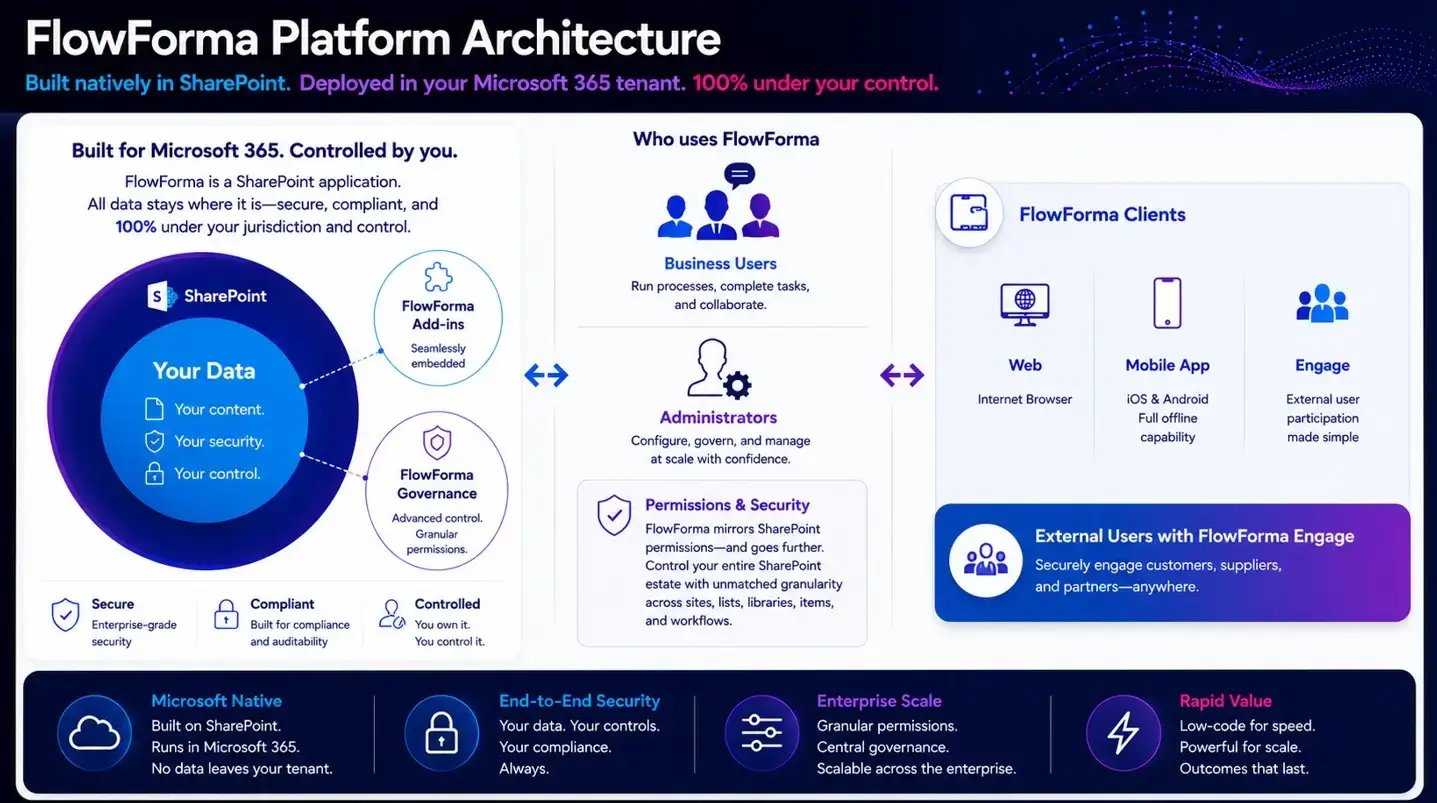
Screenshot of the FlowForma Platform Architecture
When I think back to when we first created FlowForma, we had two product goals. One was to create a full no-code process platform that was all in one (forms, workflow, document generation and AI) and the second was that the platform needed to run natively inside SharePoint, so you get the process power without giving up the native advantages.
Let’s run through these in more detail.
Native To SharePoint
FlowForma’s customer base are always huge advocates of SharePoint and once you know the benefits it’s clear why.
If your organization is already embedded in the Microsoft 365 ecosystem, choosing a native platform makes sense.
FlowForma inherits the Microsoft 365 security and governance you already run, creating a secure environment for workflow automation.
There are no separate systems needed and it makes life easier for IT leaders when it’s a simple tech deployment.
With one single system it’s therefore easier to create your audit trails and have one single source of data, making reporting simple, fast, and intuitive.
No-code, Built For The People Who Own The Process
I always say no-code is in the FlowForma DNA! The no-code experience is one of the most important features of the platform as enables business users to get involved in building and changing processes.
Your IT will always provide guardrails and sign off on critical workflows, but having a no-code experience empowers the process owners to be able to build their own processes is a dynamo for productivity in an organization.
It will also take the burden of automation off the IT teams who typically have a backlog of IT projects and tickets to get through.
One Tool With All The Features Needed For Modern Workflows
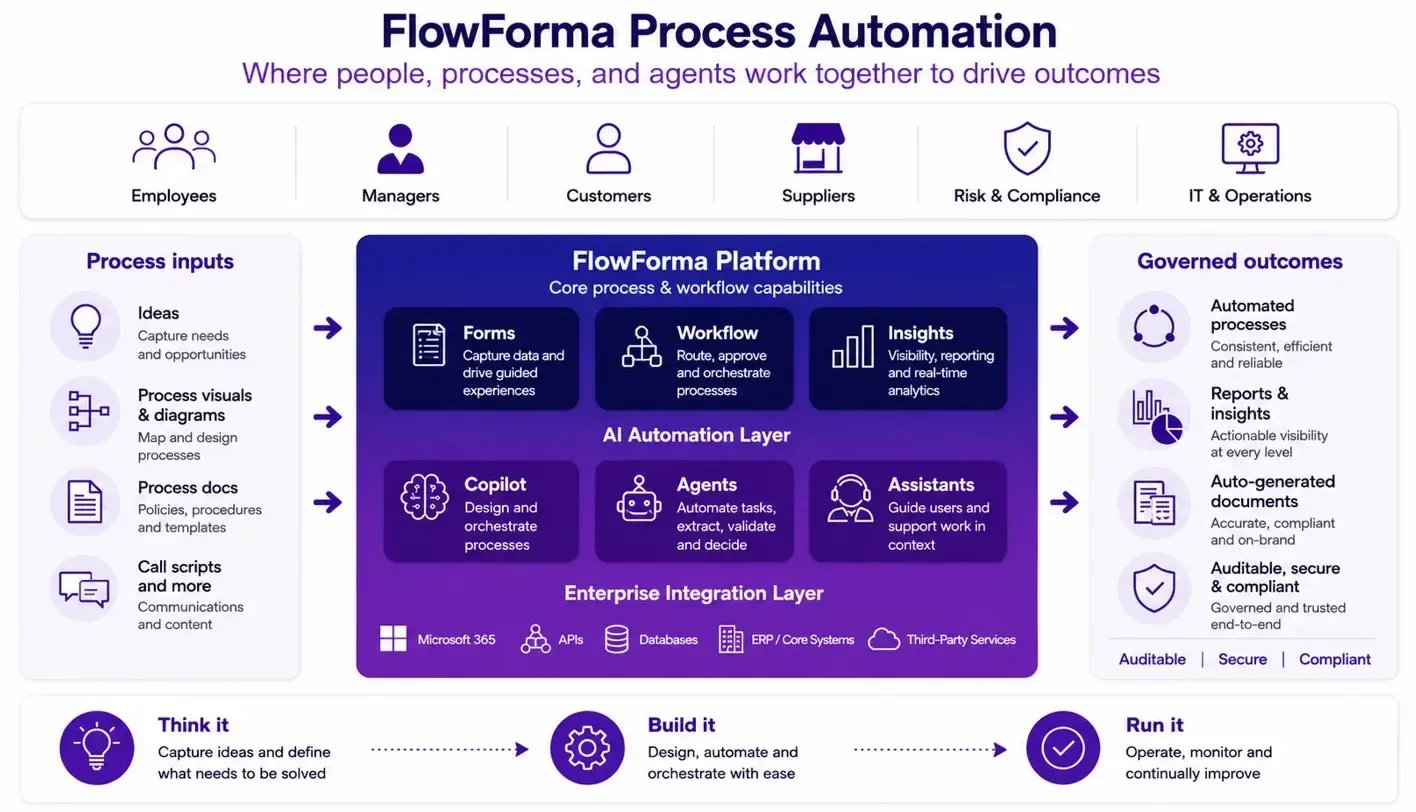
Screenshot of FlowForma features
While some platforms in the market need to be stitched together to create a complete process automation platform, FlowForma was designed from the ground up to include every feature you need in an integrated platform.
- Forms with conditional logic, dynamic fields, validation and repeating sections.
- Logic that branches, calculates and routes based on the data captured.
- Workflow that handles sequential and parallel approvals, and long-running, multi-stage processes that span days, weeks and many people.
- Document generation that produces the contracts, letters and reports a process needs, automatically.
- AI process builder and AI agents to build processes, help capture and interpret information, draft and summarise content, and take the manual effort out of steps that would otherwise slow things down.
- Insights and reporting that turn the data each process captures into a live picture of where work stands, where it stalls and where to improve, without exporting anything to a separate analytics tool.
One customer of ours recently described FlowForma as ‘Swiss Army knife for workflows in the organization’. I would second that view!
Fast to deploy, and fast to change
Because FlowForma is native to your existing SharePoint, there is no huge integration needed to deploy FlowForma. This is music to the ears of most IT leaders as integrations can be a huge challenge for organizations.
This means that FlowForma is very fast to deploy, with organizations live with their first workflow in weeks.
As a no-code platform, it is also very adaptive and easy for business users to change workflows. In the real-world we know that processes, people and technology change and FlowForma is designed to adapt quickly to any situation.
Proven in practice
One prime example of SharePoint workflow automation in practice is with Grant Thornton.
Grant Thornton saw a 60% productivity improvement by moving it’s manual job appraisal, client acceptance, data access requests and mobile requests to streamlined digital workflows.
William McCann, IT Manager at Grant Thornton stated,
‘‘As with any new software there’s a mindset change for people, but it helps that they can see tangible benefits straight away. The more processes I’ve automated, the more the business sees the benefits and the more they want to use it.
FlowForma Process Automation is completely different to other SharePoint apps; much more business intuitive. I designed a five-step Mobile Request form and completed it in a day.”
Getting Started: A 5-Step Automation Roadmap
I’ve been involved in both onboarding new customers and helping them expand their workflow automation initiatives.
Although each customer is different, the five step automation roadmap is recommended for organizations to hit the ground running with their project.
For further reading, check out the guides to migrating from legacy platforms such as K2, Nintex, and InfoPath.
Step 1: Pick One High-pain, But Simple Workflow
I know the urge it to pick the most complex workflow to automate but trust me, starting small and scaling is the way to go.
Choose a process that has high pain in the organization but is simple to automate. Maybe there are not many stakeholders involved, or there are not too many steps.
Starting with a simple process will get you familiar with the software you use, provide a quick win to share internally (and prove ROI), and give you the best chance of scaling your automation project.
Step 2: Map How It Works Today
Before you jump into software selection, map how your process works today. You can map it on a whiteboard or a document map.
Having this prepped before you reach out to vendors will speed up the vendor selection process.
With your process mapped, you’ll have a solid brief for the vendors to scope the pricing, features and functionality you’ll need.
Step 3: Choose Your Tool Against Your Criteria
Have a comprehensive buyer’s checklist ready when you reach out to your vendor shortlist.
Choose against your criteria (who builds it, native or self-hosted, total cost of ownership, form needs, governance) rather than the longest feature list.
As well as doing your own research, check their G2 reviews, customer case studies and online sentiment. Even better, if you know someone who has used their platform, ask for feedback!
Step 4: Build And Pilot With Real Users
Once you have selected a platform and are deploying workflows, you need to bring your team on the journey with you.
If you are using a no-code platform, bring the business users along with you so they are involved in day one of the pilot.
This also makes the hybrid teams of IT and business users connect and get familiar with the steps and processes.
Step 5: Measure, Refine And Scale
Once you are live with your workflow you need to create a continuous loop of measuring, refining and scaling your workflow automation project.
Data becomes critical at this step as your teams iterate the workflow, find new opportunities for automation and begin to scale the project across the organization.
Over time automation compounds. I’ve worked on projects where the simple first workflow has grown to an organization-wide automation strategy across multiple departments that has transformed the whole organization.
I’d love to see how we can achieve the same success for your own organization. If you are interested to see how FlowForma can provide you with everything you need to build and scale your own SharePoint workflow automation strategy, schedule a demo here.