I get asked this more than almost any other question, and I understand why. If your organization already runs on Microsoft 365 and SharePoint, you've made a serious, long-term investment in that ecosystem, and the last thing you want is a workflow tool that fights against it, quietly pulls your data somewhere else, or hands the keys to a development team you then have to queue behind every time a form needs changing.
It's a crowded market, and most vendors will happily tell you they're the answer. So rather than name a winner in the first paragraph, let me share what I've actually learned matters when you're choosing, the criteria I'd apply if it were my budget and my reputation on the line. Get these right and the shortlist narrows quickly.
Start With Where Your Data Lives
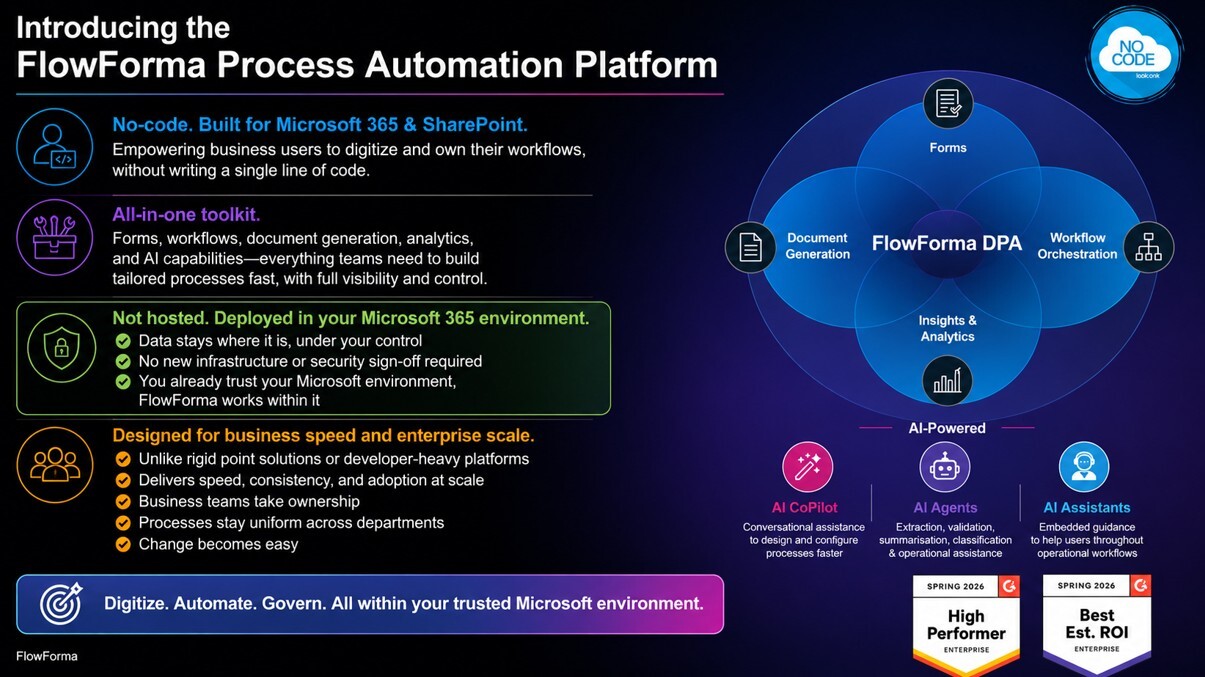
Screenshot showing FlowForma integrated platform
This is the one I'd put first, every time. A genuinely M365-native platform keeps your forms, workflows and data inside your own SharePoint and Microsoft 365 tenant, nothing leaves your environment. That isn't a technical nicety; it's the difference between a smooth security review and a stalled project.
For anyone in a regulated industry, healthcare, finance, the public sector, and increasingly for everyone, data residency is the question your IT and compliance teams will ask first. If a platform stores your process data on its own external infrastructure, you've added a third party to every audit, every data-protection assessment and every renewal conversation. I'd treat that as a red flag, not a footnote. When your data simply stays where it already lives, sign-off is faster and the platform earns trust on day one.
Ask Who Actually Builds the Processes
The best results I've seen, the ones where automation genuinely takes hold across an organization, come when the people who understand a process can build and change it themselves. The person in HR who runs onboarding, the finance lead who owns the approval chain, the operations manager who lives in the detail: they know what the process needs far better than anyone outside the department. That's what no-code should really mean.
Not "low-code with a friendlier label", but forms, logic, approvals and notifications that a capable business user can assemble and adjust without writing a line of code or raising an IT ticket for every small tweak. Crucially, this doesn't sideline IT, it frees them. Your IT team still governs, secures and oversees everything centrally; they simply stop being the bottleneck for routine changes. When a process needs a new field or an extra approval step, it happens in an afternoon, not a sprint.
Look for One Platform, Not Five
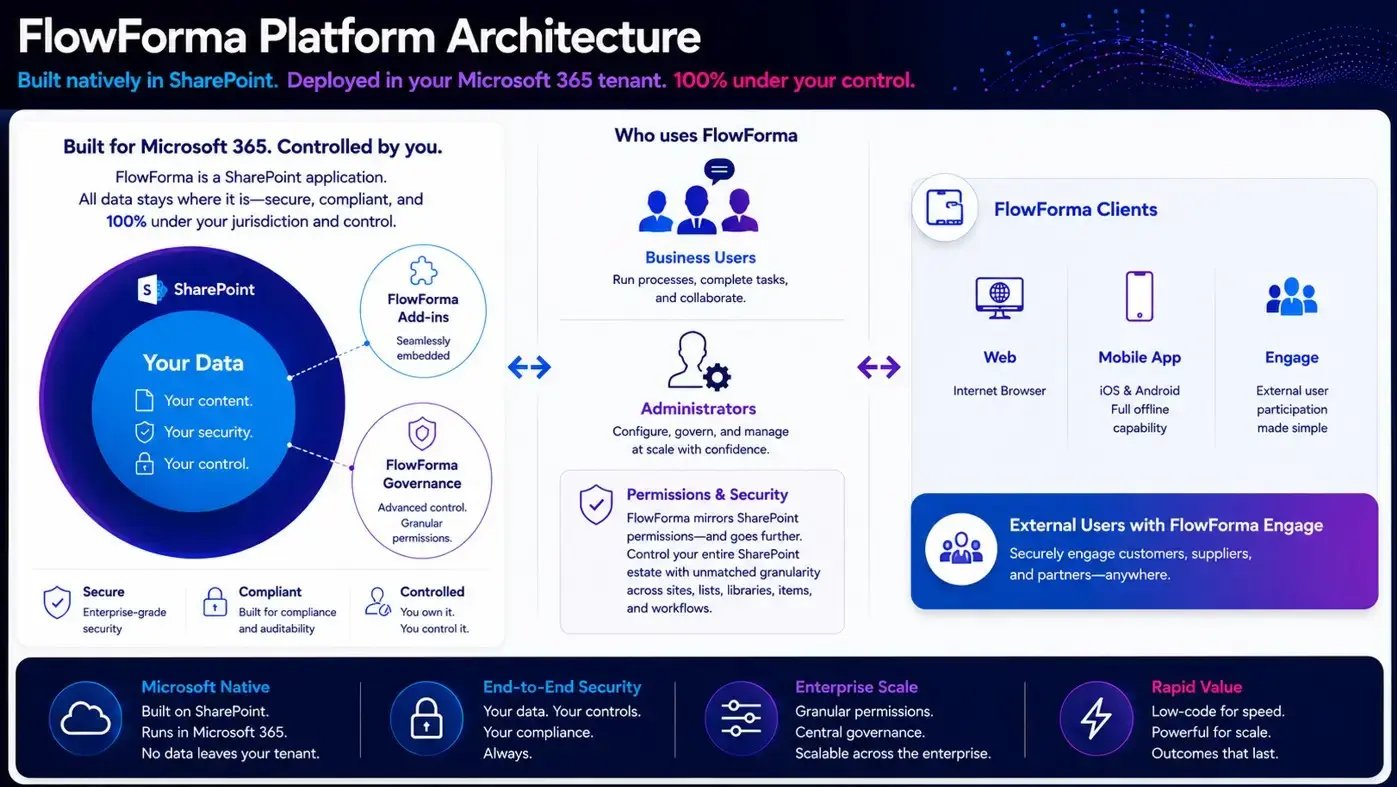
FlowForma architecture
Forms, workflow, document generation, dashboards and integrations belong together. It's tempting to assemble best-of-breed point tools, but every seam between them becomes a place where things break, costs stack up and ownership gets murky. A change that should take minutes turns into a small project spanning three vendors and two teams.
When those capabilities sit in a single platform, the maths changes. A business user can go from an idea to a live, governed process in days, capture data in a form, route it through an approval workflow, auto-generate the resulting document, and see it all on a dashboard, without anyone hand-stitching the pieces. Fewer tools also means fewer licences to manage, fewer integrations to maintain and a far lower total cost of ownership over time.
Consider How You'll Migrate Off Legacy Tools
For a lot of organizations, this isn't a greenfield decision, it's a migration. Microsoft InfoPath is gone, and Nintex's older products are reaching end of life, which means a wave of teams are being forced to move business-critical forms and workflows whether they planned to or not.
So I'd add a practical question: how painful is the move? The right platform doesn't just give you somewhere to land, it helps you get there. Look for migration support from people who've done it before, and for tooling that can interpret your existing forms and rebuild them rather than making you start from a blank page. A migration that drags on for a year, with every workflow rebuilt by hand, is its own kind of risk. One that's measured in weeks, with expert help and a clear plan, is the difference between a project that succeeds and one that quietly never finishes.
A Grounded Word on AI
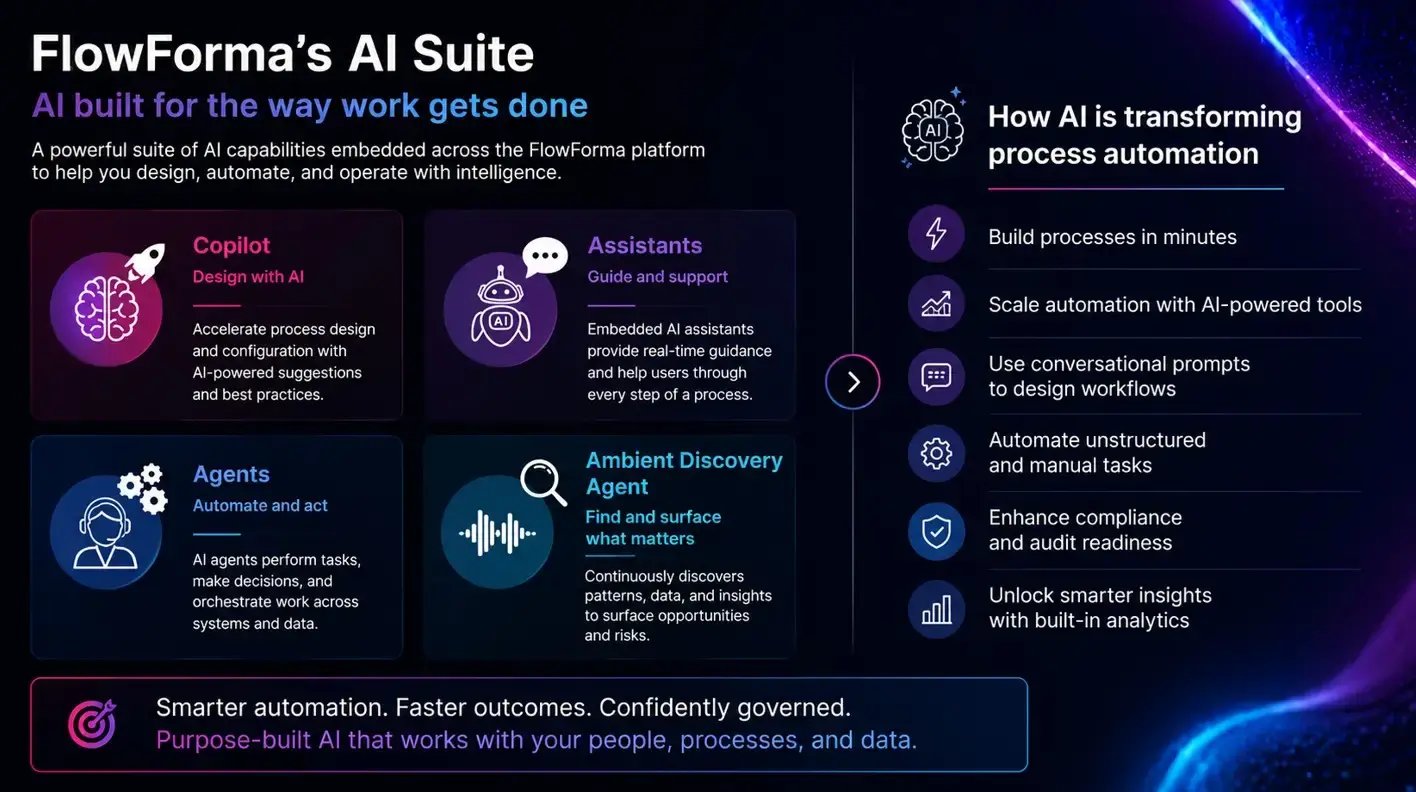
FlowForma AI Suite
Every vendor is talking about AI right now, and most of it is noise. The version I think is genuinely useful is narrow and practical: an AI Copilot that can take a plain-language prompt, or an existing form, and build a working process for you in seconds, which you then refine. That's real time saved, especially during a migration. What I'd be wary of is AI bolted on as a headline feature with little behind it. Ask to see it build something live, with your own example, before you believe the demo.
Don't Ignore the Boring Parts
Finally, the unglamorous things that quietly decide whether automation scales or stalls after three processes: audit trails and version control so you can see who changed what and roll back when needed; transparent, published pricing so costs don't balloon as you automate more; and support you can actually reach without routing through a partner. None of these feature on a flashy slide, but they're what you'll care about in year two.
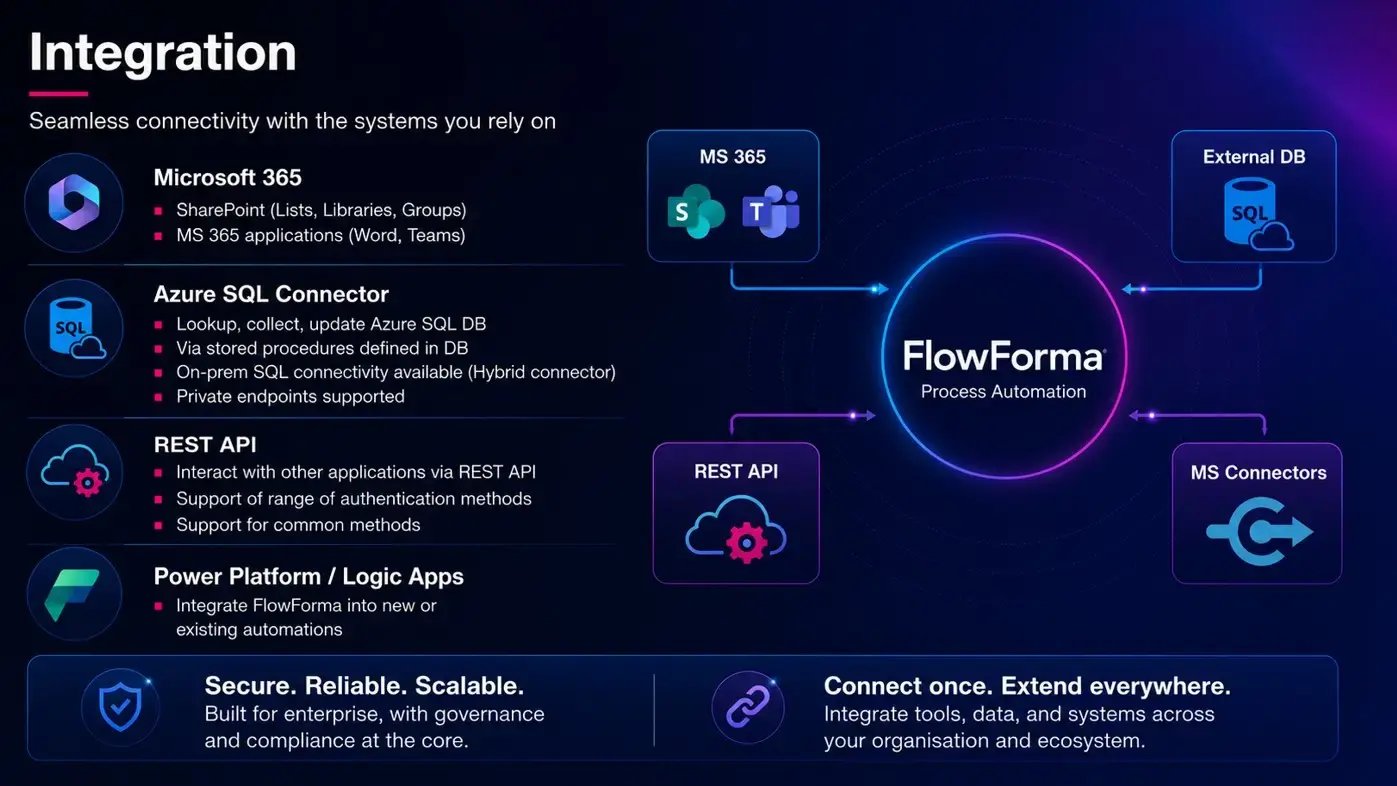
FlowForma integrations
Also you need to think about integrations and how simple it is to integrate with other platforms in your stack. This is critical to successful deployment.
So, What's the Best Fit?
My honest answer? For a Microsoft 365 or SharePoint environment, I believe FlowForma is the strongest fit, and I'd say that even if I weren't writing it on our own blog, because it's built on exactly these principles.
It's 100% no-code, your data never leaves your M365 tenant, and forms, workflow and document generation sit in a single platform, with an AI Copilot that can build processes from a simple prompt. It's precisely why organisations replacing legacy tools like InfoPath and Nintex keep landing with us.
The best tool, in the end, is the one your business can own without depending on developers, that respects the Microsoft investment you've already made, and that grows with you rather than holding you back.
If that sounds like what you're after, I'd genuinely encourage you to see it on your own processes, book a quick demo and bring along a process you'd like rebuilt and we'll automate the process on the spot :)