

Comparing Kissflow and Microsoft Power Apps on an 'apples-to-apples' basis is rudimentary and redundant.
You might shortlist both for workflow automation and internal process digitisation. On the surface, they sit in the same low-code category.
In practice, they are built for different types of users. One is designed for business teams who want to set up and manage processes themselves. The other expects more technical confidence, especially around data and integrations. A feature that feels simple to one person may feel complex to another.
So the real question when comparing Kissflow vs Power Apps is not feature parity but platform fit. Who will build your processes? How much control do you need? How will costs scale? And what happens as your automation grows? In this article, we explore these questions.
Kissflow Vs Power Apps (A Quick Platform Walkthrough of Each)
Below is a brief overview of Kissflow and Microsoft Power Apps.
What is Kissflow?
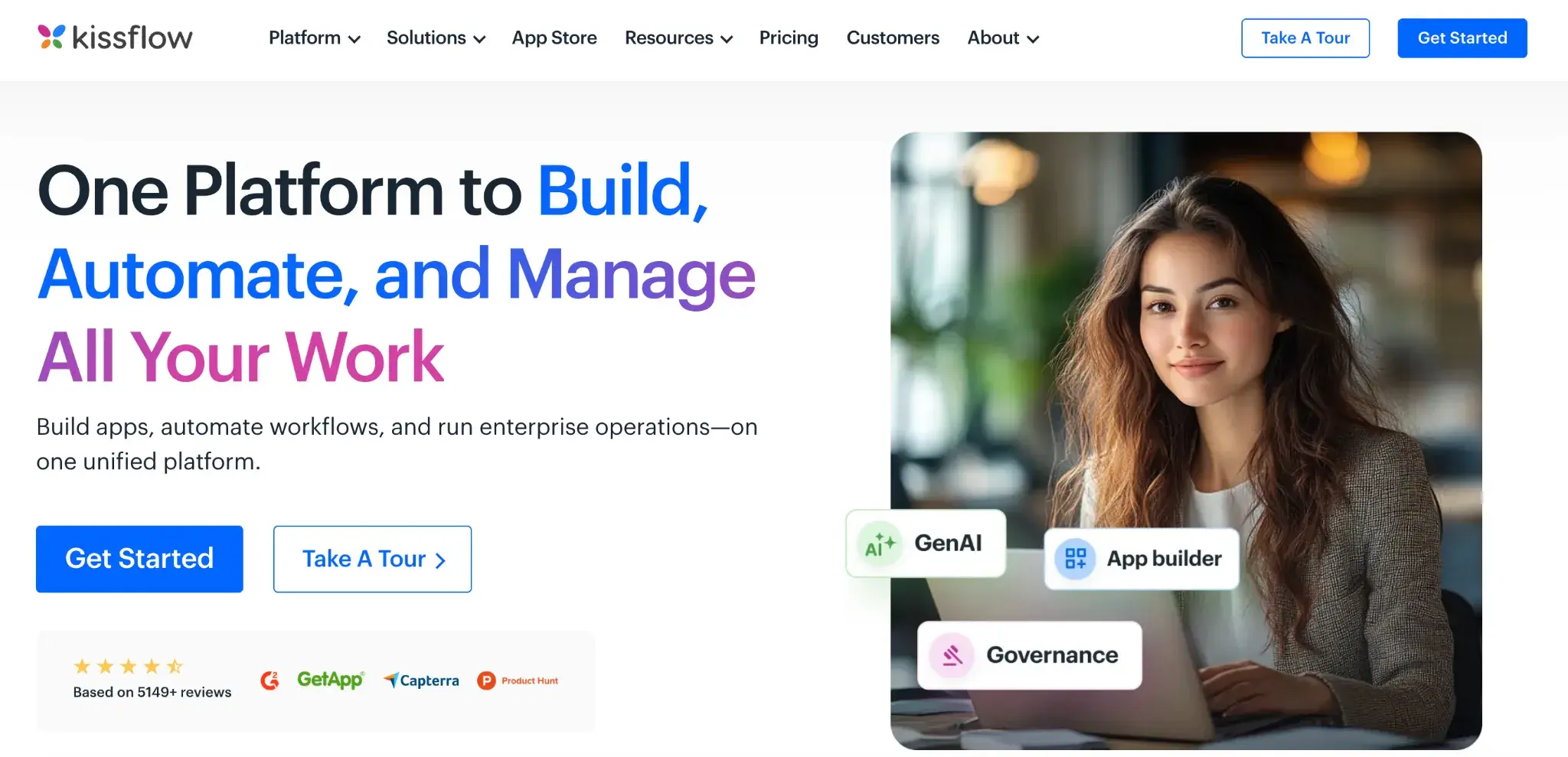
Kissflow homepage
If you want to move everyday approvals and requests out of email and spreadsheets, Kissflow helps you do it quickly, without relying heavily on IT. It connects seamlessly with everyday work tools like Google Workspace, Slack, Zapier, etc.
You can use it to digitise processes such as leave requests, purchase approvals, vendor onboarding, or internal service requests. Just set up simple workflows, assign steps and let the system route everything automatically so your team always knows what’s happening.
Suggested reading: The top 10 alternatives to Kissflow
What is Power Apps?
Microsoft Power Apps is a low-code development platform in the Microsoft Power Platform that enables users to build apps, including mobile and web apps, in a visual low-code environment.
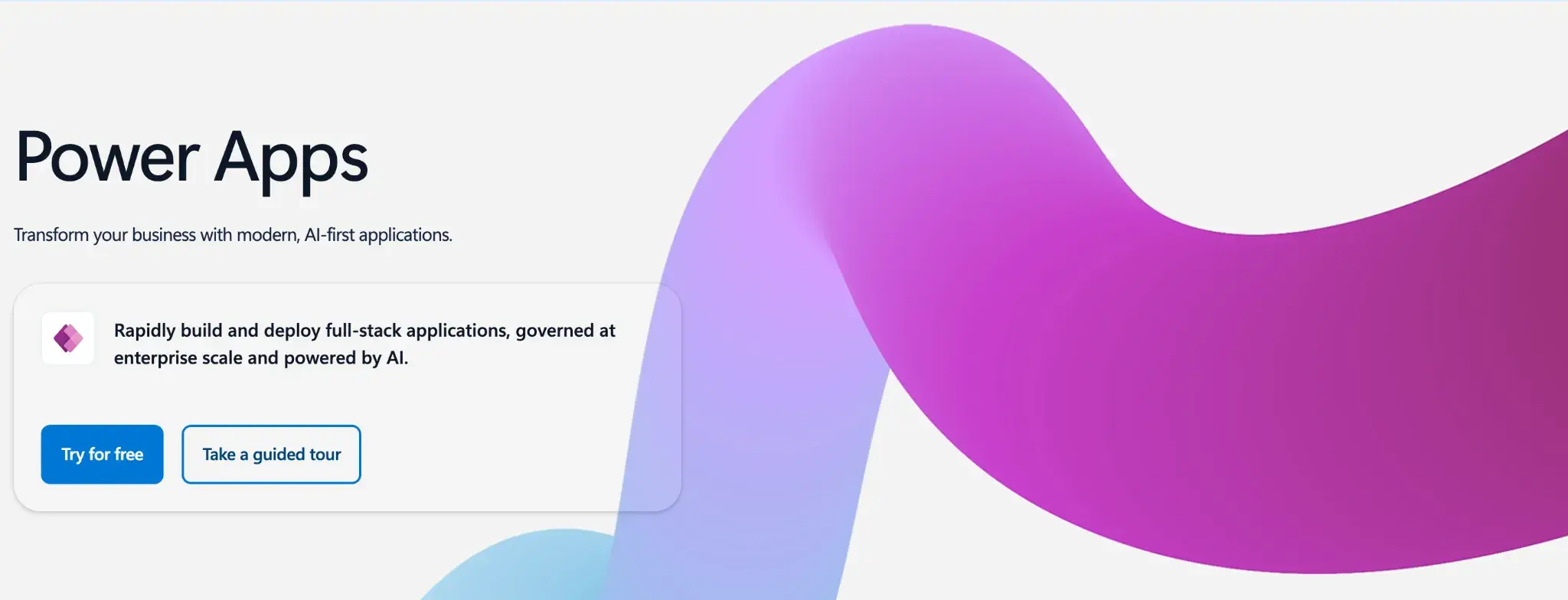
PowerApps homepage
It gives you a visual way to build internal apps without starting from scratch—especially if you already use Microsoft tools.
You can create mobile or web apps to manage inspections, track requests or replace manual spreadsheets. When you need workflow automation, you connect your apps to Microsoft Power Automate. Your data can flow across services such as Microsoft SharePoint, Microsoft Teams and Microsoft Dataverse.
Suggested reading: 10 Best PowerApps Alternatives & Competitors in 2026
Where Do Kissflow And Microsoft Power Apps Differ?
Kissflow and Microsoft Power Apps are often evaluated for similar automation goals, yet they are built on very different foundations. Understanding this distinction is important because the wrong choice creates long-term technical overhead rather than simple feature gaps.
Primary platform focus
Routine approvals, requests and internal processes sit at the centre of Kissflow’s design, where workflow automation happens through form-based configuration rather than app development.
Power Apps, in contrast, is built as a low-code platform for app creation, with workflow automation dependent on Power Automate and multiple Microsoft services working together.
Suggested reading: The Best Alternatives to Power Automate
Target users
Business users and process owners can configure workflows in Kissflow without relying heavily on IT teams. With Power Apps, as application complexity grows, developer involvement typically increases, governance becomes tighter and reliance on IT teams increases, especially when premium connectors or Dataverse are part of the solution.
Governance and accountability over time
Kissflow supports lighter governance early on, which helps teams move quickly. As adoption spreads, organizations must be more deliberate about controls, roles and audit practices to avoid inconsistencies across workflows.
Power Apps assumes stronger governance from the outset. Environment management, permissions and deployment practices require IT oversight. This reduces risk in regulated settings, but it also means business agility is closely tied to IT availability.
Complexity as usage scales
Kissflow handles structured business processes well in the early stages, but organizations often encounter limitations when workflows require advanced logic or deeper customisation.
In contrast, Power Apps is a low-code platform for app creation that offers greater flexibility but also requires users to understand data relationships, connectors and other low-code development concepts, increasing their dependence on IT teams over time.
Approach to automation
Kissflow frames automation as process configuration, allowing non-technical users to create workflows and forms through a drag-and-drop interface. Power Apps treats automation as part of a broader low-code development approach, where users build apps that connect closely with Microsoft services and underlying data layers.
Kissflow vs Power Apps: Key Feature Comparison & Analysis
Kissflow delivers features through a workflow-first, drag-and-drop interface that lets business users and process owners build and manage structured processes in one place. Power Apps, on the other hand, delivers features through app creation tied to data, connectors and Microsoft services, which often brings IT teams in as solutions grow more complex.
The table below highlights the practical differences users consider when comparing Kissflow and Power Apps as low-code development platforms for organizations.
|
Feature area |
Kissflow |
Power Apps |
|---|---|---|
|
Primary design focus |
Workflow-first platform for approvals, forms and structured business processes |
App creation platform connected to data, SharePoint, Azure and other Microsoft services |
|
Who can build comfortably |
Business users and process owners can create and update workflows with a user-friendly interface |
Users can start with drag and drop, but IT teams and developers step in as data logic grows |
|
Workflow automation |
Native, end-to-end workflow automation managed in one intuitive platform |
Automation is split between Power Apps and Power Automate across multiple Microsoft products |
|
Data handling responsibility |
Data stays tied to forms and workflow steps, reducing design effort for users |
Requires understanding of Dataverse, SharePoint and external data schemas |
|
Customisation and logic |
Suited to predictable processes with limited need for coding |
Deep customisation and integration capabilities with higher technical effort |
|
Integration flexibility |
Connects easily with common SaaS services in mixed environments |
Best suited to organizations invested in the Microsoft ecosystem |
|
Governance and control |
Easier for teams to start, but governance can become difficult as workflows expand |
Strong governance features managed actively by IT teams across environments |
|
Vendor lock-in considerations |
Workflows and applications remain inside the Kissflow platform |
Apps and workflows are closely tied to Microsoft licensing and services |
|
Ease of use over time |
Remains approachable for non-technical users managing routine tasks |
Usability reduces as formulas, connectors and complex data handling increase |
|
Scalability reality |
Scales well for operational business processes with some functionality ceilings |
Scales for enterprise applications with higher maintenance effort and cost |
|
Ownership over time |
Business teams retain ownership longer before IT involvement |
Ownership shifts to IT teams earlier as environments and integrations grow |
|
Licensing behaviour |
More predictable cost for workflow automation use cases |
Cost expands with premium connectors, Power Automate, Dataverse and user tiers |
Difference between Kissflow features and Power Apps features
Kissflow vs Power Apps: Pricing Plans & Licensing Costs Differences
Let’s understand each platform’s pricing plans and structure.
How Kissflow pricing works
Kissflow follows a tiered, per-user pricing model, with entry plans starting at around $2,500 per month. Costs increase as teams expand or require access to more advanced features and workflows.
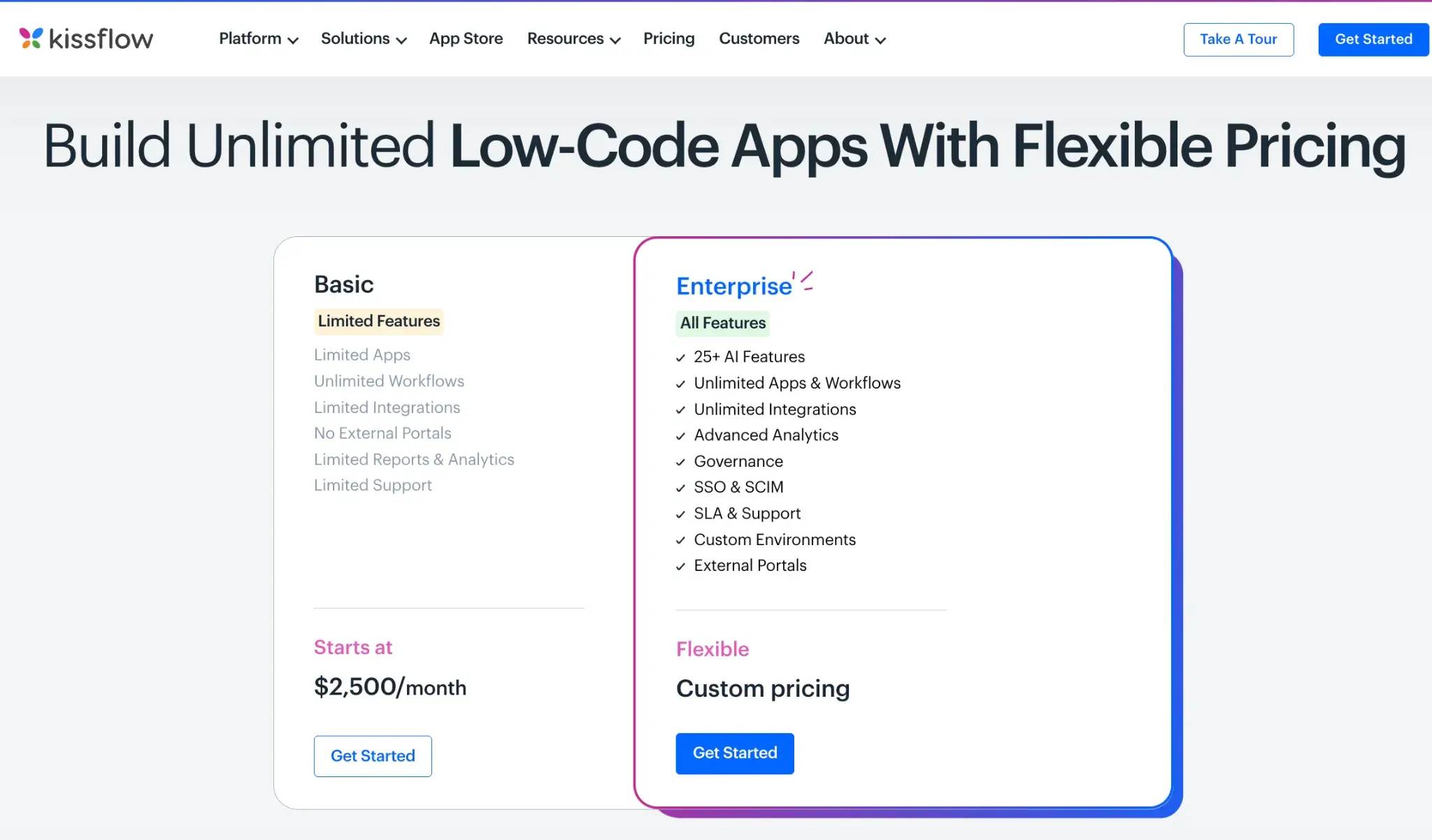
Kissflow’s pricing structure
Although the structure is relatively straightforward compared to usage-based pricing, it can become limiting for organizations that need to run multiple departmental workflows while also expecting enterprise-grade capabilities within a single pricing framework.
How Power Apps pricing works
Power Apps offers multiple pricing models, including per-app and per-user plans. Some licences are bundled into wider Microsoft subscriptions, which often makes Power Apps appear cost-effective at the outset for organizations already using Microsoft products.
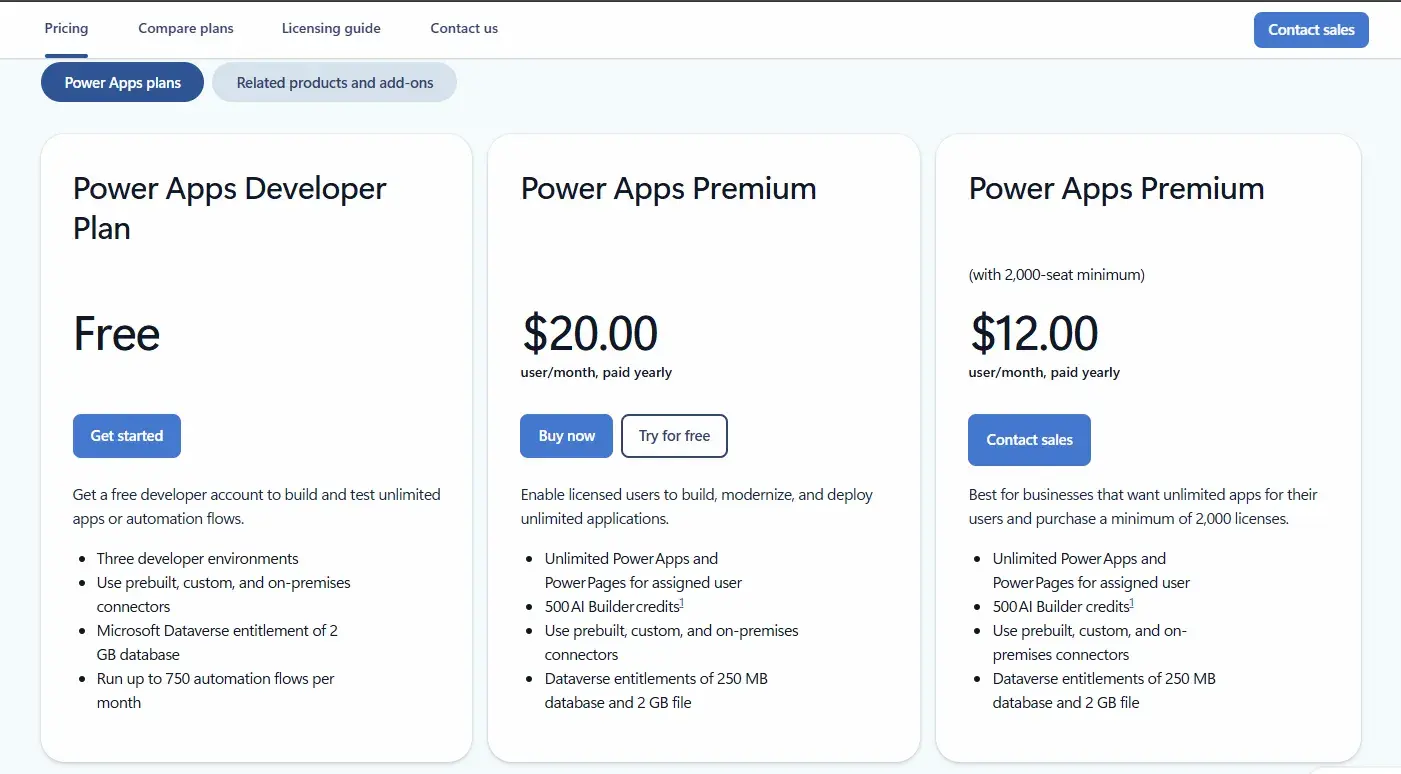
PowerApps pricing
However, real-world usage often increases costs due to premium connectors, Dataverse storage, and reliance on Power Automate. While Power Apps enables flexible app development, pricing becomes harder to predict as automation expands across systems and operations. Check here for a detailed breakdown of Power Apps pricing.
Kissflow vs Power Apps: Where Do These Platforms Struggle?
Although both platforms are praised for their low-code approach, G2 reviews highlight the friction that emerges as more teams, data and governance come into play.
Simplicity fades as processes become more realistic
Both platforms handle basic approvals and forms well, but complexity rises when workflows require conditional logic, data relationships, or cross-system behaviour, often demanding more technical skill and careful structuring.
Customisation limits appear when expectations rise
Power Apps makes it hard to design highly customised interfaces without workarounds. Kissflow can feel restrictive when workflows require more dynamic control or deeper logic.
Performance drops as usage, users and data increase
Slow screens, lagging forms and inconsistent flow performance can be a problem. Power Apps loading time significantly slows during HIL testing workflows.
These issues are more visible as larger datasets and more teams rely on the platform daily. Early performance does not always reflect long-term behaviour.
Low code does not remove technical dependency
Kissflow and Power Apps are positioned for business users, but as solutions scale, the growing complexity of connectors, data models, permissions and platform behaviour often brings IT or developers into the picture.
However, users note that licensing, governance and Dataverse costs can further limit business autonomy compared to no-code approaches, as shown in this Reddit comment.
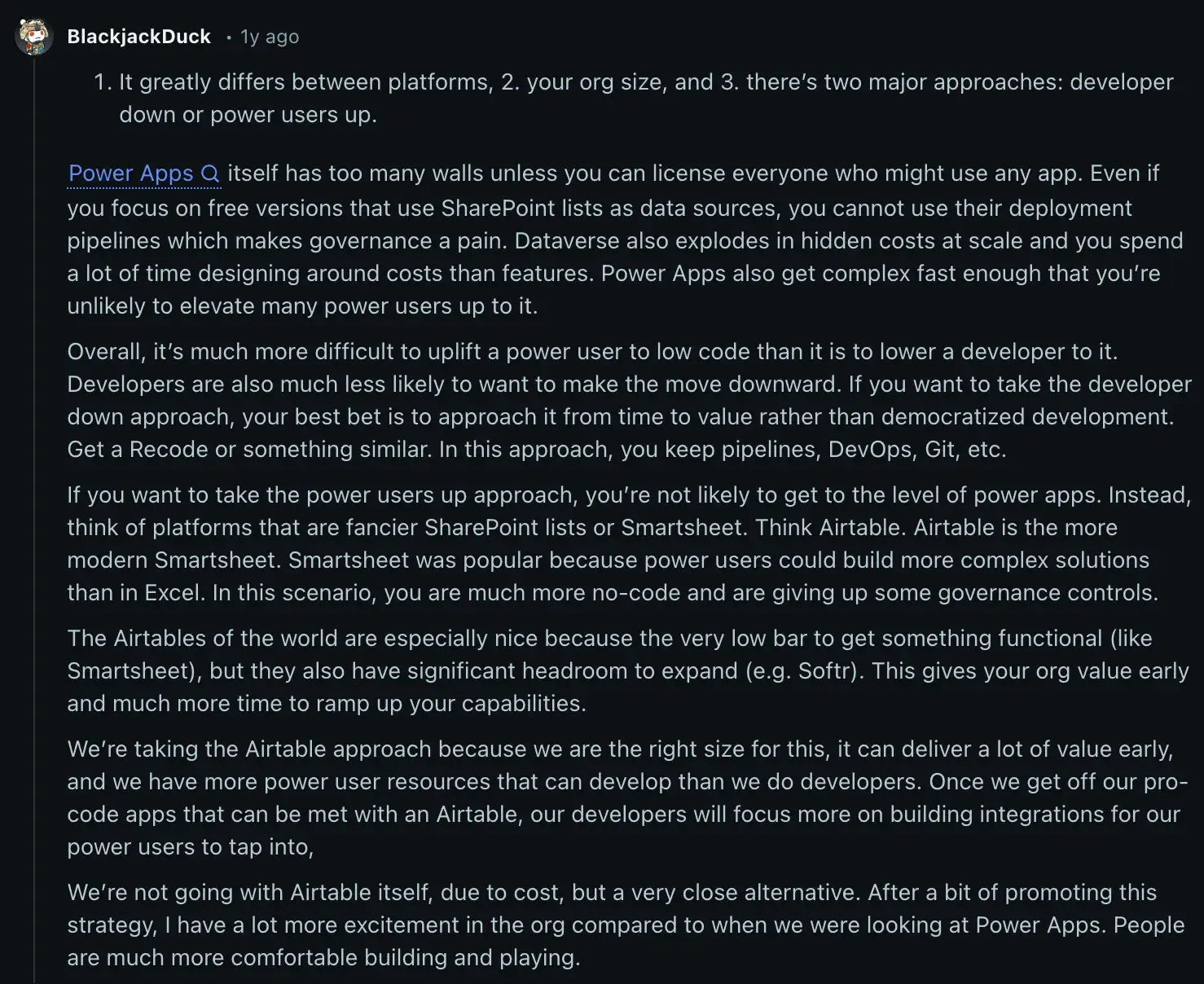
Reddit comment highlighting why no-code outpaces low-code
Licensing complexity and cost exposure increase over time
Kissflow pricing is straightforward at the entry level, but costs can rise as organizations need advanced features or scale usage across multiple teams. Buyers often find that higher tiers are required sooner than expected to support broader operational needs.
Power Apps pricing is harder to predict. Costs are influenced by licensing models, premium connectors, Dataverse capacity and reliance on Power Automate.
What appears cost-effective initially can become expensive as more apps, users and workflows are added. In both cases, pricing becomes a strategic consideration once automation moves beyond isolated use cases.
Kissflow Vs Power Apps: Why Switch to 100% No-Code Alternatives Instead
Low-code platforms handle simple apps but grow complex fast, while no-code platforms like FlowForma run processes at scale without IT overhead. Let’s understand the difference.
FlowForma vs Kissflow vs Power Apps: How the features stack up
Unlike Kissflow and Power Apps, FlowForma lets business users model processes visually without worrying about connectors or data schemas. At the same time, IT retains governance, version control and auditability.
Here’s a closer look at how the features differ:
|
Area |
FlowForma |
Kissflow |
Power Apps |
|---|---|---|---|
|
Core approach |
No code process automation |
No code workflow tool |
Low-code app development platform |
|
Best fit |
Organizations scaling process automation safely |
Teams are digitising everyday operations |
Organizations invested heavily in Microsoft products |
|
Primary focus |
End-to-end business processes |
Routine operational workflows |
Custom apps inside the Microsoft ecosystem |
|
Who builds |
Business users with IT governance |
Business users |
Business users with IT and developer support |
|
Handling complexity |
Designed for complex, governed processes |
Suited to structured, simpler workflows |
Flexible but becomes technical as apps grow |
|
Governance and audit |
Built in from the start for IT oversight |
Lighter governance for smaller-scale use |
Requires structured IT management across environments |
|
Dependence on connectors and data models |
Minimal user concern |
Moderate for integrations |
High reliance on connectors, Dataverse and data structure |
|
Licensing impact as usage grows |
Encourages organisation-wide adoption |
Can rise with scale and features |
Often increases with users, connectors and apps |
Difference between Kissflow features and Power Apps features
Over time, the difference becomes clear. Low-code platforms help teams build apps quickly, while no-code platforms help organizations run processes without adding complexity.
Pricing and cost comparisons with FlowForma
Kissflow’s tiered structure can rise sharply as adoption spreads, while Power Apps costs often become less predictable as automation grows and layered dependencies accumulate.
FlowForma takes a different approach. Its transparent,process-based pricing bundles workflows, forms, governance and integrations into a single licence, avoiding per-run or per-user surprises.
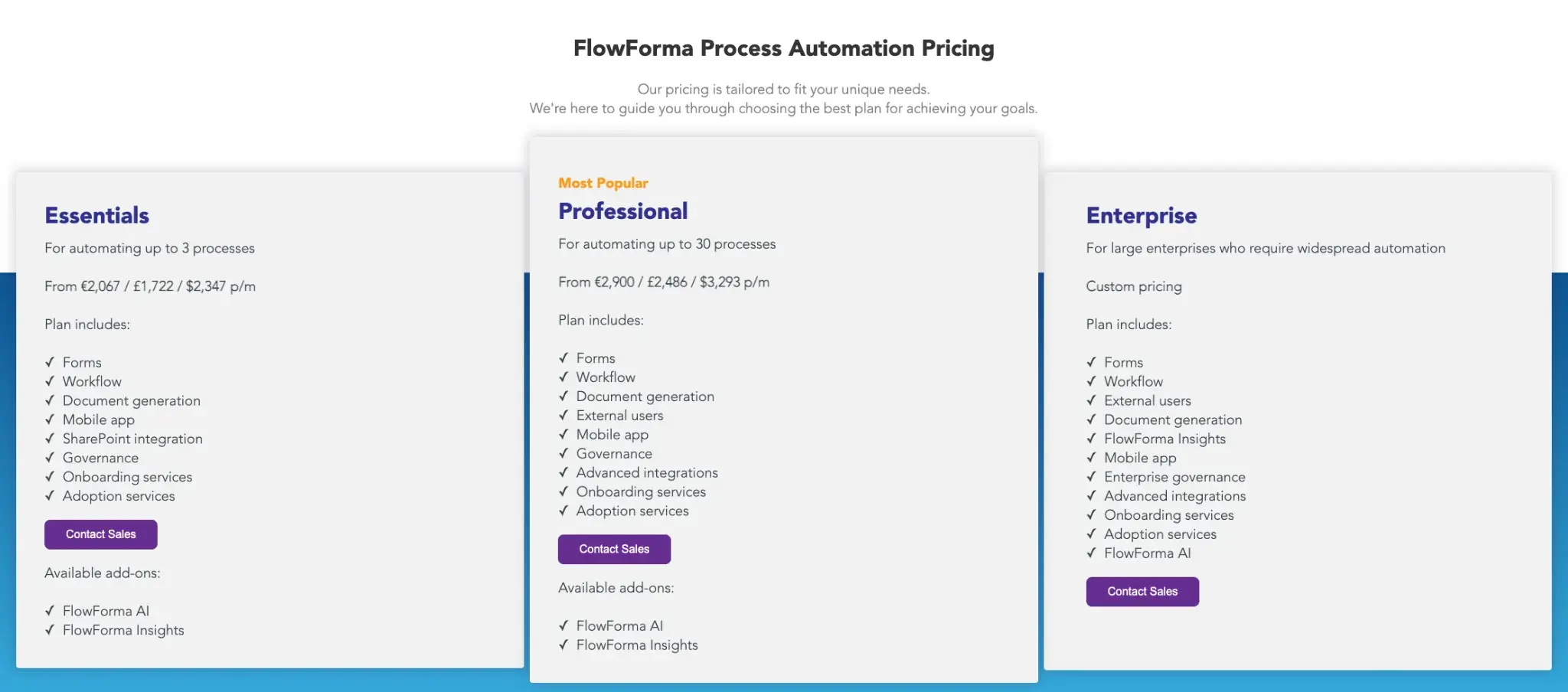
FlowForma’s pricing structure
Because FlowForma scales pricing by processes rather than users or workflow executions, organizations can forecast costs more reliably.
How FlowForma Supports Scalable, Governed Process Automation
The following capabilities show how FlowForma is designed to support those requirements.
True no-code design for business-led automation
FlowForma is a genuine no-code platform that lets business users build and automate processes independently, without technical expertise.
The intuitive interface allows workflows to be designed quickly and consistently, from simple approvals to complex, multi-stakeholder processes.
IT teams maintain governance, compliance and oversight, ensuring automation can safely scale across regulated environments. Pre-built templates and visual workflow tools make adoption faster and reduce reliance on technical resources.
AI innovations for smarter, faster automation
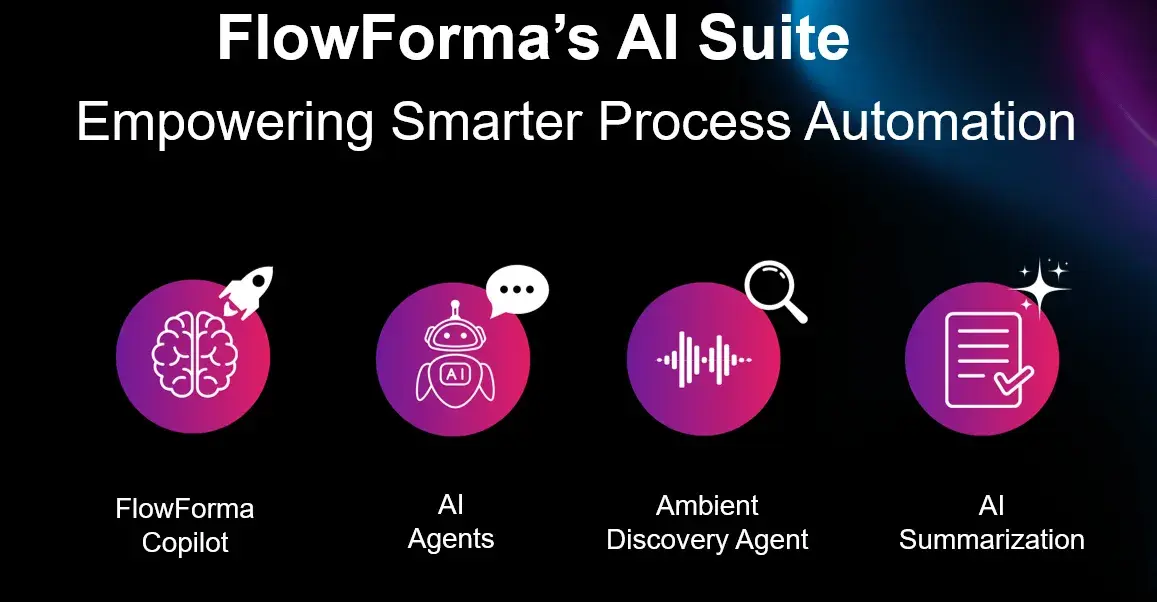
FlowForma’s AI suite enhances the entire workflow lifecycle:
- AI Copilot transforms quick notes or process sketches into ready-to-use workflows.
- Agentic AI performs context-aware actions such as reviewing invoices, validating information and updating connected systems.
- Discovery Agent scans documents and discussions to identify new opportunities for automation.
- Smart Assistants provide prompts and guidance for both workflow builders and end users.
- AI Summarisation gives an instant view of progress, decisions and open tasks.
- AI-powered Insights and Analytics highlight bottlenecks and opportunities for process improvement.
These AI capabilities reduce manual effort, accelerate deployment and guide users through complex processes with minimal IT intervention. Check out FlowForma’s AI Masterclass to learn more about the tool’s AI features.
FlowForma’s AI Masterclass
Faster deployment + ROI within weeks of implementation
Unlike traditional BPM tools, which can take months to implement, FlowForma allows organizations to automate processes in days or weeks.
Pre-built templates, AI support and true no-code design accelerate deployment, helping teams realise ROI faster with minimal IT involvement.
Compliance-focused data security
All workflow activity is fully logged for end-to-end traceability and data remains within each customer’s SharePoint tenancy. FlowForma’s compliance module supports regulatory standards such as GDPR and DORA, ensuring strong security and auditability.
Microsoft and wider ecosystem integrations
FlowForma integrates natively with Microsoft 365 and SharePoint Online, making it an excellent fit for organizations operating within the Microsoft ecosystem. It also connects with over 1,000 other applications, enabling seamless integration across existing systems.
Experience true no-code process automation that scales seamlessly. Book a personalised demo with FlowForma today.




