In regulated industries, manual processes create serious operational drag. Employees report spending around 15 hours a week on low-value admin and only 51% say most of their day is spent on value-driving work, a clear sign of operational drag.
Back-office automation fixes this by replacing emails and spreadsheets with defined workflows that show who owns each step and what happens next. Work moves forward without reminders and teams stop firefighting routine tasks.
In this article, we cover:
- What back office automation really means and why it is imperative in 2026
- Top back office automation examples
- How FlowForma streamlines back office automation seamlessly
What Is Back Office Automation?
Back-office automation is the systematic digitization of repetitive administrative processes, such as data entry, approvals and document management, using software workflows that operate without manual intervention.
It reduces errors, ensures consistency and creates audit trails necessary for regulatory compliance.
Back office automation software works around the following aspects:
- Reduce manual processes and repetitive tasks
- Standardize office workflows across teams
- Connect existing workflows across finance, HR, IT and operations
- Limit human error through rules and validation
- Provide visibility into the entire process, end to end
What technologies are involved in back office automation?
Modern back office automation combines multiple technologies to handle both routine tasks and more complex tasks.
Core technologies include:
- Robotic process automation (RPA): Bots that automate repetitive tasks by mimicking human actions without needing API access.
- AI and machine learning: Tools for automating complex tasks like document processing and fraud detection.
- Natural language processing (NLP): Technology enabling systems to understand human language, such as extracting invoice data.
- Business process management (BPM) platforms: Software for designing and optimizing workflows with drag-and-drop features.
- Cloud-based delivery: Platforms hosted online, offering scalability, flexibility and accessibility without on-premises infrastructure.
- Low-code and no-code platforms: Tools that allow users with minimal coding skills to automate tasks and workflows.
Why Back Office Automation Matters in 2026
In 2026, organizations face rising labor costs, tighter compliance requirements and increasing pressure to deliver more with fewer resources.
Several back office operations still rely on legacy systems, disconnected tools and time-consuming tasks that do not scale. As transaction volumes increase, these weaknesses become harder to manage through headcount alone.
The following factors are driving renewed focus on automation:
1. Rising complexity across business operations
Back office processes now span multiple systems, data sources and teams. A single purchase order might touch procurement, finance and inventory systems before generating an invoice that requires matching against a goods receipt note.
Employee onboarding involves creating records in payroll, benefits, IT access and facilities management, often manually. Requests arrive via email, Slack, ServiceNow and web forms, creating fragmented queues that no single person owns.
Automating these processes helps bridge system gaps, standardize data flow and ensure decisions are made using complete and consistent information rather than fragmented inputs.
2. Pressure to reduce operational costs
Cost control remains a primary driver. For instance, a finance team processing 5,000 invoices monthly at 10 minutes per invoice spends 833 hours on manual matching and data entry alone.
Payroll teams reconciling timesheets across departments, cost centers and project codes lose days to spreadsheet errors. Month-end close routinely overruns because reconciliations depend on manual journal entries compiled from multiple sources.
In high-volume functions like accounts payable or payroll, incremental efficiency gains quickly translate into measurable cost savings.
3. Compliance and audit readiness
Regulatory expectations continue to rise, particularly around traceability, data security and process consistency. Auditors now expect clear evidence of how work moved: who approved a payment, when an invoice was received, whether it matched the PO and why any exceptions were approved. Manual, email-based processes struggle to surface this detail months later.
Automation is critical for routine but high-risk processes such as invoice processing, payroll administration and accounts payable, where oversight and accuracy are non-negotiable.
4. Employee experience and productivity
Employee expectations have shifted across departments. Without automated onboarding and internal processes, teams lose time to handoffs and rework, slowing collaboration and decisions.
5. The rise of intelligent automation
Artificial intelligence now plays a practical role in back office automation. AI-powered tools can read and interpret documents, extract invoice data, classify service desk requests and summarize workflow outcomes at a level suitable for day-to-day operations.
Rather than replacing core systems, intelligent automation extends them, enabling teams to handle greater volume and variation without adding complexity or headcount.
The Top 10 Back Office Functions That Should Be Automated
| Industry |
Back Office Task |
Automation Benefit |
| Healthcare |
Incident and Claims Management |
Automates document generation, approval routing and compliance checks to reduce errors and shorten resolution timelines. |
| Healthcare |
Patient Onboarding |
Streamlines intake, cuts administrative effort and maintains compliance with NHS DSPT and GDPR requirements. |
| Healthcare |
Regulatory Compliance Management |
Automates compliance tracking and audit trails to support accurate, timely reporting across departments. |
| Financial Services |
Invoice Processing |
Automates validation, approval routing and reconciliation to lower fraud risk and improve payment efficiency. |
| Financial Services |
Regulatory Compliance and Reporting |
Ensures audit trails, faster reporting and better compliance with industry regulations like GDPR. |
| Financial Services |
Risk Mitigation in Client Onboarding |
Automates data capture, validation and compliance checks to improve onboarding accuracy and reduce manual reviews. |
| Insurance |
Claims Management |
Automates data extraction, approval routing and status tracking to improve resolution consistency and customer experience. |
| Insurance |
Underwriting Process |
Automates risk assessments and generates real-time, auditable reports to support confident decision-making. |
| Education |
Student Admissions and Registration |
Automates document checks, eligibility verification and approvals to improve decision quality and applicant experience. |
| Education |
Form Submissions and Updates |
Digitizes submissions to ensure accuracy and traceability, reducing rework and approval delays. |
Back office automation is no longer just about efficiency. It is about efficiency, scalability and giving business users the tools they need to streamline operations without waiting on IT backlogs.
The following are 10 back office functions across regulated industries such as healthcare, insurance, financial services and education that can be automated to improve accuracy and boost overall efficiency:
Back office tasks that can be automated in the healthcare sector
Resident doctors in the UK spend four hours on administrative work for every hour spent seeing patients.
By replacing paper-based and email-driven processes with digital workflows, healthcare organizations reduce errors, eliminate delays and maintain continuous compliance with strict regulatory standards.
Incident and claims management
Automation digitizes and standardizes large volumes of incident reports and insurance claims by auto-generating documents, routing approvals and enforcing compliance rules, reducing delays, errors and audit risk.
With the FlowForma, users can create an incident management process in just a few steps. For instance, Blackpool Teaching Hospitals NHS Foundation Trust used FlowForma to automate incident and safety reporting, reducing paperwork, increasing staff engagement and improving CQC inspection readiness.
Automated workflows also created a complete audit trail for every incident report, helping the Trust meet regulatory standards efficiently.
In this interactive demo, you'll see how FlowForma Copilot can build out a regulatory compliance workflow in just a few clicks.
Patient onboarding
Automating patient onboarding standardizes forms, verifies information upfront and reduces admin effort while improving the patient experience.
Platforms like FlowForma enable healthcare organizations to automate patient onboarding and training, helping them comply with strict regulations like NHS DSPT and GDPR.
I've included an interactive demo showcasing how FlowForma Copilot can automate a patient onboarding process.
Automated healthcare regulatory compliance management
In healthcare, compliance reporting requires collecting evidence from multiple departments, verifying data and maintaining audit trails. With 3,820 self-reported personal data breaches between 2023 and Q1 2025, the highest of any sector, automation is critical to reduce errors, ensure traceability and prevent regulatory lapses.
Process automation platforms such as FlowForma support a broad spectrum of operational and regulatory compliance needs, including:
- Data protection and information governance (GDPR, DPA 2018, DSPT; consent management, audit logs, encrypted storage)
- Cybersecurity compliance (NHS Cyber Standards, NCSC guidance; vulnerability scanning, network monitoring, staff training)
- Clinical governance and patient safety (CQC, NHS Clinical Governance, NICE; digital incident reporting, clinical audits, AI dashboards)
- Financial and procurement compliance (NHS Financial Manual, Public Contracts Regulations; e-procurement, expense tracking, audit trails)
- Workforce compliance and training (Employment checks, Care Certificate, mandatory training; credential verification, e-learning tracking)
- Clinical coding and data quality (Accurate patient records, NHS Digital Clinical Classifications Service compliance)
Back office tasks that can be automated in financial services
92% of professionals in finance say they spend too much time on manual tasks. Automating labor-intensive tasks in financial services reduces processing delays, improves visibility into financial operations and ensures every action is traceable for audits and regulatory scrutiny.
Invoice processing
Finance teams handle thousands of invoices that require validation, approval routing and reconciliation, making manual processing slow and prone to errors. This delays payments while increasing the risk of fraud and inefficiencies.
With FlowForma Copilot, automating invoice management becomes seamless and intuitive. Users can easily create workflows by adding a text prompt or uploading a form or diagram and defining rules and conditional logic.
Regulatory compliance and reporting
For financial institutions, automation ensures every loan approval, payment and reconciliation follows the correct workflow. Each step is logged automatically, so reporting is faster, accurate and ready for audits without manual cross-checks.
FlowForma's automation ensures that every step in financial workflows, such as audit reporting and GDPR compliance, is tracked, helping firms meet regulatory demands with greater ease.
Risk mitigation when onboarding new clients
For financial services, onboarding new clients requires a thorough risk assessment, including data validation and compliance checks. These steps are time-consuming and can lead to delays, especially when manual processes are involved.
Automating it accelerates the process by capturing essential data, validating risk profiles and ensuring compliance with industry standards. Additionally, FlowForma's AI-driven workflow automation ensures that all client interactions are logged, approvals are routed efficiently and risk assessments are completed, all in real time.
Back office tasks that can be automated in the insurance industry
Nearly two-thirds of life insurance carriers report that manual data collection slows business processes and erodes profits. Removing manual handoffs and duplicate data entry enables insurers to respond faster and gain real-time visibility into complex operations.
The following are some critical back office processes in the insurance sector that can be automated for enhanced efficiency without compromising on accuracy:
Claims management
Insurance claims often involve multiple documents, reviews and approvals, making manual handling slow and error-prone. Automating the claims management process helps extract claim data, route approvals and track progress in real time, speeding up resolution and enhancing the customer experience.
In this interactive demo, you'll see how FlowForma Copilot can quickly generate a claims managment process with steps, rules and questions.
Underwriting process
Risk assessments require continuous data collection and documentation, which manual processes struggle to keep current. Automation helps standardize assessments, generate real-time, auditable reports and enable faster, more accurate decisions.
FlowForma supports insurance companies in automating risk assessments and compliance reporting. By digitizing workflows, firms can generate real-time reports, ensuring faster decision-making and complete auditability, meeting critical industry standards for regulatory compliance.
Back office tasks that can be automated in the education sector
Back-office automation in education reduces administrative burden for staff while improving transparency for students and funding bodies. With 76% of education staff reporting stress and 86% of senior leaders reporting signs of burnout and exhaustion, manual administrative tasks are a major contributor.
Automating workflows such as attendance, grading and reporting digitizes repetitive tasks, reduces errors and frees educators to focus on teaching and student engagement.
Student admissions and registration
Admissions teams often handle large volumes of applications, each involving document checks, eligibility verification and approvals. When managed manually, these steps introduce delays, data inconsistencies and unnecessary back-and-forth, slowing decision-making and impacting the applicant experience.
A good example is the College of Paramedics of Nova Scotia (CPNS), which modernized its registration process after struggling with fragmented data collection and slow renewal cycles.
By introducing structured digital applications and a secure self-service portal, the college streamlined registrations and renewals while significantly improving reporting and visibility.
This interactive demo, showcases how education bodies can generate student onboarding workflows with FlowForma Copilot.
Form submissions and updates
Paper forms and manual signatures make it difficult to maintain accurate records and consistent audit trails. Digitizing form submissions ensures data is captured clearly and instantly, providing real-time accuracy and traceability across every step of the process.
Smart digital forms can also guide users through conditional logic and validate inputs in real time, preventing incomplete or incorrect submissions that would otherwise delay approvals.
Back Office Automation: 6 Core Features to Consider
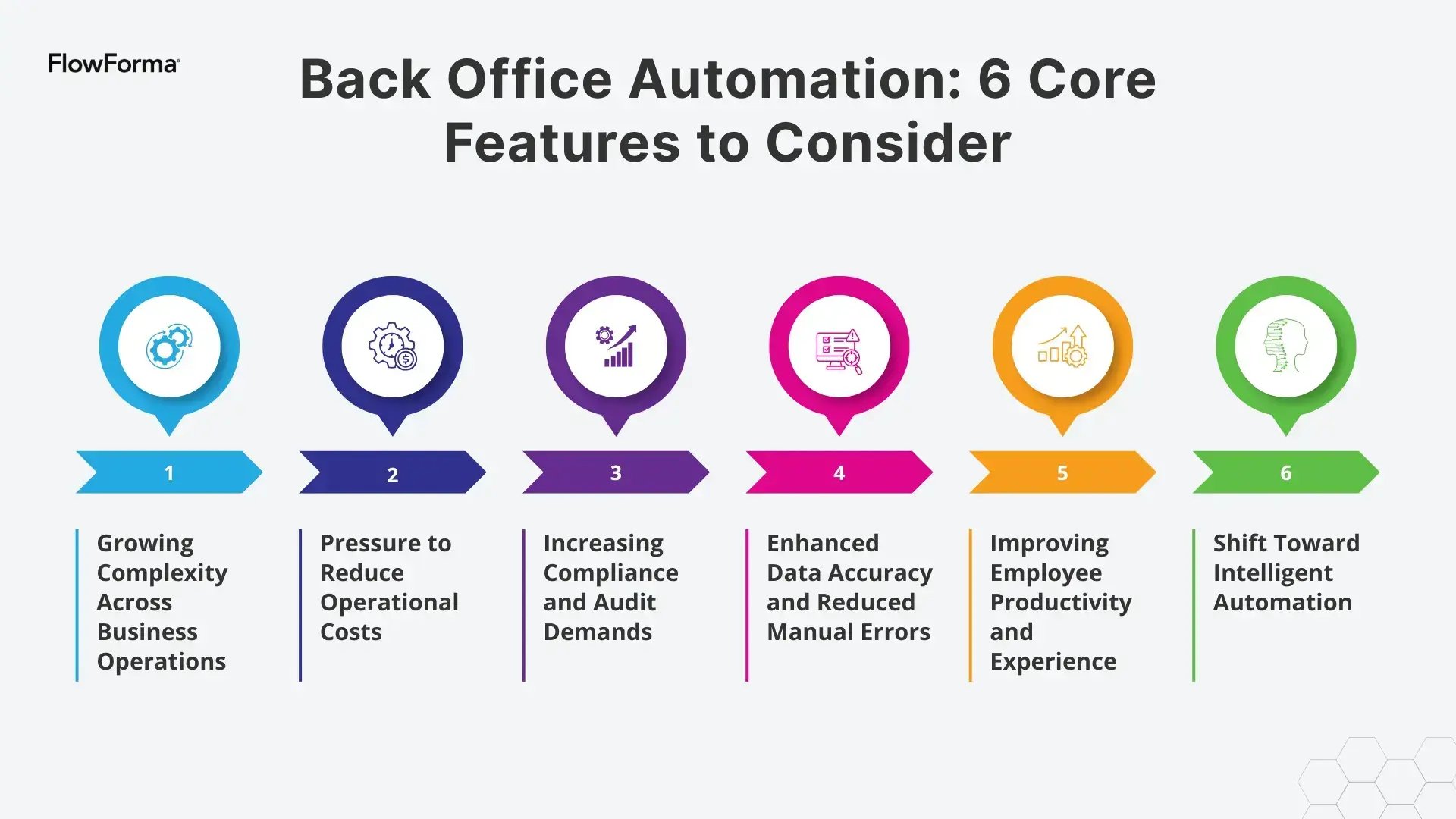
Core back office automation features to consider
Back-office automation is effective only when it manages complete business processes rather than isolated tasks.
Evaluate software based on these six capabilities for core operations:
1. Process-first workflow automation
Effective back office automation software must manage entire workflows, not just automate individual steps.
Built around business process management principles, FlowForma allows teams to design, manage and optimize structured workflows with clear stages, approvals and outcomes.
This process-first approach supports:
- Multi-step and cross-department workflows that standardize processes across different departments
- Long-running processes that evolve over time and handle increased volume without proportional increases in manual effort
- Clear ownership and accountability at each stage
2. No-code to empower independent process creation
Workflows are built and updated by business users, not developers. Finance managers, HR leads and operations teams can adjust office workflows as requirements change.
For instance, FlowForma's intuitive, no-code platform empowers individuals to automate processes and workflows without heavily relying on technical skills—all the while IT teams maintain governance and oversight to ensure consistency and compliance.
3. AI-powered automation
AI addresses specific friction points in workflows, for example:
- Extracting invoice data from documents for accounts payable processing
- Summarizing workflow history for approvers
- Supporting decision points with contextual information
This approach aligns with how AI-powered automation delivers value in practice, by reducing effort at key points rather than over-engineering processes.
4. Seamless integration with legacy systems
Back office automation works best when it connects seamlessly with existing systems. Integration allows data to flow automatically between platforms, enabling organizations to automate processes without replacing legacy infrastructure or disrupting established workflows.
5. Robust governance and compliance
Automation enforces compliance and reduces errors in accounts payable, accounts receivable and payroll. Every action is logged for audits and regulatory purposes.
6. Cost efficiency and scalability
Repetitive administrative tasks are automated to cut costs and reduce rework. Workflows can scale across teams and departments without increasing headcount proportionally, keeping operational costs predictable as workload rises.
Platforms like FlowForma also enable organizations to scale processes more efficiently without expanding headcount at the same rate.
Streamlining End-to-End Back Office Workflows With FlowForma
FlowForma takes a process-first approach to back office automation. The platform unifies workflow automation, forms, analytics, document generation and AI, enabling teams to manage back office operations more consistently and efficiently.
Key capabilities include:
1. Intelligent AI-driven automation for back office functions
FlowForma's AI suite enhances back office automation by streamlining routine tasks, optimizing workflows and reducing manual effort.
Here's how FlowForma's AI features directly contribute to automating back office processes:
| AI Feature |
What It Does |
How It Supports Back Office Automation |
| FlowForma Copilot |
Builds workflows using natural language |
Speeds up workflow creation and deployment with no IT needed |
| AI Agent Rule |
Reads documents, extracts data and validates inputs |
Automates document-based tasks like invoices and claims |
| AI Summarization |
Creates natural-language summaries of workflow history and decisions |
Improves collaboration and reduces time spent on reviews |
| AI Discovery Agent |
Scans documentation to identify automation opportunities |
Identifies processes for automation, accelerating roadmap development |
| Smart Assistants |
Provides AI-driven guidance and enables natural-language actions |
Eases automation adoption with minimal training |
| AI Insights & Analytics |
Identifies bottlenecks, trends and performance issues |
Drives continuous process improvement and boosts efficiency |
2. No-code accessibility empowering independent automation without sacrificing governance
FlowForma enables business users to build workflows without writing code, while IT teams maintain governance, access control and integration standards. This accelerates deployment and reduces the backlog of requested automations.
3. Built-in compliance and audit trails
FlowForma automatically records each step, decision and document, ensuring compliance with regulations like GDPR, ISO 27001 and CQC. This end-to-end traceability strengthens governance and risk management.
4. Built for integration and continuous improvement
FlowForma integrates with Microsoft 365 and operates within SharePoint, ensuring complete control over data, permissions and security, crucial for industries with strict compliance and cybersecurity needs.
This unified approach supports continuous process improvement. Data captured during workflows feeds into reporting and analytics, giving teams visibility into performance, bottlenecks and trends.
5. Transparent pricing that supports scale and digital transformation
FlowForma's transparent, process-based pricing model supports unlimited workflows without unexpected scaling costs, giving organizations clear financial visibility and a competitive edge.
Scale Business Growth With Strategic Back Office Automation
Time is your competitive advantage. While your team handles manual processes, competitors are gaining ground. The organizations investing in automation now will set the pace in their markets. With FlowForma, users get a practical and scalable solution to move beyond isolated tools without compromising on accuracy, governance and compliance.
In 2026, excelling with digital transformation means freeing your employees' valuable time to focus on strategic work that drives growth. FlowForma gives your team the tools to reclaim productivity and deliver real value.
Start your free trial today and see how FlowForma can transform your back office operations, no credit card required.


.webp?width=800&height=600&name=blogdigital-workflow-automation%20(5).webp)