My colleague Robert Kane and I recently hosted a live webinar on “Modern Workflow Automation Without the Migration Headache”, and the level of interest in the topic was a clear indicator that this is a challenge many organizations are actively trying to solve.
We’ve also worked with hundreds of organisations looking to move away from legacy workflow platforms such as Nintex on-premises and InfoPath. This experience has given us valuable insight into what makes a workflow migrshareation successful and how to avoid common pitfalls.
In this article, I’ll explain how to modernise your workflow automation seamlessly, what to consider when evaluating Nintex alternatives, and how to migrate from InfoPath to a modern workflow platform quickly and with minimal disruption.
Why organizations are modernizing their workflow automation platforms
While every organization has its own reasons for considering a move, the most common themes we’re hearing are:
1. Rising licensing costs and unpredictable pricing
We’ve spoken with many organizations, who wanted to modernize their platform, because their current legacy system was starting to cost too much. Some leading vendors are charging organizations extreme prices to migrate them off their legacy solutions. We’ve had businesses tell us that new licensing costs were presented to them at double and in some cases quadruple what they were paying the previous year to the same vendor.
Others told us that they had been forced into new pricing plans with consumption models, that were eroding their platform ROI and making budgeting a nightmare. IT leaders need predictable pricing.
2. Legacy platforms are not keeping up with innovation
Technology is moving faster than ever. AI, intelligent automation and orchestration, and no-code automation are now the norm, if you’re on a legacy platform you understand the lack of innovation. We had one customer tell us that they were using a platform from an automation market leader, which hadn’t seen any innovation or improvement in over 8 years. One organization said “The vendor calls it ‘supported’, but it feels abandoned.”
3. Maintaining legacy workflows is becoming increasingly difficult
We’ve heard a lot of feedback from companies who are challenged with out-dated systems to which they are afraid of making changes on, because a simple change can break a legacy workflow or to make any successful changes they’ve been instructed by the legacy platform vendor to undertake an array of workarounds, to apply a simple change. It’s not a good situation to be in.
The biggest mistake when migrating off Nintex or InfoPath: rip-and-replace
The most successful organizations that have moved off legacy and onto a modern platform such as FlowForma Process Automation, have been those that haven’t just replicated their processes on a new platform.
Those who have been most successful have:
- Categorized their processes by simple and advanced
- Categorized their processes by needing improvement or not
- Established priorities based on the above categorization
- Have looked at where they can make their processes leaner and stronger with AI
- Analyzed their processes for improvement opportunities across elements such as reducing manual data entry, improving decision making criteria, adding AI agents to validate data, push/pull data, complete steps within the workflow etc.
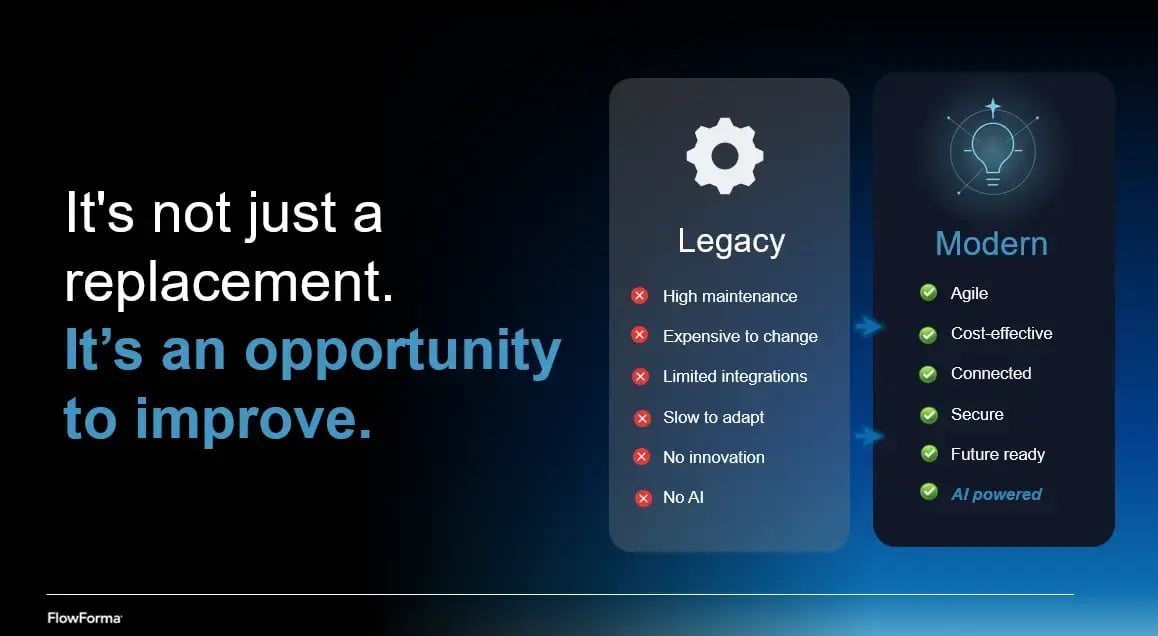
Challenges of legacy
What to look for in a Nintex or InfoPath replacement
When evaluating automation platforms, there are several capabilities IT leaders must consider. We discussed the key considerations on our recent webinar and you can watch the replay here below.
1. A faster and smarter migration approach to migration
Of course, from all our conversations over the last ten years with companies looking to move off legacy, a big concern is the amount of effort they foresee in the migration. Afterall these companies have invested years of effort on InfoPath and other on-premises solutions from the likes of Nintex for example, leaving organizations with hundreds of processes to migrate.
A modern platform and proven vendor, can make the migration easier:
- By availing of a platform that can input process diagrams and charts of existing processes
- Reuse existing workflow knowledge and documentation
- Move priority processes quickly
- Perform migration in phased stages with a migration expert supporting you every step of the way
AI is thankfully simplifying the project too. So instead of starting with a blank canvas, organizations can use existing process diagrams, screenshots, forms, documents or descriptions as a starting point.
AI-powered platforms can now help generate an initial process structure, allowing teams to refine workflows, add business rules and improve processes much faster.
The goal is not simply to replicate legacy workflows, it is to modernise them as you go.
2. Business-friendly automation, governed by IT
Historically, workflow automation was dependent on IT developers. That’s no longer the case with modern platforms, we’ve moved from low-code, no-code and designer-based workflows to the new era of AI-powered automation.
As we’ve always believed here at FlowForma, a modern workflow platform should empower the people who understand the processes best: the business teams who run them every day.
We recommend that you look for platforms that provide:
- No-code workflow design and AI-powered automation
- The ability to empower business users able to create and update processes
- Simple tools for forms, approvals, rules and routing
- The ability to test and improve processes without complex development cycles
However, enabling business users does not mean removing IT oversight, I suggest when you’re considering alternatives that governance of processes and agent deployment be top of your list of functionality to demo or trial.
Enterprise organizations need governance capabilities that empower IT teams to manage:
-
- Who can create and modify processes
- How automation is deployed
- How AI capabilities are implemented
- Security, compliance and access controls
The right platform creates a fusion between business teams and IT, giving users the ability to move quickly while maintaining enterprise standards.
3. A platform that seamlessly integrates with your core systems
The majority of organizations we speak with rely on Microsoft technology, their staff are living in Outlook, Teams, Dynamics etc, they are often looking for a powerful workflow platform that can sit alongside their Microsoft technology stack, something more powerful for complex processes, where Power Apps / Power Automate just aren’t the right fit.
One of the most common questions we get asked regarding FlowForma is “where is the data stored”, and they usually love the answer, that with FlowForma we don’t host your data, it stays within your Microsoft tenancy, so it’s one less worry for IT leaders.
More and more organizations are wanting staff to initiate and input to processes from where they are already working, which is why the love being able to collaborate on processes from Microsoft Teams Outlook, SharePoint etc.
4. Practical AI that improves the entire process lifecycle
We’re all about using technology for outcomes, not just for the sake of technology, you want a practical deployment of AI that will support you in achieving your KPIs
Most platforms claim to have AI. I recommend that when getting demonstrations or trials of modern automation platforms that you have your AI checklist ready, good questions to have in mind are:
- Can this platform’s AI simplify process automation, as in reduce the time to go live?
- How simply can we create agents that can validate and check data?
- How simply can we create agents that will support staff in elements of the process?
- Can agents support with pushing and pulling data?
- Can agents create documentation utilizing the data captured in the process?
- Can the AI support us in making better decisions?
- How is the AI governed?
- Can I bring my own AI?
Look for AI across the process lifecycle, not just process creation.
AI for building:
- Generate workflows from prompts, screenshots, diagrams, SOPs, existing documentation
- Reduce migration effort
- Help business users create processes faster
AI for running:
-
- Complete tasks
- Validate information
- Reduce errors
- Support decisions
- Improve data quality
AI for improving:
- Identify bottlenecks
- Suggest improvements
- Optimize processes over time
5. Proven AI matters because enterprise processes are complex
Your automation platform of choice needs to handle real business processes, approvals, tasks, rules, escalations, document generation, audit trails, and more complex routing.
Buyers need to be asking themselves:
- Can it handle complex approval logic?
- Can it maintain auditability?
- Can IT govern how AI is used?
- Can it work with existing systems?
AI should enhance a proven and powerful workflow engine, not replace one.
6. Avoid choosing AI based on marketing claims
Today, nearly every platform claims that it is AI-powered. There’s no challenge in finding an AI-powered platform, the real value is in finding the platform that utilizes AI in a way that you can deliver ROI from.
From your demonstration or trial you want to be establishing if the platform:
- Has AI embedded or as a standalone feature
- Supports a human-in-the-loop approach
- Seamless auditability on AI actions
- Has real customer stories of AI success
- Supports turning AI features on/off
Real-world Nintex and InfoPath migration stories
All buyers want to hear peer stories and success stories of successful workflow modernization projects. A common question we hear is "What does a successful workflow modernization project actually look like?"
While every organization's journey is different, below I’m sharing 3 examples of customer success stories that our webinar audience found really helpful.
Morley College London: replacing Nintex and InfoPath in higher education
About Morley College London
Morley College London is one of the UK’s largest adult education providers, supporting more than 11,000 students with a team of approximately 600 staff across its operations.
Managing a diverse learning community of this scale requires hundreds of processes across areas including curriculum management, student services, administration, and internal operations. As the organization continued to evolve, it needed a workflow automation platform that could support changing requirements while enabling teams to improve processes more easily.
The challenge: Moving beyond legacy workflow limitations
Like many organizations, Morley College had invested significantly in its existing workflow environment. Important processes were supported by legacy technologies, including Nintex and InfoPath, which had played an important role over many years.
However, as business needs changed, maintaining and adapting those workflows became increasingly challenging.
The issue was not that the processes were no longer valuable. The issue was that improving them had become more difficult than it needed to be.
The college needed a modern approach that would allow it to reduce reliance on technical resources, improve efficiency across administrative workflows, create better user experiences, and build a stronger foundation for future digital transformation.
The approach: Improving processes during migration
One of the biggest misconceptions organizations have about workflow migration is that it means simply rebuilding existing processes on a new platform. Morley College took a different approach.
Rather than treating migration as a technical replacement exercise, the college used the opportunity to review existing workflows and identify where processes could be simplified, improved, and better aligned with the needs of staff and students.
Using FlowForma, the organization automated a range of processes, including curriculum management, room bookings, student transfers, course creation, pre-enrolment, and staff requests.
A key part of the transformation was enabling teams closer to the business to take greater ownership of workflows. With no-code automation, process improvements could be made more quickly without every change requiring specialist development support.
The outcome: A platform built for continuous improvement
.webp?width=200&height=200&name=Wills%20Quote%20(3).webp) The result was more than a successful move away from legacy technology. Morley College created a more flexible and sustainable approach to process automation.The college achieved paper-free workflows across key processes, improved data quality through automation and validation, reduced administrative effort, and created a platform that could continue evolving as requirements changed.
The result was more than a successful move away from legacy technology. Morley College created a more flexible and sustainable approach to process automation.The college achieved paper-free workflows across key processes, improved data quality through automation and validation, reduced administrative effort, and created a platform that could continue evolving as requirements changed.
As Will Johnson, Head of Information Services at Morley College London, summarised: “We needed to move beyond legacy systems like InfoPath and Nintex. With FlowForma, we didn’t just replace; we improved. The FlowForma platform is easier to use, highly customizable, and scalable to meet our college’s needs.
Beaufort County: migrating off Nintex On-Premise in local government
About Beaufort County
Beaufort County is a local government organization in South Carolina, serving a diverse community through a range of public services and administrative functions. With approximately 1,000 employees operating across multiple departments, the county relies on efficient processes to support day-to-day operations, from internal administration to citizen-facing services.
Like many public sector bodies, Beaufort County had accumulated a range of workflows over time and needed a modern automation platform that could support growth, improve process management, and enable teams to digitize processes more efficiently.
The challenge: Moving away from Nintex On-Premise limitations
Beaufort County came to FlowForma earlier this year as they began planning their move away from Nintex On-Premise, which had reached a point where it was becoming increasingly difficult to support the organization’s future automation needs.
Like many organizations that have used workflow platforms for many years, Beaufort County had built valuable processes on the platform. However, as requirements grew, the existing environment presented a number of challenges.
Scaling automation across the organization was becoming more difficult, with process improvements often dependent on IT resources. This created delays when teams needed to make changes, update workflows, or respond to evolving business requirements.
The county was also facing challenges around maintaining governance, managing integrations, and ensuring processes could continue to evolve in a way that supported the wider organization.
Rather than simply replacing Nintex On-Premise with another workflow tool, Beaufort County wanted to modernize how processes were created, managed, and improved.
The goal was to find a platform that would enable teams to take greater ownership of automation while giving IT the governance and control required in a public sector environment.
The outcome: Accelerating migration and empowering teams
With FlowForma, Beaufort County was able to begin its migration journey quickly, combining platform training, migration support, and AI-powered process creation capabilities to accelerate the transition.
Following initial training, teams began migrating processes at speed, moving approximately 20 complex processes within the first month.
The transition has helped Beaufort County move away from a legacy environment and towards a more flexible approach to automation, where teams can build, manage, and optimize workflows without relying solely on technical resources.
By using migration as an opportunity to improve rather than simply replace, Beaufort County is building a stronger foundation for scaling automation and modernizing the way staff work.
Utah DHHS: replacing InfoPath ahead of the Microsoft deprecation deadline
About Utah Department of Health and Human Services
Utah Department of Health and Human Services (DHHS) is a state government agency dedicated to supporting the health, safety, and wellbeing of Utah communities. The department delivers a wide range of social, health, and community services, working with individuals, organizations, and partners across the state.
With teams managing complex programs, contracts, grants, purchasing, and operational processes across multiple divisions, DHHS needed a scalable approach to digitizing processes and improving how staff work.
Challenge: Replacing legacy InfoPath processes and digitizing manual public sector workflows
As part of its migration to SharePoint Online, Utah Department of Health and Human Services needed to replace processes built on InfoPath, which was being deprecated by Microsoft. The department also had a significant opportunity to modernize manual, paper-based, and email-driven processes that were creating inefficiencies across teams.
Many workflows relied on lengthy approval chains, document exchanges, and manual tracking across multiple divisions. This made it difficult to maintain visibility, improve processes, and provide the reporting required for compliance and audits.
DHHS needed a flexible, user-friendly automation platform that could support complex, cross-departmental processes while enabling non-technical users to build and manage workflows without constant reliance on IT.
Outcomes: Streamlining complex government processes and empowering teams to drive continuous improvement
With FlowForma, Utah DHHS has transformed critical processes across the department, including contract management, grants, purchasing, travel approvals, risk assessments, and legislative reporting.
One of the biggest successes was modernizing the contract management process.
Previously, contract approvals could take months due to multiple approval stages, email communication, and manual document handling. With FlowForma, the process was reduced to approximately one week, and urgent contracts could be completed within hours.
“It was taking about two months just to get a contract approved and signed because it required signatures from the funding office, program managers, division directors, office directors, all the way to the governor’s office depending on the size of the contract. After FlowForma, it literally went down to a week, and for emergency contracts, it can take a couple of hours,” said Sarah Klenk, SharePoint Administrator, Utah Department of Health and Human Services
The department also gained greater visibility, improved audit readiness, and created a scalable foundation for ongoing digital transformation.
“The visibility was just amazing. Once you automate your manual processes, you can see all the steps, where the process is, who is doing what, who is approving it, and how long it takes to complete the process.” commented Sarah Klenk, SharePoint Administrator, Utah Department of Health and Human Services
By adopting a no-code approach, DHHS has empowered teams across the organization to take ownership of process improvement and continue expanding automation.
“If you can write English, you pretty much can understand the code. It’s that simple. It took me that first day of training to actually build a process”, said Sarah Klenk, SharePoint Administrator, Utah Department of Health and Human Services.
Migrate off Nintex or InfoPath without disrupting your business
Modernizing workflow automation does not mean abandoning the investment you have already made in your existing processes. The organizations achieving the best results are using modernization as an opportunity to improve, simplifying workflows, empowering teams, introducing AI right where it creates real value, and building a stronger foundation for the future.
Whether you are looking to move away from legacy platforms, improve existing workflows, or understand where AI can enhance your processes, the right modernization approach can help you move faster without unnecessary disruption.
Download our Modern Automation Guide to learn how leading organizations are approaching workflow modernization, what capabilities to look for in a modern automation platform, and how to create a practical roadmap for improving your processes with AI.
Ready to understand what your migration could look like?
ur migration experts can help you assess your current workflow environment, identify opportunities for improvement, and create a practical roadmap for moving to a modern automation platform.
Here’s our proven migration plan:
Book a demonstration to get started.