We live in a highly regulated era, with health and safety a top priority for organizations globally.
I see the evolution of regulations through a positive lens, as workplaces are made safer for employees and the public, and the technologies to support that are evolving fast.
Part of the evolution was the introduction of Health & Safety Management Systems (HSMS) to manage the end-to-end process of safety in a workplace.
An HSMS is a digital tool that contains the functionality to record health and safety issues, share data with key stakeholders along the health and safety lifecycle, and report on incidents for compliance and regulations.
The key goal of these platforms is to reduce workplace risks, prevent incidents, and ensure compliance for organizations.
From my own experience working alongside FlowForma customers, there are key industries where health and safety is critical and where an HSMS is most applicable.
Those industries include manufacturing, construction, healthcare, education and the public sector, but HSMS tools can be applied in any industry where health and safety is a priority.
In this article, I'll share my experience of an HSMS, how process automation improves health and safety, and provide some real-world health and safety automation use cases from some of our customers at FlowForma.
Core Components of an H&S Management System
An HSMS is a set of connected components for managing health and safety end-to-end. Here's how they fit together as an overarching system.
Hazard Identification and Risk Assessments
This is a core component of an HSMS, and one that is critical to ensuring issues are identified, logged and reported on from a compliance perspective.
In the example below, I wanted to share a real-world example of recording hazard identification in an HSMS.
The overall screenshot is from a Recording of Issues workflow within FlowForma. In the bottom right of the screen, you can see a photograph of a pipe with a red marker highlighting an issue. The issue highlighted is a broken pipe.
In this example, the worker on the site has identified the issue, taken a photo and uploaded it to the system. This triggers a whole workflow across the team on the ground, the health and safety team, and finally back to the team on the ground to confirm the issue has been resolved. In this example, it is a seven-step process.
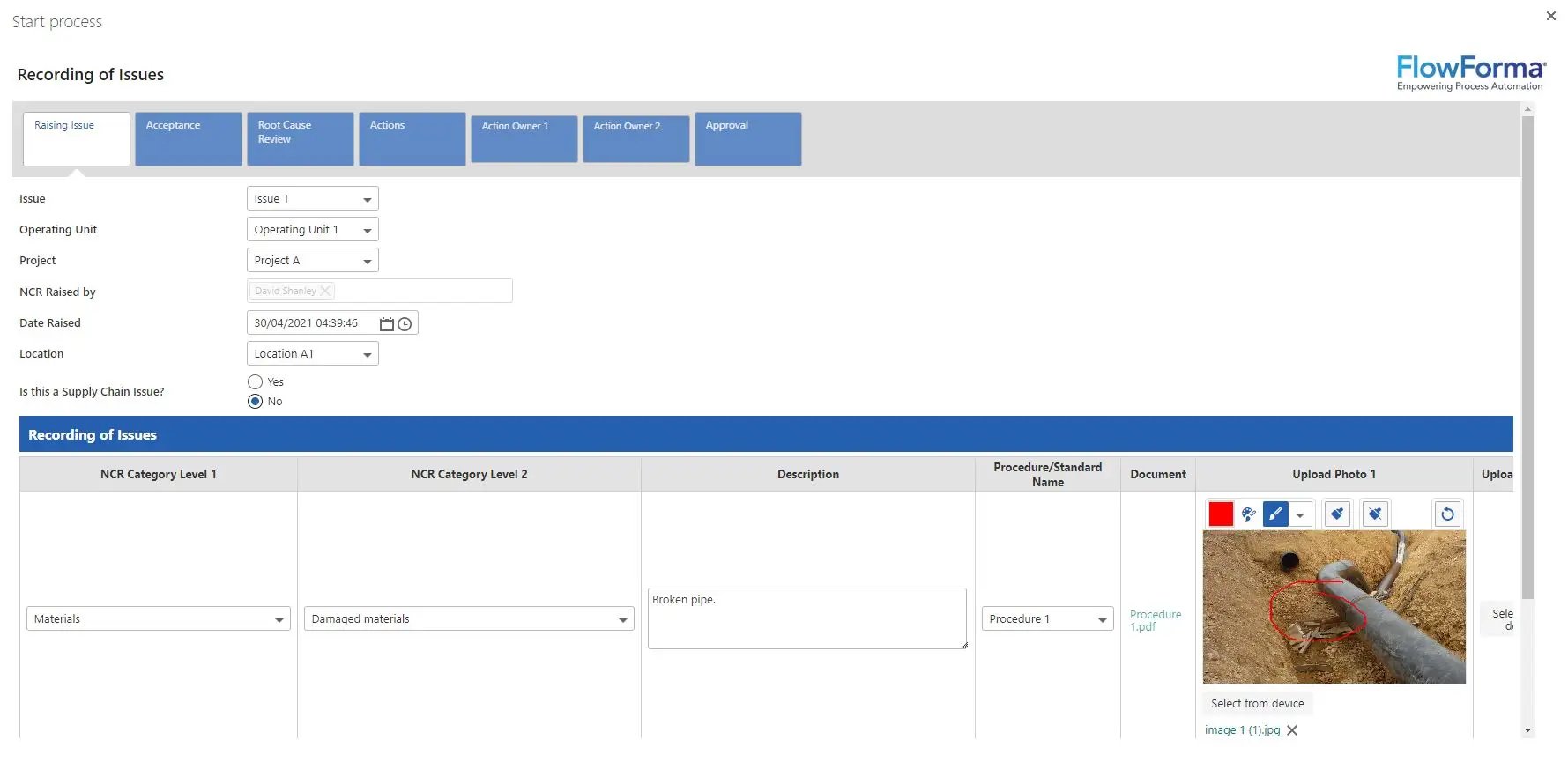
This screenshot shows a broken pipe
Organizations need to be carrying out regular risk assessments like this to capture issues, address them and protect against workplace accidents.
The goal is to highlight and address issues before they become a major accident, make sure compliance or legal issues are avoided, and ensure staff and the public are kept safe.
By automating risk assessments, organizations can expect to see improved productivity, time savings and operational excellence. Abingdon & Witney College, for example, saved around 620 hours a year on task risk assessments and a further 370 hours on student risk assessments after automating them with FlowForma.
In this video, you'll hear from Mark Lay, Finance Director at Abingdon & Witney College, on how they streamlined risk assessment with FlowForma.
You can also read the full Abingdon & Witney College case study here.
Policies and Procedures
Standard operating procedures (SOPs) are one of the main ways organizations manage safe work instructions.
Version control is critical to SOPs, as it creates one source of truth for the document and ensures the document is current, accessible and managed for compliance.
An HSMS needs robust functionality to manage SOPs, and this feature is a critical one for organizations to add to their vendor checklist.
Incident and Near-Miss Management
An HSMS needs functionality for workers to report incidents and near-miss accidents in the workplace.
This is usually captured with a photo and then uploaded to the system (like the example I gave earlier).
Relevant stakeholders can then be notified via the workflow, corrective action taken, and the process finally closed out once the issue is resolved.
Training and Competency Management
Modern legislation increasingly expects organizations to maintain a central digital repository for onboarding, safety certifications and refresher training.
I see this reflected in most new health and safety legislation emerging across industries including the 2022 Building Safety Act in the UK. It makes perfect sense to me: having your teams fully trained and their skills up to date will help drive a safer workplace.
From an HSMS point of view, it also means the system can host the documents in one place, track who is compliant, and flag when training or competency certification is about to lapse, so the relevant parties can address it before an auditor finds it.
Audits and Inspections
If you imagine having your data stored in spreadsheets, or even on paper in the past, auditors would have needed a significant amount of time to review it.
There was also a greater risk of information being overlooked due to corrupted spreadsheets, misplaced records, or data buried in email.
With an HSMS, auditors can access your data in a central digital repository, making audits and compliance much faster, more efficient and easier.
This is a core component of an HSMS, and central to managing health and safety compliance.
One project I worked on at FlowForma that's relevant here is the A14 road project (Costain, Skanska and Balfour Beatty) in the UK.
The project lead needed a platform that enabled better governance with full traceability, a central data repository for reporting, and clear audit trails for compliance.
A14 deployed FlowForma Process Automation, automating 76+ processes across the project including civil department work requests, employee onboarding, material requisition, the waste transfer process, and the health referral process.
The project delivered on its goals, reinforced by A14 avoiding significant penalties relating to material requisition, fines that could have run to millions of Pounds.
"We can complete processes much quicker, and with mobile access you're enabling people in the field to work on forms from anywhere, you're not waiting for someone to get back to their desks. Using FlowForma Process Automation, we can generate PDFs of the forms and push them through to our document control and records management people. It saves a lot of time, instead of having to find paperwork and scan it."
IT Manager, Costain, Skanska & Balfour Beatty A14 Joint Venture
Continuous Improvement
Continuous improvement is one of the core pillars of workflow automation that we advocate at FlowForma.
Deploying your HSMS is just one step of the process. Continuous improvement initiatives enable your organization to enhance safety in the areas that matter most for your business.
One framework worth mentioning is Plan → Do → Check → Act. It's used by some of our customers to bring continuous improvement methodologies into their safety programs.
Within that framework, one top tip is to always have a process automation champion in your organization to push the automation agenda. This is central to making sure the HSMS is widely used across the organization.
ISO 45001 vs. Custom H&S Frameworks
Health and safety leaders will be familiar with the approaches to formalizing health and safety. Some options include ISO 45001 and custom H&S frameworks.
ISO 45001 is a recognized standard for occupational health and safety management systems, while a custom framework is one you develop around your organizational needs. You can choose to use either or both, depending on your requirements.
What ISO 45001 Actually Involves
ISO 45001 is built on the Plan → Do → Check → Act cycle I discussed earlier. It is essentially a way for organizations to demonstrate leadership commitment, put plans in place for addressing risks and opportunities, establish operational controls, monitor and measure performance, and continually improve. The standard governs how you run safety as a management system.
ISO 45001 benefits
As a globally recognized standard, organizations that are ISO 45001 certified will stand out from their competitors, enhance credibility with customers, and have a tighter overall health and safety posture.
Going through the certification process also creates a robust, structured approach to risk management. Having been through our own ISO 27001 certification for information security at FlowForma, I can attest to the value of tightening up procedures. It makes the whole organization more structured, and it becomes easier to demonstrate compliance during audits.
Custom framework benefits
Think of a custom framework as a blank canvas your teams can draw on, tailored to the specific risks of your industry and operation.
This gives your teams greater flexibility as your organizational needs evolve. It's also less restrictive, which makes it easier to map processes to how your organization actually works.
Comparison of ISO 45001 and Custom Frameworks
| ISO 45001 |
Custom Framework |
| Standardized |
Flexible |
| Certification possible |
No formal certification |
| Recognized globally |
Organization-specific |
| Prescriptive structure |
Custom design |
Key takeaway
You can decide to go with either route, or combine both for a more robust H&S framework. No matter which route you take, the HSMS plays a central role in facilitating the gathering, reporting and analysis of the data an auditor needs to see.
How Process Automation Improves H&S Effectiveness
In the world of process automation, health and safety continues to be one of the most active use cases, and for good reason. Health and safety can't be managed efficiently using email or spreadsheets, as that presents a risk of mislaid data or miscommunication, which ultimately creates challenges for health and safety teams.
Common H&S Challenges
- Paper-based inspections are slow, and paper can even go missing
- Reports can be lost in an email chain
- Manual incident reporting delays response times
- Deadlines can be missed with slow communications
- It's very difficult to see real-time data or compliance status
- Siloed information that can't be shared easily
How Automation Helps
- Faster incident reporting: with mobile forms, incidents can be logged immediately and flagged to the relevant stakeholder to remedy
- Streamlined risk assessments: data, reviews and approvals are standardized, so risk assessments are fast and accurate
- Automated corrective actions: corrective actions are assigned to relevant stakeholders, who can signal when issues are addressed
- Ready for audits: with data hosted and organized clearly in a centralized digital repository, organizations are health and safety audit-ready
- Enhanced compliance insights: dashboards provide a real-time view into all areas of compliance, with reporting for health and safety teams, compliance managers and the C-suite
We recently had Sinead Gaines, EHS Manager from PJ Hegarty on a webinar speaking about the full health and safety process automation journey. I'd recommend watching the video below to gain a real understanding of how manual health and safety processes can be transformed into seamless workflows.
Key Features to Look for in H&S Management Software
Having both bought and pitched software, I know the challenges from both perspectives.
I'd start with a checklist of your requirements, which will help narrow the choice of HSMS down to a shortlist of three to five vendors. Some key questions to include:
Questions to Ask Before Selecting H&S Software
- Can non-technical users build and change workflows themselves?
- Does it support mobile use from any device, including offline access?
- Can it automate corrective actions and escalate overdue ones?
- Does it integrate with the systems you already run (Microsoft 365, SharePoint, HR, ERP)?
- Can my safety team change processes or do I need to go to IT for every request
Key Features to include on your H&S software checklist:
- No-code or low-code automation: this is a critical question to answer. If you want health and safety teams, supported by IT, to build and change processes, then no-code is best — these systems are designed for non-technical users. But if you want IT to stay in complete control of process building, then low-code may suit better, as your teams will need technical expertise and sometimes coding experience.
- Incident and near-miss reporting: your teams on the ground need to be able to report incidents or near misses when they happen. The system needs to be accessible on any device so users can add photos, highlight issues and report them immediately.
- Risk assessment management: streamlining risk assessments is key. Functionality needs to include digital assessments with version control and approval routing.
- Audit and inspection workflows: the whole audit and inspection workflow needs to be automated, with inspections recorded digitally, schedule notifications automated, and an audit trail of inspection findings accessible 24/7.
- Document management: a golden thread of data that provides a single source of truth for policies, procedures and safety records, hosted in a central repository for easy access.
- Reports and insights: data within the system needs to be available to stakeholders across the health and safety lifecycle, including health and safety teams, the C-suite and auditors.
- Integration capabilities: this will be specific to your organizational requirements. You may need to integrate with Microsoft 365, SharePoint, HR systems and ERP platforms. Build a separate checklist and work with IT to map your integration needs.
- Compliance tracking: the system needs to provide a 360-degree view of corrective actions, regulatory deadlines and certification support, helping your teams maintain compliance with health and safety regulations.
How FlowForma Supports Health & Safety Teams
Since we established FlowForma many moons ago, health and safety has been one of the most popular use cases for our customers.
We excel in this area because our platform provides the detailed audit trails needed to support compliance teams, it's simple to automate processes on a no-code platform, and it's native to Microsoft 365 and SharePoint, so it's well suited to document management.
Here are some real-world examples of how we've supported our customers with health and safety process automation.
- Incident reporting: capture incidents digitally, trigger investigations automatically and route approvals to the right stakeholders. PJ Hegarty is a great example, their team rolled out FlowForma's platform across 12+ construction sites for incident reporting. They saw a 45% increase in Safety Behavior Observations, a 40% increase in participation in safety reporting across teams, and a 25% reduction in EHS administration time.
- Audits and inspections: document inspection areas and share them with stakeholders to address issues and complete work. Coinford needed a digital tool to connect with existing systems and reach their workforce via mobile for health and safety inspections. With FlowForma, they maintained a health and safety digital audit trail to help with compliance across the organization. Project admin was reduced by 50% and site managers saved 20% of their time.
- Employee safety requests: PPE requests, raised safety concerns and hazard reports, all captured and routed in one place. Aberdeen Radiation Protection Services (ARPS) operates in a highly regulated environment and used FlowForma to replace spreadsheets and paper processes. The organization highlighted improved audit trails, easier demonstration of compliance to regulators and clients, and significantly more efficient workflows.
- Compliance and regulatory readiness: highly relevant for sectors with specific legal duties. Coinford deployed FlowForma to support its ISO compliance by providing an auditable, end-to-end digital record.
- Risk assessments: standardize assessments, ensure reviews are completed on time and keep a central record of risk. Liverpool School of Tropical Medicine (LSTM) built their Travel Assist risk-assessment process on FlowForma precisely so they could capture robust assessments without burdening staff.
- AI-powered health and safety: AI features that drive productivity for health and safety teams. Another construction customer, Gallagher Group, used FlowForma Copilot to automate a temporary works inspection sheet in minutes.
What Sets FlowForma Apart
"We didn't want an off-the-shelf solution that forced us to change how we work. We chose FlowForma because it gave us the flexibility to digitize and standardize our safety processes in a way that fits our business, while also providing the scalability and seamless integration we needed across the organization."
- Sinead Gaines, Regional EHS Manager, PJ Hegarty